Testcontainers Explained - Reliable Integration Testing with Real Dependencies

Integration tests are where trust is won or lost. A unit test can pass while the real system still fails on a query your mock never executes, a migration your in-memory database never applies, or a timeout your stub never produces. Testcontainers was built to close that gap by letting tests launch the actual dependency — a genuine PostgreSQL, Kafka, Redis, or any Docker image — for the duration of a run, then throw it away. The result is integration tests that exercise real behavior without the setup burden of permanently running infrastructure.
Table of Contents
- What Are Testcontainers?
- Why Mocks Break Down
- How Testcontainers Works Under the Hood
- A First Test with Testcontainers
- The Container Lifecycle
- Real-World Example: Testing Against PostgreSQL
- Patterns, Pitfalls and Best Practices
- Testcontainers vs Mocks and In-Memory Databases
- Key Takeaways
- Frequently Asked Questions
What Are Testcontainers?
Testcontainers is an open-source library that gives you lightweight, disposable instances of anything that runs in a Docker container, wired directly into your test code. Instead of maintaining a shared staging database or relying on a hand-written fake, your test suite requests a container, waits for it to become healthy, and connects to it using a dynamically allocated port.
Originally created for Java, the project now ships official and community libraries for many languages, including Java/JUnit, Python, Node.js, Go, .NET, and Rust. The core idea stays the same across all of them:
- Declare the dependency you need (an image and configuration).
- Start the container as part of the test setup.
- Connect using the actual host and port the container exposes.
- Destroy the container when the test or suite finishes.
Note: Testcontainers is not a mocking framework. It is the opposite of mocking — it deliberately removes the abstraction layer so your tests talk to real software over real network protocols.
Because containers are isolated and ephemeral, tests can run in parallel without stepping on each other, and every developer and CI runner gets the same clean environment.

Why Mocks Break Down
Mocks and fakes are valuable for isolating logic, but they carry a hidden cost: they encode your assumptions about a dependency rather than its actual behavior. Those assumptions drift.
- An ORM mock happily accepts a query that the real database rejects due to a type mismatch or a missing index constraint.
- A fake message broker delivers messages in the order you wrote the mock to deliver them, hiding real-world reordering.
- A stubbed HTTP client never simulates the 503 your upstream dependency returns under load.
In-memory databases such as H2 or SQLite are a partial fix, but they still differ from production engines in SQL dialect, transaction semantics, and concurrency behavior. Testcontainers lets you test against the exact same image and version you deploy, which removes an entire class of "works on my machine" surprises.
How Testcontainers Works Under the Hood
At runtime the library uses the Docker API — usually through the local Docker daemon, or a remote one in CI — to pull an image, create a container, map its internal ports to free host ports, and poll a health check until the service is ready.

The Wait step matters enormously. Databases can take several seconds to accept connections, and Kafka can take longer to elect leaders. Testcontainers ships ready-made wait strategies — listening ports, log messages, HTTP endpoints, and health checks — so you do not have to guess with arbitrary sleeps.
A First Test with Testcontainers
The API is intentionally small. Here is a Python example that starts a real Redis container and verifies caching behavior:
import redis
from testcontainers.redis import RedisContainer

def test_cache_roundtrip():
    with RedisContainer("redis:7-alpine") as redis_container:
        host = redis_container.get_container_host_ip()
        port = redis_container.get_exposed_port(6379)

        client = redis.Redis(host=host, port=port)
        client.set("greeting", "hello")

        assert client.get("greeting") == b"hello"
And an equivalent Node.js snippet using the official library:
import { RedisContainer } from "@testcontainers/redis";

test("stores and retrieves a value", async () => {
  const container = await new RedisContainer("redis:7-alpine").start();
  const client = createClient({ url: container.getConnectionUrl() });
  await client.connect();

  await client.set("greeting", "hello");
  expect(await client.get("greeting")).toBe("hello");

  await container.stop();
});
No external services, no shared credentials, no cleanup scripts. The with block and the explicit stop() call guarantee cleanup even when assertions fail.
The Container Lifecycle
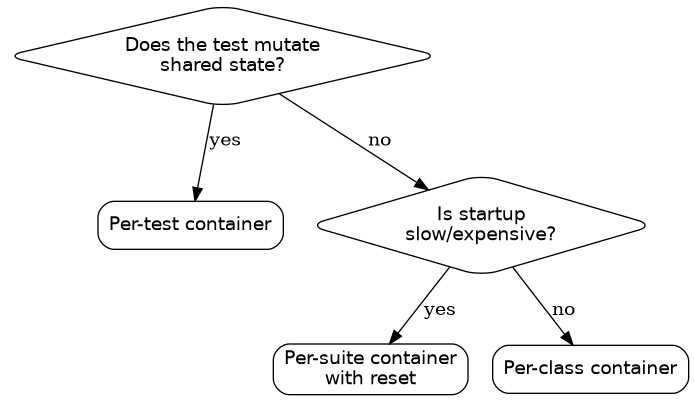
Understanding lifecycle scope is the difference between a fast suite and a sluggish one. Containers are expensive to start, so where you create them matters.
| Scope | Typical API | Cost | Best For |
|---|---|---|---|
| Per test | Fresh instance inside each test | Highest | Tests that mutate global state and must be fully isolated |
| Per class / file | Shared within a test class | Medium | Most integration tests |
| Per suite / session | Started once, reused everywhere | Lowest | Read-mostly dependencies, expensive engines |
The common pattern is to start a container once per test class and reuse it, resetting data between tests with transactions or truncation. For a full guide to isolating that state, see our article on test data management.
Real-World Example: Testing Against PostgreSQL
Consider a repository layer that filters orders by date. With Testcontainers you can apply your real migrations and assert on real query plans.
@Testcontainers
class OrderRepositoryTest {

    @Container
    static PostgreSQLContainer<?> postgres =
        new PostgreSQLContainer<>("postgres:16-alpine")
            .withInitScript("schema.sql");

    static OrderRepository repository;

    @BeforeAll
    static void setup() {
        var ds = new PGSimpleDataSource();
        ds.setUrl(postgres.getJdbcUrl());
        ds.setUser(postgres.getUsername());
        ds.setPassword(postgres.getPassword());
        repository = new OrderRepository(ds);
    }

    @Test
    void findsOrdersWithinRange() {
        repository.save(new Order("A", LocalDate.of(2026, 1, 1)));
        repository.save(new Order("B", LocalDate.of(2026, 6, 1)));

        var results = repository.findBetween(
            LocalDate.of(2025, 12, 1),
            LocalDate.of(2026, 3, 1));

        assertEquals(1, results.size());
        assertEquals("A", results.get(0).id());
    }
}
This test would catch a dialect-specific casting error, a timezone bug in date handling, or a migration that forgot to add a column — none of which a mock would ever reveal. The same approach extends naturally to message brokers, object storage emulators, and browser automation through the companion project Testcontainers for Selenium or Playwright.
Patterns, Pitfalls and Best Practices
Testcontainers is powerful, but a few habits keep suites reliable:
- Pin image tags. Use
postgres:16-alpine, neverpostgres:latest. Floating tags make "passing yesterday, failing today" bugs possible with zero code change. - Always use wait strategies. Connections attempted before readiness cause intermittent failures — the same flakiness pattern described in our guide to flaky tests.
- Prefer reuse between runs for speed. Development environments and CI can enable container reuse so images and containers are not recreated on every test invocation.
- Keep images lean. Alpine-based or distroless variants start faster and pull quicker in CI.
- Do not put secrets in image tags. Inject credentials through environment variables using the library's configuration API.
- Budget CI resources. Each parallel worker needs room for its containers; running fifty parallel jobs each launching a database can exhaust a runner's memory.
Caution: Testcontainers requires a working Docker (or compatible) daemon at test time. On CI runners without Docker-in-Docker, tests will fail before your code ever executes. Verify the runner supports containers or run the suite on a machine that does.
Testcontainers vs Mocks and In-Memory Databases
| Approach | Realism | Speed | Setup Effort | Catches Integration Bugs |
|---|---|---|---|---|
| Hand-written mocks | Low | Highest | Medium | Rarely |
| In-memory DB (H2, SQLite) | Medium | High | Low | Sometimes |
| Shared staging environment | High | Medium | High | Usually |
| Testcontainers | High | Medium | Low | Usually |
The trade-off is straightforward: you give up a little startup time in exchange for testing against the software you actually run in production. For the thin slice of logic that is purely computational, unit tests and test doubles remain the right tool. Testcontainers fills the middle and outer layers of the test pyramid, where confidence matters most.
A pragmatic strategy is to reserve Testcontainers for tests that touch infrastructure — repositories, message consumers, HTTP clients — and keep fast unit tests for business rules. This keeps the overall pipeline quick while eliminating the flaky, mock-driven integration tests that erode trust in a suite.
Key Takeaways
- Testcontainers runs real databases, brokers, and services in disposable Docker containers during your tests.
- It replaces mocks and in-memory databases with the exact images and versions you deploy, catching integration bugs early.
- Built-in wait strategies remove the guesswork and flakiness of manual readiness checks and arbitrary sleeps.
- Container lifecycle scope — per test, per class, or per suite — is the main lever for balancing isolation against speed.
- Pin image tags, lean on reuse, and confirm your CI runner supports Docker before adopting it everywhere.
- Used alongside fast unit tests, Testcontainers strengthens the integration and end-to-end layers of your test pyramid.
Frequently Asked Questions
Does Testcontainers replace my unit tests? No. It targets integration and end-to-end testing. Unit tests stay fast and isolated; Testcontainers adds realism where tests interact with external dependencies.
Will my test suite get much slower? There is a startup cost per container, but per-class or per-suite reuse and lean images keep it manageable. Parallel execution across containers often offsets the overhead.
Can I run Testcontainers in CI? Yes, provided the runner exposes a Docker daemon. Many CI providers support Docker natively, though Docker-in-Docker setups need extra configuration.
How do I keep data isolated between tests? Either start a fresh container per test, or share one and reset state using transactions, truncation, or dropping and recreating schemas between tests.
Which languages are supported? Official libraries exist for Java, Python, Node.js, Go, .NET, and Rust, alongside a growing set of community modules for popular services.
Related Articles
- Test Data Management Explained: Fixtures, Factories, Seeding and Synthetic Data
- Flaky Tests Explained: A Practical Guide to Finding and Eliminating Test Unreliability
- Contract Testing Explained: Consumer-Driven Contracts for Microservices
- Performance Testing Masterclass — Load, Stress, and Scalability with k6


Comments
Post a Comment