React Server Components Explained: Streaming, Suspense and the Server-Client Boundary

For most of the last decade, a React application followed one simple rule: everything you write in a component file runs in the browser. The server sends JavaScript, the browser executes it, builds a virtual DOM, and paints pixels. Server-side rendering (SSR) and hydration were bolted on later as optimizations — the same component tree ran in both places, just at different times.
React Server Components (RSC) invert that default. Now there are two kinds of components, two execution environments, and a serializable payload that travels between them. The server renders by default; only the parts that genuinely need interactivity ship JavaScript to the client.
This article explains what Server Components actually are, how the server-client boundary works, how streaming and Suspense fit together, and where the pattern falls flat. It is framework-agnostic at the core, with examples in Next.js App Router syntax since that is the most widely deployed implementation today.

Table of Contents
- Why React Needed a New Model
- The Two Component Worlds
- How the Boundary Actually Works
- Streaming, Suspense and Partial Hydration
- A Real-World Example: Product Page
- When Not to Use Server Components
- Adoption Strategy for Existing Apps
- Key Takeaways
- Frequently Asked Questions
Why React Needed a New Model
Classic SPA rendering has three recurring costs:
- Bundle weight. Data-fetching libraries, serializers, markdown parsers, and date formatters all end up in the client bundle, even when they only ever run during rendering.
- Waterfalls. On hydration or on client-side navigation, components fetch data one after another, blocking interactivity.
- Secret leakage. Anything you import runs where it is imported. A database driver or an API key used in a "render-only" helper will ship to the browser unless you carefully fence it off.
RSC addresses all three directly:
- Components that never attach event handlers are never sent to the browser as JavaScript. They render on the server and produce a serialized tree.
- Data fetching happens during the server render, so components can
awaitinline without client waterfalls. - Server-only code stays on the server because the boundary is explicit and enforced at build time.
Important: Server Components are not "SSR with extra steps." SSR runs the same client component tree on the server and then hydrates it in the browser. Server Components are a different component type that never hydrates at all — there is no copy of their code in the client bundle.
The Two Component Worlds
Every file in a Server Component-enabled app is a Server Component unless it opts out with the use client directive.
Server Components
- Run only during rendering, on the server (or during a build step for static content).
- Can
awaitdata directly — async components are a first-class feature. - Can import server-only things: database clients, file systems, internal APIs, secret tokens.
- Cannot use hooks like
useState,useEffect, or browser APIs. - Cannot attach event handlers (
onClick,onChange) — there is no browser to attach them to. - Emit a serializable representation of their output, not executable JavaScript.
Client Components
- Are marked at the top of the file with
'use client'. - Ship to the browser, hydrate, and can use state, effects, refs, and event handlers.
- Can import other client components freely.
- Can receive Server Component output as
children, but their props must be serializable if they come from the server.
The use client Boundary
The directive is not "run this on the client." It is "this is an entry point into the client bundle." Everything imported below (imported by) a client component becomes part of the client graph too, unless a further server-only fence exists. Every use client file therefore pulls its transitive imports across the boundary — which is why putting the directive as deep in the tree as possible keeps bundles small.
// app/page.jsx  (Server Component by default)
import { db } from '../lib/server/db';   // never reaches the browser
import AddToCartButton from './add-to-cart'; // 'use client'

export default async function ProductPage({ params }) {
  const product = await db.product.findUnique(params.slug);

  return (
    <article>
      <h1>{product.name}</h1>
      <p>{product.description}</p>
      <AddToCartButton productId={product.id} />
    </article>
  );
}
// app/add-to-cart.jsx
'use client';

import { useState } from 'react';

export default function AddToCartButton({ productId }) {
  const [pending, setPending] = useState(false);

  return (
    <button
      disabled={pending}
      onClick={async () => {
        setPending(true);
        await fetch('/api/cart', {
          method: 'POST',
          body: JSON.stringify({ productId }),
        });
        setPending(false);
      }}
    >
      {pending ? 'Adding…' : 'Add to cart'}
    </button>
  );
}
Note what crossed the boundary: a plain string ID. Not the product row, not the database client, not the query — just serializable data.
How the Boundary Actually Works
When the server finishes rendering, it produces a stream of a specialized format (React calls the implementation Flight internally). This payload contains the rendered Server Component tree plus "holes" where Client Components should be mounted, along with the props for those holes. The browser receives it, React reconciles it with the client component tree, and hydration happens only for the client islands.
Graphically, a single request looks like this:
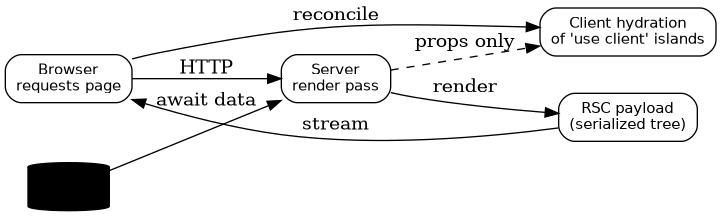
Three rules keep this predictable:
- Props must be serializable across the boundary. Functions can cross only in one specific form: Server Actions (see below). Class instances, database connections, and closures cannot.
- The boundary is a contract, not a suggestion. Frameworks enforce it at build time; passing an unserializable prop throws during development.
- Rendering is a server concern. Layouts, templates, and data loading live server-side; interactivity lives client-side.
Server Actions: The Return Path
The reverse direction — calling server code from the client — is handled by Server Actions, functions marked 'use server'. The compiler replaces them with an RPC endpoint reference, so the client calls a POST endpoint without you writing a route handler.
// actions.js
'use server';

export async function addToCart(formData) {
  const productId = formData.get('productId');
  await db.cartItem.create({ data: { productId, userId: await currentUserId() } });
  revalidatePath('/cart');
}
Server Actions close the loop: data flows down as serializable props, mutations flow up as typed RPC calls, and neither direction requires a hand-written API layer for page-level interactions.
Streaming, Suspense and Partial Hydration
The other half of the RSC story is when things arrive. Streaming SSR (React 18+) sends HTML chunks as they finish; Suspense boundaries mark where placeholders go. Server Components extend this: the RSC payload streams alongside the HTML, and a Client Component deep in the tree can hydrate as soon as its dependencies arrive, without waiting for the whole page.
The typical pattern:
- Shell (layout, navigation) streams first — instant first paint.
- Heavy Server Components (
await db…) resolve and stream in place. - Client islands hydrate independently as their JS chunks land.
export default function Dashboard() {
  return (
    <Layout>
      <Suspense fallback={<ChartSkeleton />}>
        <RevenueChart />   {/* async Server Component */}
      </Suspense>
      <Suspense fallback={<TableSkeleton />}>
        <RecentOrders />   {/* async Server Component */}
      </Suspense>
      <DateRangePicker />  {/* Client Component, hydrates on its own */}
    </Layout>
  );
}
The result is partial hydration in practice: the interactive islands are small and independent, while the bulk of the page is server-rendered HTML plus a tiny serialized tree.

A Real-World Example: Product Page
Consider an e-commerce product page: breadcrumbs, product gallery, description, reviews, recommendations, and an "Add to cart" button.
| Concern | Where it runs | Why |
|---|---|---|
| Product data fetch | Server Component | Needs DB access, no interactivity |
| Markdown description render | Server Component | Parser never needed in browser |
| Recommendations | Server Component + Suspense | Streams late without blocking the shell |
| Gallery carousel | Client Component | Needs state, swipe gestures |
| Add to cart button | Client Component | Event handler + optimistic UI |
| Size selector | Client Component | Local state until checkout |
The dependency graph shows how few files actually cross the boundary:
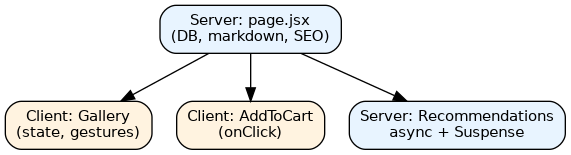
Only the orange boxes ship JavaScript. The description parser, the database driver, and the recommendation logic stay server-side entirely.
When Not to Use Server Components
Server Components are a sharp tool, and misuse creates worse problems than the ones they solve.
Caution: Do not force every component across the boundary "for performance." Each crossing costs serialization, adds a network hop in the RSC payload, and constrains props to plain data. A component with heavy local state and frequent updates usually belongs in the client — moving it to the server makes it chattier, not faster.
Signs a component should stay (or move to) the client:
- It uses
useState,useEffect,useRef, or browser APIs. - It listens to high-frequency events (drag, scroll, keypress) and updates immediately.
- It renders a rich text editor, canvas, WebGL, or third-party widget that expects a DOM node.
- It needs optimistic UI across many interconnected nodes (a collaborative board, for example).
- Its props cannot be expressed as plain data.
Conversely, avoid Server Components when:
- Your app has no server at build/runtime (pure static hosting without an RSC-capable runtime).
- You rely on a library that must run during render in the browser only.
- You need real-time bidirectional updates — pair a client component with a socket instead.
There is also a debugging cost: two environments, two sets of errors, and a serialization boundary in the middle. Teams without server-side React experience should adopt gradually rather than rewriting everything at once.
Adoption Strategy for Existing Apps
A pragmatic migration path that avoids the big-bang rewrite:
- Start at the leaves. Convert presentational, data-reading components (footers, article bodies, tables of static content) to Server Components — they rarely need state.
- Move data fetching down. Replace
useEffect-plus-fetch patterns with directawaitin the server tree; delete the loading-state boilerplate. - Keep interactive islands. Leave forms, menus, and widgets as Client Components with
'use client'at the deepest possible file. - Add Suspense where it hurts. Wrap the slowest server subtrees first; measure with stream timing before and after.
- Convert page mutations to Server Actions only after the read path is stable.
- Audit the boundary regularly. Watch client bundle size and for accidental import of server-only modules — enforce with a
server-onlypackage marker if your stack supports it.
The metric that matters is not "how many files are Server Components," but kilobytes of JavaScript sent to the browser and time to first interaction.
Key Takeaways
- Server Components render only on the server and never hydrate; their code does not appear in the client bundle.
'use client'marks an entry point into the client graph — place it as deep in the tree as possible to keep bundles small.- Everything crossing the boundary must be serializable; Server Actions are the sanctioned function-passing mechanism.
- Streaming plus Suspense gives partial hydration: the shell paints fast, slow data streams in, islands hydrate independently.
- Interactivity, browser APIs, and high-frequency updates still belong in Client Components — RSC is about division of labor, not eliminating the client.
- Measure adoption by JavaScript shipped and time to interaction, not by counting converted files.
Frequently Asked Questions
Do Server Components replace client-side rendering entirely? No. Client Components remain a full part of the model. RSC adds a server-rendered tier; the browser still hydrates interactive islands and handles client-side navigation between routes.
Are Server Components the same as Next.js? No. Server Components are part of React core and the underlying protocol is framework-level. Next.js App Router, Remix, and other frameworks implement them, with different file conventions and configuration.
What happens to useEffect data fetching?
In a Server Component it is not needed at all — await the data during render. useEffect remains valid inside Client Components for browser-driven concerns like subscriptions or syncing with local storage.
Can a Server Component import a Client Component?
Yes, and it is a common pattern: the server parent passes serializable props or JSX children down. The reverse — a Client Component importing a Server Component directly — is not allowed; pass server output through children instead.
Does this help SEO and first paint if my app is already SSR'd? It helps in a different way: existing SSR still ships the full component tree for hydration. RSC reduces that hydration payload, which typically improves time-to-interactive rather than the initial HTML byte count.
Related Articles
- Signals in Frontend Development: The Reactivity Pattern Reshaping Modern Web Frameworks
- Web Components in 2026: The Native Browser Standard That Eliminates Framework Lock-In
- Local-First Software and CRDTs: A Practical Guide to Building Collaborative Apps Without the Cloud
- Mastering TypeScript: The Bridge to Safer, Scalable JavaScript


Comments
Post a Comment