Passkeys and WebAuthn Explained - How Passwordless Authentication Finally Went Mainstream
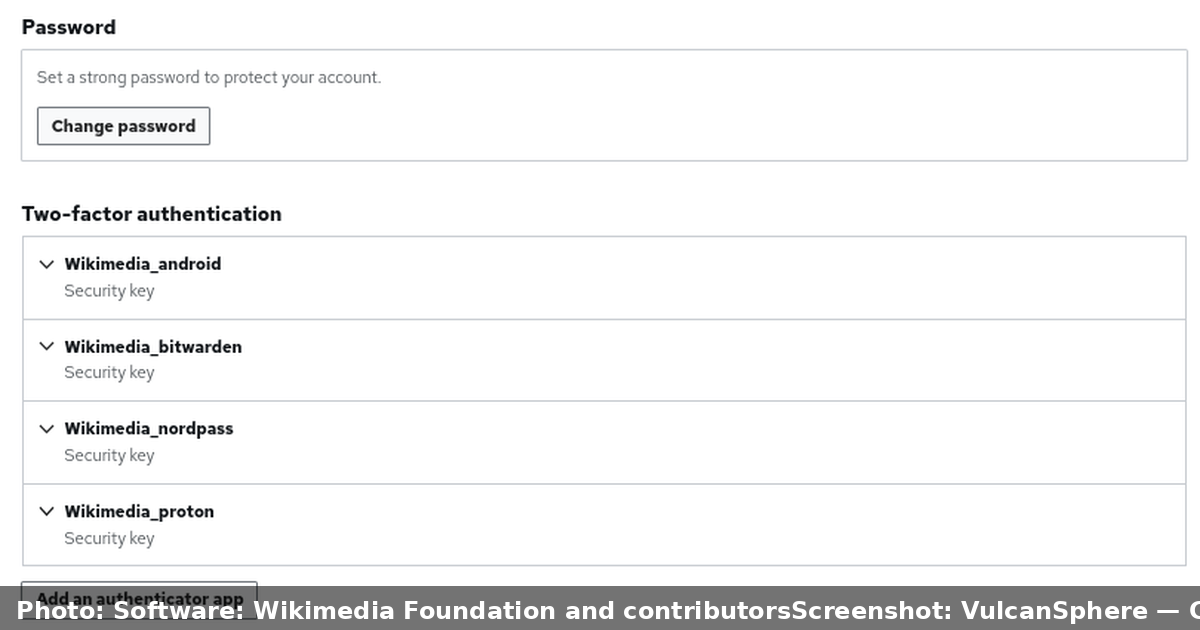
For decades, the password has been the weakest link in every application we build. We ask users to create secrets, we store hashes of those secrets, we add a second factor, we train people to spot phishing pages, and yet credential theft remains one of the most common ways accounts are compromised. Passwords are a shared secret, and shared secrets can be copied, guessed, reused, and phished.
Passkeys flip that model on its head. Instead of a shared secret, your device holds a private key that never leaves it. The website only ever stores a public key. Signing in becomes a cryptographic proof rather than a secret transmitted across the network. This article explains what passkeys are, how the WebAuthn standard works under the hood, where the FIDO2 ecosystem fits, and how to introduce passwordless authentication in a real product without locking users out.
Table of Contents
- Why Passwords Keep Failing
- What Exactly Is a Passkey
- The FIDO2 Stack - WebAuthn and CTAP2
- How a Passkey Login Works Step by Step
- Passkeys vs Passwords, OTPs and TOTP
- Synced Passkeys and Platform Lock-In
- A Real-World Example - Adding Passkeys to a SaaS App
- Security Caveats and Misconceptions
- Implementation Checklist
- Key Takeaways
- Frequently Asked Questions
Why Passwords Keep Failing
Authentication failures are rarely the result of exotic attacks. They come from predictable, structural weaknesses:
- Reuse. People reuse the same password across dozens of services, so one breach cascades into many.
- Phishing. A convincing login page can harvest a password and a one-time code in real time, then replay them before the code expires.
- Database leaks. Servers store password hashes. Even with strong hashing, a breach puts every account at risk of offline cracking.
- Server-side secret risk. Because the server holds a verifier for the password, the server itself becomes a target.
- Recovery complexity. Password reset flows, security questions, and email links introduce their own attack surface and support burden.
Multi-factor authentication helps, but SMS codes can be intercepted through SIM swapping, and even TOTP codes can be relayed by a well-built phishing proxy. The deeper problem is that the secret is shared: whatever the user knows, the attacker can learn.
Important note: Passkeys do not eliminate the need for account recovery, device management, or user education. They change the nature of the credential, but identity lifecycle problems still have to be designed for.
What Exactly Is a Passkey
A passkey is a FIDO credential that uses public-key cryptography and is designed to be discoverable, meaning the authenticator can find it without the user typing a username first. Conceptually it has three parts:
- A private key generated inside an authenticator (a phone, laptop, security key, or password manager). This key is never exported in usable form.
- A public key registered with the website, called the relying party (RP) in the spec.
- A credential ID that lets the authenticator locate the right key pair during sign-in.
When you register, the authenticator creates the key pair and signs a challenge with the private key. When you sign in later, the site sends a fresh random challenge, the authenticator signs it, and the server verifies the signature against the stored public key. At no point is a secret transmitted that an attacker could replay.
Because the signature is bound to the specific website's origin, a passkey created for example.com simply will not produce a valid signature on examp1e.com. That origin binding is the reason passkeys are considered inherently resistant to phishing.
Hardware and software authenticators
A passkey can live in several kinds of authenticator:
| Authenticator type | Example | Portability |
|---|---|---|
| Platform (synced) | iCloud Keychain, Google Password Manager | Syncs across a user's devices |
| Roaming hardware key | YubiKey, Google Titan | Physical device, manual transport |
| Password manager | Bitwarden, 1Password, Proton Pass | Vault-based, cross-platform |

The FIDO2 Stack - WebAuthn and CTAP2
Passkeys are not a single product; they are the consumer-facing name for credentials built on the FIDO2 project, which has two cooperating standards:
- WebAuthn is the W3C standard that defines the browser JavaScript API (
navigator.credentials.create()andnavigator.credentials.get()) and the server-side data formats. It is the layer your web app talks to. - CTAP2 (Client to Authenticator Protocol 2) defines how the browser or platform talks to a roaming authenticator over USB, NFC, or Bluetooth.
The browser or operating system acts as an intermediary, sometimes called the client platform. Your JavaScript never touches the private key directly; it only passes structured options to the platform, which coordinates with the authenticator.

Two credential flags matter a great deal in practice:
- Discoverable credential (also called resident key): the authenticator stores enough information to be found without a username. This is what makes true username-less login possible.
- User verification: the authenticator confirms a local gesture such as a biometric scan or PIN. This controls whether the sign-in is single-factor or effectively multi-factor.
The attestation question
During registration, an authenticator can optionally provide an attestation statement that proves which make and model created the key. Enterprises sometimes require attestation to enforce policies like "only allow security keys with certified firmware." Consumer services often skip attestation verification because it adds complexity and can hurt privacy, since attestation can fingerprint users.
How a Passkey Login Works Step by Step
The flow splits into two ceremonies: registration and authentication.
Registration (creating a passkey)
- The server generates a random challenge and a user handle, and sends a
PublicKeyCredentialCreationOptionsobject to the browser. - The browser calls
navigator.credentials.create(). - The authenticator generates a key pair, optionally verifies the user, and returns the public key and credential ID.
- The server verifies the attestation (if used) and stores the public key and credential ID for that account.
Authentication (signing in)
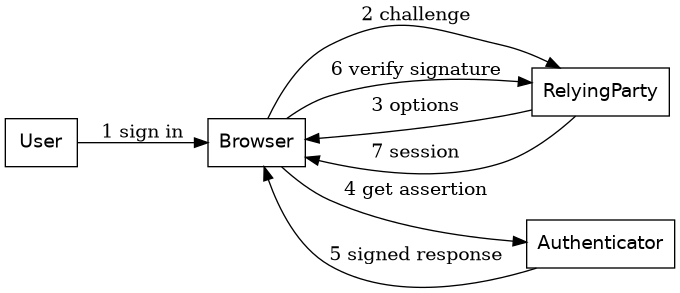
- The server sends a fresh challenge in
PublicKeyCredentialRequestOptions. - The browser calls
navigator.credentials.get(). - The authenticator signs the challenge (including the origin) with the private key.
- The server looks up the stored public key and verifies the signature and challenge.
The following diagram shows the runtime interaction during authentication.
Passkeys vs Passwords, OTPs and TOTP
It helps to place passkeys next to the mechanisms they are replacing.
| Mechanism | Secret shared with server | Phishing resistant | Replay resistant | User effort |
|---|---|---|---|---|
| Password | Yes (hash/verifier) | No | No | Remember + type |
| SMS OTP | Yes (code) | No | Partially | Wait + type |
| TOTP app | Yes (shared seed) | No | Partially | Open app + type |
| Push + number matching | No | Partially | Yes | Approve prompt |
| Passkey (WebAuthn) | No | Yes | Yes | Biometric gesture |
The standout property is that the server stores no secret it could leak that would let someone impersonate the user. The public key is, by definition, public.
Synced Passkeys and Platform Lock-In
Early FIDO security keys were tied to a single physical device, which made account recovery painful and adoption slow. Synced passkeys changed the calculus by storing the credential in a platform keychain (iCloud Keychain, Google Password Manager) or a third-party password manager, then syncing it end-to-end encrypted across a user's devices.
This improves usability dramatically, but it raises fair questions:
- Portability. In 2023, the FIDO Alliance published the Credential Exchange Specification (now called Credential Exchange Protocol, CXP) to allow passkeys to be exported and imported between providers. Adoption is still maturing, so cross-provider migration is not universally smooth yet.
- Provider trust. A synced passkey relies on the security of the vault that holds it. If the account protecting that vault is compromised, the passkey could be at risk in a way a dedicated hardware key would not be.
- Recovery. If users lose all their devices and their vault, they need a recovery path that does not silently downgrade security to a password reset email.
A pragmatic strategy for many products is to support both synced passkeys for convenience and hardware keys for high-assurance users, rather than forcing a single model.
A Real-World Example - Adding Passkeys to a SaaS App
Imagine a project management SaaS with a few hundred thousand accounts. The team wants to reduce account takeovers and support tickets from forgotten passwords. A staged rollout looks like this:
- Add passkeys as an optional second factor first. Users keep their password but register a passkey for step-up authentication. This builds familiarity and lets you collect telemetry.
- Offer passkey-only login. Once passkeys are common, allow users to sign in with a passkey and no password. Keep the password as a fallback during the transition.
- Deprecate passwords gradually. After measuring adoption, prompt password users to add a passkey at login.
- Design recovery deliberately. Provide multiple registered passkeys, an admin-mediated recovery flow for organizations, and clear messaging for the rare total-loss case.
On the server side, verification is a well-defined process. Most teams use a vetted library rather than writing the cryptography themselves. A simplified Node.js sketch using a library such as @simplewebauthn/server looks like this:
import {
  generateRegistrationOptions,
  verifyRegistrationResponse,
  generateAuthenticationOptions,
  verifyAuthenticationResponse,
} from "@simplewebauthn/server";

// Registration options sent to the browser
const options = await generateRegistrationOptions({
  rpName: "Acme Projects",
  rpID: "acme.example",
  userID: user.id,
  userName: user.email,
  attestationType: "none",
});

// Verify the response the authenticator returned
const verification = await verifyRegistrationResponse({
  response: credentialFromClient,
  expectedChallenge: options.challenge,
  expectedOrigin: "https://acme.example",
  expectedRPID: "acme.example",
});

if (verification.verified) {
  await saveCredential(user.id, verification.registrationInfo);
}
Two rules matter above all else: never reuse a challenge, and always validate that the returned origin and relying-party ID match the ones you expected. Skipping those checks reopens the phishing hole that passkeys were meant to close.
Security Caveats and Misconceptions
Passkeys are strong, but they are not magic. A few honest caveats:
- Not every authenticator is equal. Some are software-only and less protected than a dedicated secure element. Policy may need to restrict which authenticators are acceptable.
- Attestation can fingerprint users. Requiring it in consumer contexts has privacy trade-offs.
- Phishing resistance depends on correct server validation. The browser enforces origin binding, but the server still has to verify the signed origin and challenge.
- Recovery is the soft spot. A weak recovery flow can bypass the strongest credential. Treat recovery as an authentication surface in its own right.
- Accessibility and shared devices matter. Design for users who cannot use biometrics and for environments where a device is shared.
Caution: Rolling out passkey-only login without a robust, well-tested recovery path is one of the most common ways teams create a support nightmare. Add passkeys as an addition before you make them the only option.
Implementation Checklist
Before shipping passkeys, verify the following:
- [ ] Server issues a single-use, high-entropy challenge per ceremony.
- [ ] Origin and RP ID are validated on every verification.
- [ ] Public keys are stored per credential, not per account, so users can register several.
- [ ] A user can register more than one passkey across devices.
- [ ] Recovery is designed and tested, and does not silently weaken security.
- [ ] Telemetry tracks registration and login success rates by platform.
- [ ] A vetted WebAuthn library handles the cryptographic details.
Key Takeaways
- Passkeys replace shared secrets with public-key pairs, so the server never stores anything that can be replayed to impersonate a user.
- WebAuthn is the browser-facing W3C API, while CTAP2 governs communication with roaming authenticators; together they form FIDO2.
- Origin binding makes passkeys resistant to phishing in a way passwords, SMS codes, and TOTP cannot match.
- Synced passkeys greatly improve usability, but portability across providers and recovery design are still evolving concerns.
- A staged rollout, starting with passkeys as an optional factor, reduces risk and support load.
- Correct server-side validation of challenges, origin, and RP ID is non-negotiable.
Frequently Asked Questions
Are passkeys the same as WebAuthn? Not exactly. WebAuthn is the underlying standard and browser API. A passkey is a FIDO credential, typically a discoverable one, that is created and used through WebAuthn and the surrounding FIDO2 ecosystem.
Can passkeys be phished? The credential itself is bound to a website's origin, so a look-alike domain cannot obtain a usable signature. That makes passkeys highly resistant to phishing, provided the server validates the signed origin and challenge correctly.
What happens if a user loses all their devices? That depends on the design. Synced passkeys usually recover through the user's platform account, hardware-only keys need backup keys or an admin recovery process, and services should provide a deliberate recovery path rather than falling back to weak email resets.
Do I still need a password or second factor? During migration, keeping a password fallback is common. Once adoption is high and recovery is solid, many services run passkey-only. A passkey with user verification can itself satisfy multi-factor requirements.
Are passkeys free to use? Yes. WebAuthn and FIDO2 are open standards with no licensing fees. Costs come from implementation effort and any hardware keys an organization chooses to issue.
Related Articles
- OAuth 2.0 and OpenID Connect Explained - The Complete Guide to Modern Authentication and Authorization
- Public Key Infrastructure Explained - X.509 Certificates, ACME Automation and Zero-Downtime Rotation
- Zero Trust Architecture Explained - Replacing Network Perimeters with Identity-Based Security
- Post-Quantum Cryptography Explained - Preparing for the Quantum Computing Threat


Comments
Post a Comment