How Virtualization Works with Linux KVM and QEMU
Introduction
Virtualization allows multiple operating systems to run simultaneously on a single physical machine, each isolated in its own virtual environment. This technology forms the backbone of modern cloud computing, container orchestration, and efficient resource utilization across data centers.
At its core, virtualization leverages hardware acceleration to enable guest operating systems to run as if they have direct access to physical resources, while maintaining strong isolation between different virtual machines. One of the most widely adopted open-source approaches on Linux is the combination of Kernel-based Virtual Machine (KVM) and Quick Emulator (QEMU).
Table of Contents
- Introduction
- The Architecture of KVM and QEMU
- How It All Works Together
- Key Components Explained
- Real-World Example
- Conclusion
- Key Takeaways
- Frequently Asked Questions
The Architecture of KVM and QEMU
The power of Linux-based virtualization comes from the complementary roles that KVM and QEMU play. Rather than one monolithic solution, these two components work together to provide both performance and device emulation.
The typical stack consists of three layers:
- Hardware Layer - The physical CPU, RAM, disk, and Network Interface Card (NIC), with virtualization extensions such as Intel VT-x or AMD-V enabled.
- Kernel Layer - The Linux kernel with KVM built in, which provides the hypervisor functionality and direct CPU/memory virtualization.
- User Space Layer - QEMU, which emulates virtual hardware devices and manages the virtual machine as a process.
How It All Works Together
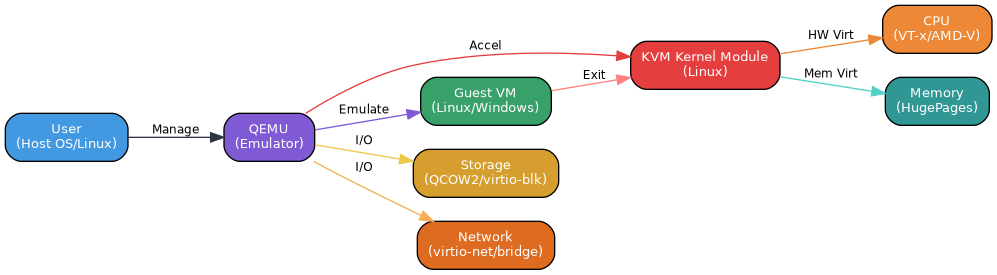
When running a virtual machine with KVM and QEMU, the flow is straightforward yet efficient:
- KVM handles acceleration: As a kernel module, KVM transforms the Linux kernel into a type-1-like hypervisor. It allows guest virtual CPUs to execute directly on physical CPUs using hardware virtualization extensions, achieving near-native performance for compute and memory operations.
- QEMU handles emulation: QEMU runs in user space and is responsible for emulating essential hardware components that the guest OS expects, such as disks, network interfaces, USB controllers, and the BIOS/UEFI.
- VMs run as processes: Each virtual machine is treated as a normal Linux process by the host operating system. This means standard Linux process scheduling, resource limits, and security controls can be applied to VMs just like any other application.
Note: The key distinction is performance - KVM provides the speed through hardware-assisted virtualization, while QEMU provides the compatibility through device emulation. Together, they form a complete virtualization solution.
Key Components Explained
| Component | Role | Key Functionality |
|---|---|---|
| Hardware (VT-x/AMD-V) | Foundation | Provides CPU-level virtualization extensions necessary for guest code to run directly on the processor. |
| Linux Kernel + KVM | Hypervisor | Manages CPU and memory virtualization, allowing guests to run at native speeds with hardware acceleration. |
| QEMU | Device Emulator | Emulates virtual hardware including disks, network cards, USB, and BIOS, presenting them to the guest OS. |
| Guest VMs | Virtual Machines | Isolated operating systems (like Ubuntu, Windows, or RHEL) running independently on the host. |
Real-World Example
Consider a Linux host system running three different workloads simultaneously: a Ubuntu development environment, a Windows testing machine, and a RHEL production-like instance. With KVM and QEMU:
- The Linux kernel loads the KVM module and utilizes the CPU's VT-x/AMD-V extensions.
- QEMU is launched for each VM, creating a separate Linux process for Ubuntu, Windows, and RHEL respectively.
- For each process, QEMU emulates the necessary virtual hardware (virtual disk images, virtual NICs, etc.).
- KVM handles the actual execution, allowing each guest OS to run its CPU instructions directly on the physical cores at near-native speed.
- All three VMs operate in complete isolation, with their resources managed by the host's scheduler.
This setup is commonly used in development environments, testing labs, and is the foundation for many open-source cloud platforms.
Conclusion
KVM and QEMU together provide a powerful, efficient, and flexible virtualization solution on Linux. KVM delivers the performance benefits of hardware-assisted virtualization by managing CPU and memory at the kernel level, while QEMU ensures broad compatibility through comprehensive device emulation. The fact that each VM is a normal Linux process makes management, monitoring, and integration with the broader Linux ecosystem seamless. This architecture remains a cornerstone of modern virtualized infrastructure.
Key Takeaways
- Complementary roles: KVM provides speed (hardware virtualization of CPU and memory), while QEMU provides device emulation for full system virtualization.
- Hardware acceleration is essential: Modern CPUs with VT-x or AMD-V extensions are required for optimal KVM performance.
- VMs are processes: Each virtual machine runs as a standard Linux process, allowing for easy resource management and control.
- Full isolation: Multiple guest operating systems can run simultaneously with strong isolation from one another.
- Open and flexible: This stack supports a wide variety of guest OSes including Linux distributions, Windows, and others.
Frequently Asked Questions
Q: Do I need both KVM and QEMU, or can I use them separately?
A: You need both for full system virtualization. KVM alone only provides CPU and memory virtualization, while QEMU alone would be purely software-emulated and much slower. Together, they create a complete solution.
Q: What CPU features are required to use KVM?
A: Your processor must support hardware virtualization extensions - Intel VT-x for Intel CPUs or AMD-V for AMD CPUs. These must also be enabled in your BIOS/UEFI.
Q: Is KVM better than other hypervisors?
A: Based on the source material, KVM's strength is its integration with the Linux kernel and its ability to achieve native-speed performance through hardware acceleration, with VMs running as regular Linux processes.
Q: Can KVM run Windows as a guest OS?
A: Yes, as shown in the architecture example, KVM with QEMU can virtualize multiple operating systems including Windows alongside Linux distributions.


KVM의 실행 가속과 QEMU의 장치 에뮬레이션을 나눠 설명하니 역할이 잘 보이네요. VM도 호스트의 프로세스라는 대목에서, 격리와 자원 보장을 같은 의미로 보지 않는 것이 중요할 것 같습니다. 여러 VM을 함께 운영할 때는 vCPU 수뿐 아니라 메모리 압박과 디스크 I/O 경합도 따로 점검하는 예시가 있으면 도움이 되겠습니다.
ReplyDelete