GitHub Actions Explained: Reusable Workflows, OIDC and Hardened CI/CD Pipelines
For years, "CI/CD" meant operating a server. GitHub Actions inverted that: the pipeline lives in the repository, next to the code, and the runner is rented per job. That convenience is exactly why it is easy to build a pipeline that is fast, cheap and quietly insecure.
This guide goes past the "hello world" workflow. You will learn the execution model that explains every GitHub Actions behaviour you have found confusing, how to keep pipelines fast with matrices and caches, how to share logic across dozens of repositories without copy-pasting YAML, how to reach your cloud without storing a single long-lived credential, and how to harden a pipeline so that a pull request from a stranger cannot steal your secrets.
Table of Contents
- The mental model: what actually runs
- Workflow anatomy: your first real pipeline
- Triggers: choosing events deliberately
- Runners: hosted, self-hosted and image drift
- Making pipelines fast and cheap
- Reuse: composite actions vs reusable workflows
- Cloud access without long-lived secrets
- Hardening: the checklist teams skip
- Real-world example: shipping a container to Kubernetes
- Common pitfalls
The mental model: what actually runs
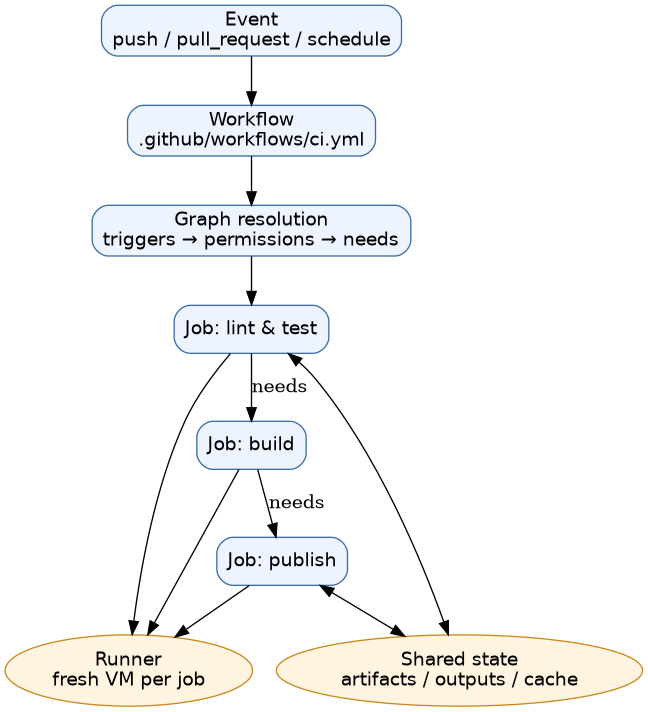
Most Actions confusion disappears once you stop thinking of a workflow as a script. It is a declarative graph of jobs that the platform schedules onto runners.
Four nouns carry the whole model:
| Concept | What it is | Where it lives |
|---|---|---|
| Workflow | One YAML file describing triggers, permissions and jobs | .github/workflows/*.yml (or .yaml) |
| Job | A unit of work with its own runner and token permissions | Inside a workflow |
| Step | A single task inside a job, either run: a shell command or uses: an action |
Inside a job |
| Runner | The machine (or VM) that executes steps | GitHub-hosted or self-hosted |
Two consequences explain most behaviour:
- Each job gets its own machine. State does not survive between jobs — not files, not environment variables, not shell history. The only hand-off mechanisms are the filesystem artifacts you upload, job outputs, caches, and the API.
- Each job gets its own
GITHUB_TOKENwith permissions defined by the workflow (or repo defaults).
Workflow anatomy: your first real pipeline
A realistic baseline for a service repository looks like this:
name: CI

on:
  push:
    branches: [main]
  pull_request:
    branches: [main]

# Least privilege by default. Anything not listed is denied.
permissions:
  contents: read

# One run per ref; a new push cancels the older one.
concurrency:
  group: ci-${{ github.ref }}
  cancel-in-progress: true

jobs:
  test:
    name: Test (Node ${{ matrix.node }})
    runs-on: ubuntu-24.04
    timeout-minutes: 15
    strategy:
      fail-fast: false
      matrix:
        node: [20, 22]
    steps:
      - uses: actions/checkout@v4

      - uses: actions/setup-node@v4
        with:
          node-version: ${{ matrix.node }}

      - name: Install dependencies
        run: npm ci

      - name: Run tests
        run: npm test

  build:
    needs: test
    runs-on: ubuntu-24.04
    permissions:
      contents: read
      id-token: write
    steps:
      - uses: actions/checkout@v4
      - name: Build image and push
        run: ./scripts/build-and-push.sh
Context variables you will actually use:
| Variable | Meaning |
|---|---|
GITHUB_SHA |
The commit SHA that triggered the run |
GITHUB_REF |
Full git ref, e.g. refs/heads/main |
GITHUB_REPOSITORY |
owner/repo |
GITHUB_ACTOR |
The user or app that triggered the event |
GITHUB_WORKSPACE |
Checkout directory on the runner |
RUNNER_OS |
Linux, Windows or macOS |
Two gotchas worth internalising early:
on:is a YAML 1.1 boolean. Strict third-party linters may parse the key astrue. This is whyactionlintexists — ayamllint/schema pipeline in your repo can reject a perfectly valid workflow.- Job-level
permissionsreplaces the top-level block for that job. Declare them where they are used so that reviewing the diff actually tells you what a job can do.
Triggers: choosing events deliberately
Most accidental credential leaks start with a trigger that should never have been there.
| Event | Use it for | Watch out |
|---|---|---|
push |
Branch/tag builds | Add branches:/paths: filters to avoid wasted minutes |
pull_request |
Validation of proposed changes | No repository secrets for forks; GITHUB_TOKEN is read-only |
pull_request_target |
Comment commands, labelling | Runs untrusted code with your secrets — avoid |
workflow_dispatch |
Manual runs and reruns | Add typed inputs: with required and choices |
schedule |
Nightly builds, dependency checks | Runs on the default branch only, and can be delayed |
workflow_run |
Chain on completion of another workflow | Dangerously powerful; treat the triggering run as hostile |
merge_group |
Testing before a merge queue merges | Fires on the synthetic merge group ref |
Limit work with path filters — a docs-only change does not need a full build:
on:
  pull_request:
    paths:
      - 'src/**'
      - 'package.json'
      - '.github/workflows/ci.yml'
Runners: hosted, self-hosted and image drift
GitHub-hosted runners are disposable VMs with the gh CLI, common toolchains and Docker preinstalled. They are the right default: no capacity planning, no patching, billed per minute.
Self-hosted runners earn their keep when your build needs hardware or software the hosted images do not provide — GPU inference, ARM builds, macOS, hardware dongles, or an air-gapped network. The two rules that matter:
- Prefer ephemeral runners. A runner registered with
--ephemeralaccepts one job and then unregisters itself, so leftover state cannot influence the next build. GitHub's Actions Runner Controller (ARC) scales this pattern on Kubernetes. - Never run untrusted code on a persistent runner. A PR from a fork that lands on your machine can read whatever that machine has cached.
Caution: A self-hosted runner with persistent job containers is, by design, trusted to execute whatever arrives from your repository — including code from pull requests. Treat "run untrusted PRs" as incompatible with "reuse warm machines", and pick one.
The reproducibility trap is ubuntu-latest. It tracks the newest image, so a workflow that worked yesterday can break when the image rolls. Pin ubuntu-24.04 (or ubuntu-22.04) when you care about stability, and re-pin deliberately when you want the upgrade.
Making pipelines fast and cheap
Speed work has a predictable order of payoff: don't run what you don't need, then parallelise, then cache.
Parallelise with a matrix
strategy:
  fail-fast: false          # keep going so you see every failure at once
  max-parallel: 4           # throttle to protect a self-hosted pool
  matrix:
    os: [ubuntu-24.04, ubuntu-22.04]
    include:
      - os: ubuntu-24.04
        experimental: true
include adds fields to matching combinations — handy for a single experimental leg without duplicating the whole matrix.
Run databases as service containers
jobs:
  integration:
    runs-on: ubuntu-24.04
    services:
      postgres:
        image: postgres:16
        env:
          POSTGRES_PASSWORD: postgres
        ports: ['5432:5432']
        options: >-
          --health-cmd pg_isready
          --health-interval 10s
          --health-timeout 5s
          --health-retries 5
    env:
      DATABASE_URL: postgres://postgres:postgres@localhost:5432/postgres
The health check matters: without it your test step can start before Postgres is ready and fail intermittently. This is the single most common cause of "works locally, fails in CI".
Cache and pass artifacts explicitly
- uses: actions/cache@v4
  with:
    path: ~/.npm
    key: npm-${{ runner.os }}-${{ hashFiles('package-lock.json') }}
    restore-keys: npm-${{ runner.os }}-

- uses: actions/upload-artifact@v4
  with:
    name: test-report
    path: reports/
    retention-days: 7
Artifacts are immutable in v4 — uploading to a name that already exists fails unless you opt in to overwriting, which is a feature, not an inconvenience. Combine with concurrency + cancel-in-progress: true so superseded PR runs die early and stop burning minutes.
Reuse: composite actions vs reusable workflows
Duplicated YAML drifts. Two mechanisms reduce it, and they solve different problems.
| Composite action | Reusable workflow | |
|---|---|---|
| Granularity | One or more steps | One or more jobs |
| Defined in | action.yml |
workflow.yml with on: workflow_call |
Its own runs-on |
No — inherits caller's runner | Yes |
Supports secrets: |
Limited pass-through | Yes, incl. secrets: inherit |
| Typical use | "Set up Node and install deps" | "Build, sign and publish an image" |
A composite action
# .github/actions/setup-python/action.yml
name: Setup Python project
description: Install Python with caching and run dependency install
runs:
  using: composite
  steps:
    - uses: actions/setup-python@v5
      with:
        python-version: '3.12'
        cache: pip
    - shell: bash
      run: |
        python -m pip install --upgrade pip
        pip install -r requirements.txt
A reusable workflow
# .github/workflows/build-image.yml
name: build-image
on:
  workflow_call:
    inputs:
      image:
        type: string
        required: true
    secrets:
      registry-token:
        required: true

jobs:
  build:
    runs-on: ubuntu-24.04
    permissions:
      contents: read
      packages: write
      id-token: write
    steps:
      - uses: actions/checkout@v4
      - name: Build
        uses: docker/build-push-action@v6
        with:
          push: true
          tags: ${{ inputs.image }}
          cache-from: type=gha
          cache-to: type=gha,mode=max
Callers then reference it like an action, which is what makes organisation-wide standards practical:
jobs:
  release:
    uses: ./.github/workflows/build-image.yml
    with:
      image: ghcr.io/acme/api:${{ github.sha }}
    secrets: inherit
For cross-repository reuse, use owner/repo/.github/workflows/build-image.yml@main (or a tag). Cross-repo reusable workflows must be explicitly allowed in the repository settings — a common "why is nothing happening" cause.
Cloud access without long-lived secrets
Storing AWS access keys in repository secrets means a key that never expires, a key you rotate by hand, and a key that a compromised workflow can exfiltrate forever. OpenID Connect removes the secret entirely: the runner proves who it is, and the cloud exchanges that proof for a short-lived credential.

The token's claims identify the repository, the ref, the workflow and the environment. Your cloud trust policy decides which of those it accepts — for example, main of one repo only.
permissions:
  contents: read
  id-token: write          # required to mint the OIDC token

steps:
  - uses: aws-actions/configure-aws-credentials@v4
    with:
      role-to-assume: arn:aws:iam::111122223333:role/gha-build
      aws-region: eu-west-1
Azure (azure/login@v2 with a federated credential) and GCP (google-github-actions/auth@v2 with workload identity federation) follow the same shape. The two halves must agree: an OIDC claim set on the GitHub side and a trust policy on the cloud side, keyed to repository and ref. Neither is optional.
Hardening: the checklist teams skip
Pin third-party actions to a commit SHA
uses: some/action@v4 is a mutable tag; whoever controls that repository can repoint it. GitHub's own hardening guidance is to pin the full commit SHA and annotate the tag:
- uses: actions/checkout@<full-40-character-commit-sha> # v4.x.y
Resolve a tag to its commit with gh api repos/actions/checkout/git/ref/tags/v4.x.y, then let Dependabot or Renovate bump the pins for you.
Never interpolate untrusted input into run:
This is the highest-impact rule on the page. Anything derived from a PR title, branch name or issue body is attacker-controlled:
# Vulnerable: the title becomes part of the shell command
- run: echo "Cloning ${{ github.event.pull_request.title }}"

# Safe: the value arrives as an environment variable, quoted
- env:
    PR_TITLE: ${{ github.event.pull_request.title }}
  run: echo "Cloning $PR_TITLE"
Scope permissions and protect fork PRs
New repositories default to a read-only GITHUB_TOKEN, but many older repos still have write-all defaults. Declare permissions: explicitly. And remember: for pull requests from forks, secrets are not passed and the token is read-only — so if a job needs secrets, it must not be the job that checks out untrusted code.
Caution:
pull_request_targetexecutes in the context of the base branch, with access to repository secrets. Runningcheckoutplus build steps from a fork underpull_request_targetis the classic self-inflicted supply-chain compromise. If you need to label or comment on fork PRs, keep the checkout out, or gate it on agithub.event.pull_request.author_associationcheck.
Add the rest
- Set
timeout-minuteson every job so a hung test cannot occupy a runner for hours. - Run scanners in the pipeline (dependency, SAST, container). Use tools you trust, and pin them like any other action.
- Gate production deploys with GitHub environments and required reviewers rather than branch protection alone.
- Emit build provenance attestations (
actions/attest-build-provenance, verifiable withgh attestation verify) so downstream consumers can check what built an artifact. This is still maturing across ecosystems — treat it as an additive signal, not a replacement for signing. - Run
actionlintin CI over.github/workflows/**— it catches the majority of "invalid workflow file" failures before a push.
Real-world example: shipping a container to Kubernetes
Putting the pieces together: a tagged release triggers a build, which publishes an image, and a separate environment-protected job promotes it. Note that only the deploy job holds deployment permissions and the protected environment.
name: release
on:
  push:
    tags: ['v*']

permissions:
  contents: read

jobs:
  build:
    runs-on: ubuntu-24.04
    permissions:
      contents: read
      packages: write
      id-token: write
    outputs:
      digest: ${{ steps.push.outputs.digest }}
    steps:
      - uses: actions/checkout@v4
      - uses: docker/setup-buildx-action@v3
      - uses: docker/login-action@v3
        with:
          registry: ghcr.io
          username: ${{ github.actor }}
          password: ${{ secrets.GITHUB_TOKEN }}
      - id: push
        uses: docker/build-push-action@v6
        with:
          push: true
          tags: ghcr.io/acme/api:${{ github.ref_name }}
          cache-from: type=gha
          cache-to: type=gha,mode=max

  scan:
    needs: build
    runs-on: ubuntu-24.04
    container: aquasec/trivy:latest
    steps:
      - name: Scan image
        run: trivy image --exit-code 1 --severity HIGH,CRITICAL ghcr.io/acme/api:${{ github.ref_name }}

  deploy:
    needs: [build, scan]
    runs-on: ubuntu-24.04
    environment:
      name: production
      url: https://api.acme.example
    permissions:
      contents: read
      id-token: write
    steps:
      - uses: actions/checkout@v4
      - uses: azure/login@v2
        with:
          client-id: ${{ secrets.AZURE_CLIENT_ID }}
          tenant-id: ${{ secrets.AZURE_TENANT_ID }}
          subscription-id: ${{ secrets.AZURE_SUBSCRIPTION_ID }}
      - name: Render manifests with the pinned digest and apply
        run: |
          kubectl set image deployment/api \
            api=ghcr.io/acme/api@${{ needs.build.outputs.digest }} \
            -n production
          kubectl rollout status deployment/api --timeout=120s
Properties worth copying:
- Permissions grow job by job.
packages: writeexists only in build; deployment rights only in deploy. - The deploy gate is an environment, so required reviewers and environment secrets apply.
- Promotion is by digest, not tag. A mutable tag can point somewhere else between your scan and your rollout; a digest cannot.
- Failure ordering is enforced by
needs, so a high-severity finding blocks promotion without a conditional.
Common pitfalls
- Assuming state persists between jobs. It does not. Use
needs.*.outputs, artifacts or caches. fail-fast: trueon a matrix. You learn about one failure at a time. Set it tofalsefor diagnostics.- No
timeout-minutes. The default job timeout on GitHub-hosted runners is generous (360 minutes); a hanging test still burns minutes. ubuntu-latestdrift. Pin the image for reproducibility.- Secrets in the pull-request path. Split validation and release into different workflows with different triggers.
- Unpinned third-party actions. One compromised tag is enough.
- Debugging by re-running blindly. Add
- run: ${{ runner.temp }}/_diag/*.txtor upload logs as an artifact, and useif: always()on cleanup/notify steps so they still run after a failure. - Assuming
servicesare ready. Add a health check; do not rely on timing.
Key Takeaways
- A workflow is a graph of jobs scheduled onto fresh runners — jobs share no state, so artefacts, outputs and caches are your only hand-offs.
- Declare
permissions:explicitly and grow them job by job;id-token: writeis the exception that unlocks passwordless cloud access. - Pin third-party actions to full commit SHAs, and never interpolate PR titles, branch names or issue bodies directly into
run:. - Use OIDC federation plus a cloud trust policy instead of static cloud keys, and promote by immutable image digest rather than tag.
- Reach for matrices, path filters, concurrency cancellation and
type=ghabuild caches before reaching for bigger runners. - Share logic with composite actions for steps and reusable workflows for whole pipelines, then lint
.github/workflows/**withactionlint.
Frequently Asked Questions
Should I use pull_request or pull_request_target?
Use pull_request for anything that checks out or builds contributor code. pull_request_target runs with base-repository secrets and is only appropriate for trusted, metadata-only operations such as labelling or comment commands. If you must combine them, ensure no untrusted code is ever checked out in a pull_request_target job.
How do I share pipeline logic across many repositories?
Publish a reusable workflow in a central repository and call it with owner/repo/.github/workflows/build.yml@ref, enabling it in each consumer's workflow permissions settings. For step-level logic, publish a composite action. In both cases, pin the reference and keep one owner responsible for versioning.
Can I run tests on pull requests from forks with access to my secrets?
No, and that restriction is protective: fork pull requests do not receive repository secrets, and their GITHUB_TOKEN is read-only. Restructure instead — run untrusted tests without secrets, and do privileged work in a separate workflow triggered after merge or by a maintainer.
How do I deploy to AWS without storing access keys?
Add id-token: write to the job's permissions, create an IAM role whose trust policy accepts the GitHub OIDC provider for your account and constrains the sub claim to your repository and ref, then call aws-actions/configure-aws-credentials with role-to-assume. Credentials are then issued per job and expire within minutes.
When is a self-hosted runner actually worth it? When your build needs hardware, an OS image or network access the hosted images cannot provide. Otherwise hosted runners win: no patching, no idle capacity cost, and a clean machine per job. If you go self-hosted, use ephemeral runners.
How do I debug a workflow that passes locally but fails in CI?
Compare the environment first: pinned runner image, npm ci instead of npm install for lockfile fidelity, and an explicit database health check. Then re-run with ACTIONS_STEP_DEBUG enabled to get step-level diagnostics, and upload logs as artifacts so they survive the run.
Related Articles
- Push vs Pull Deployment Models - Understanding GitOps and Continuous Delivery
- Jenkins Architecture, Declarative Pipelines, and CI/CD Explained
- Supply Chain Security in DevOps: Securing Your CI/CD Pipeline from Code to Container
- SonarQube Complete Guide — Static Code Analysis and Quality Gates
- Policy as Code: Securing Kubernetes with Open Policy Agent and Kyverno
- Platform Engineering in 2026: Building Your Internal Developer Platform from Scratch


Comments
Post a Comment