FinOps Explained - A Practical Guide to Cloud Cost Optimization for DevOps Teams

For most of software history, infrastructure was a capital expense. You bought servers, racked them, and paid for them whether you used them or not. The cloud flipped that model on its head: capacity became an operating expense that scales elastically, and cost became a variable that engineering decisions directly control. That shift is why cloud bills can double in a quarter without anyone making an obviously reckless choice, and it is the reason FinOps has moved from a niche finance term to a core DevOps discipline.
FinOps is not about spending less. It is about getting more value per dollar by making cost a first-class engineering signal, right alongside latency, availability and error rates. This guide explains the FinOps framework, the practical levers you can pull, how to allocate costs in a containerized world, and a realistic example of reducing a large cloud bill without breaking production.
Table of Contents
- What Is FinOps?
- The FinOps Lifecycle: Inform, Optimize, Operate
- The Core Cost Levers
- Allocating Costs: Tagging, Showback and Chargeback
- Kubernetes Cost Allocation
- Real-World Example: Cutting a $120k Monthly AWS Bill
- The FinOps Tooling Landscape
- FinOps and GreenOps
- Key Takeaways
- Frequently Asked Questions
What Is FinOps?
FinOps (short for "Cloud Financial Operations") is an operational framework and cultural practice that brings financial accountability to the variable spend model of cloud. It is defined and stewarded by the FinOps Foundation, now part of the Linux Foundation. The core idea is a cross-functional collaboration: engineering, finance, product and leadership all share responsibility for how cloud money is spent.
The classic mistake organizations make is treating cost as purely a finance problem. Finance sees an invoice at the end of the month but has no visibility into which service, team or feature generated a line item. Engineers, meanwhile, make architectural decisions every day, instance sizes, storage classes, replication factors, data transfer paths, without seeing the cost consequence. FinOps closes that loop by making cost visible to the people who can actually change it.
A caution worth stating plainly: cost optimization without guardrails is a reliability risk. Removing a replica, shrinking a database or aggressively using spot capacity to save money can cause an outage that costs far more than the savings. Always pair cost changes with SLOs and load testing.
Why Cloud Costs Spiral
A few forces push bills upward even when nobody is being careless:
- Elasticity without off-switches. Non-production environments and forgotten experiments keep running 24/7.
- Distributed ownership. One hundred small decisions across dozens of teams compound into a large bill.
- Opacity. Without tagging, cost data does not map cleanly to teams or products.
- Growth. Sometimes a rising bill is healthy, it means adoption. FinOps helps you tell the difference between growth and waste.
Unit Economics: The Metric That Matters
Total spend is a poor optimization target. Far better is unit economics: cost per customer, per transaction, per active user, per thousand API calls. If your bill grew 40% but your revenue grew 60%, your unit cost actually fell. Unit economics turns cost into a product metric instead of a finance complaint.
The FinOps Lifecycle: Inform, Optimize, Operate
The FinOps Foundation describes a continuous loop with three phases. Teams run these phases repeatedly, not once.
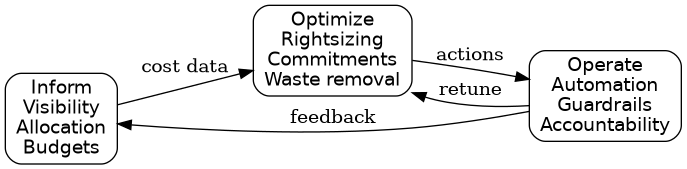
- Inform creates visibility and allocation. You tag resources, build dashboards, map spend to teams, and set budgets and forecasts.
- Optimize identifies and acts on opportunities: rightsizing, purchasing commitments, deleting waste, choosing better storage tiers.
- Operate builds the ongoing practice: automation, policy guardrails, anomaly alerts and clear ownership so optimization does not decay.
The loop matters. Teams that only "optimize" once and never re-measure watch their savings erode as workloads change.
The Core Cost Levers
Most cloud savings come from a small number of high-impact levers. Here is a comparison of the main ones, roughly ordered by how much effort they take.
| Lever | What It Does | Typical Impact | Effort |
|---|---|---|---|
| Rightsizing | Match instance/container size to real usage | 10-30% | Low-Medium |
| Commitment discounts | Savings Plans / Reserved Instances for steady load | 20-40% on covered spend | Low |
| Spot / preemptible | Use spare capacity for fault-tolerant work | 60-90% vs on-demand | Medium |
| ARM (Graviton) | Cheaper, efficient processors | 10-20% | Low-Medium |
| Storage lifecycle | Move cold data to cheaper tiers | 20-50% on storage | Low |
| Waste removal | Kill idle resources, orphaned volumes, old snapshots | Highly variable | Low |
| Architecture | Caching, batching, compression, fewer egress hops | Large but variable | High |
Rightsizing
Rightsizing is the practice of aligning provisioned capacity with actual demand. The typical enterprise finding is that a large fraction of instances run at low CPU and memory utilization. Right-sizing means shrinking instance types, adjusting Kubernetes requests and limits, and consolidating underused nodes. The key discipline is to right-size on real percentile data (for example, p95 or p99 over weeks), not on a single snapshot, and to leave headroom for traffic spikes.
Commitment-Based Discounts
Cloud providers sell steady-state usage at a discount if you commit in advance. AWS offers Savings Plans and Reserved Instances; Azure offers Reserved VM Instances and Savings Plans; Google Cloud offers Committed Use Discounts. The art is coverage versus risk: cover your reliable baseline, leave room for elasticity, and avoid over-committing to architectures you may migrate away from.
Spot and Fault-Tolerant Workloads
Spot instances (preemptible VMs on GCP) cost a fraction of on-demand but can be reclaimed with short notice. They are excellent for CI runners, batch jobs, stateless web tiers behind autoscaling, and data pipelines designed to checkpoint and resume. The FinOps and reliability lesson is identical: only use spot where the workload can tolerate interruption gracefully.
Storage and Data Transfer
Two sneaky cost drivers:
- Storage tiers. Logs, backups and archives on hot storage are wasteful. Lifecycle policies that move objects to infrequent-access or archive tiers cut storage cost dramatically.
- Data egress. Cross-region and internet egress charges add up fast. Co-locating chatty services, caching, and compressing payloads reduce this.
Allocating Costs: Tagging, Showback and Chargeback
You cannot optimize what you cannot see, and in the cloud you cannot see anything without tags.
A Practical Tagging Strategy
Adopt a small, enforced set of mandatory tags. A common baseline:
OwnerorTeam- who is accountableEnvironment- production, staging, dev, sandboxProjectorCostCenter- which product or budgetManagedBy- Terraform, Argo CD, manual
Enforce required tags at creation time using Infrastructure as Code policies and provider-level tag policies, so untagged resources are rejected rather than discovered later.
# Example AWS Organizations tag policy fragment
tags:
  Owner:
    tag_key: Owner
    enforced_for:
      - ec2:instance
      - rds:db
      - s3:bucket
  Environment:
    tag_key: Environment
    enforced_values:
      - production
      - staging
      - dev
Showback vs Chargeback
- Showback reports cost to teams without moving real money. It raises awareness and is the right first step.
- Chargeback actually bills internal budgets for what they consume. It creates strong incentives but requires accurate allocation and is politically harder.
Caution: A common failure is "tagging theater" - tags exist but nobody enforces or reports on them, so 30% of the bill lands in an "unallocated" bucket and the showback is meaningless.
Kubernetes Cost Allocation
Kubernetes makes cost allocation genuinely hard because many workloads share the same nodes. You cannot simply read a VM's hourly price and attribute it to a service. The community answer is to calculate cost by resource request and actual usage.
Projects such as OpenCost (an open specification and tool, part of CNCF) and Kubecost (built on OpenCost) split the cost of each node across the pods scheduled on it, weighted by CPU and memory requests, and add the cost of idle capacity, storage volumes and network. This lets you answer questions like "which namespace costs the most?" and "what did this new service add to the bill?"
A few Kubernetes-specific levers stand out:
- Requests and limits accuracy. Over-requested CPU/memory inflates cluster size. Tune them with real metrics (for example the Vertical Pod Autoscaler in recommendation mode).
- Idle and over-provisioned nodes. Consolidated bin-packing of workloads reduces the number of nodes required.
- Cluster autoscaling. Scale node pools down during off-hours.
- Spot node pools for tolerant workloads, mixed with a small on-demand baseline.
Real-World Example: Cutting a $120k Monthly AWS Bill
Consider a fictional but realistic SaaS company running Kubernetes on AWS with a roughly $120,000 monthly bill. An initial assessment using Cost Explorer and Kubernetes cost tooling reveals the distribution below.
| Area | Share of Bill | Finding |
|---|---|---|
| EC2 / EKS nodes | 48% | Average CPU utilization 18% |
| RDS databases | 20% | Two dev replicas running 24/7 |
| S3 storage | 12% | 90% of data not accessed in 90 days |
| Data transfer | 9% | Chatty cross-AZ service calls |
| Other (NAT, logs, misc) | 11% | Orphaned volumes and idle NAT gateways |
The team runs a structured program over one quarter:
- Inform. Enforce tags in Terraform, build per-team dashboards, and adopt OpenCost for namespace-level visibility.
- Rightsize. Reduce node instance sizes based on p95 usage, fix over-requested container limits, and enable aggressive cluster autoscaling for nights and weekends.
- Commit. Purchase a three-year compute Savings Plan covering only the stable baseline, leaving variable load on-demand.
- Adopt spot. Move CI runners and a stateless batch tier onto a spot node pool with graceful interruption handling.
- Storage. Add S3 lifecycle rules moving objects older than 60 days to infrequent access, and older than 180 days to archive.
- Waste. Delete orphaned EBS volumes and snapshots, and shut down non-production RDS and NAT gateways outside working hours.
A realistic outcome from measures like these is a 30-40% reduction in the bill while keeping production reliability intact. Note the emphasis on realistic: savings are limited by how much waste existed, and some of the bill is genuinely justified growth. Beware any vendor promising 70% cuts with no risk.
The FinOps Tooling Landscape
You rarely need exotic tools to start; native provider tooling plus good tagging gets you far. As you mature, specialized tools help.
| Tool | Cloud | Primary Use |
|---|---|---|
| AWS Cost Explorer / Budgets | AWS | Native cost analysis and alerts |
| Azure Cost Management | Azure | Native cost analysis and budgets |
| Google Cloud Billing | GCP | Native cost reporting |
| OpenCost | Any (K8s) | Open specification for K8s cost |
| Kubecost | Any (K8s) | K8s and cloud cost dashboards |
| Cloudability / CloudHealth | Multi | Enterprise FinOps platforms |
| Infracost | Multi (IaC) | Cost estimates in pull requests |
| AWS Trusted Advisor | AWS | Idle resource detection |
Infracost deserves a special mention for DevOps teams: it comments a monthly cost delta directly on Terraform pull requests, so cost becomes visible at code review time rather than at the end of the month. This is FinOps shifted left, exactly parallel to shifted-left security and testing.
FinOps and GreenOps
FinOps is increasingly converging with GreenOps, the practice of reducing the carbon footprint of cloud workloads. The overlap is large because wasted compute wastes both money and energy. Regional grid carbon intensity, ARM processors (typically more energy-efficient per unit of work), and shutting down idle resources all reduce both the bill and emissions. Many organizations now report cost and carbon side by side in the same dashboards.
Key Takeaways
- FinOps is a cross-functional practice, not a finance-only exercise, that makes cost a first-class engineering signal.
- The FinOps lifecycle is a loop: Inform (visibility and allocation), Optimize (act on levers), Operate (automate and sustain).
- The biggest levers are rightsizing, commitment discounts, spot capacity, storage lifecycle policies and waste removal.
- Accurate tagging and, in Kubernetes, request-based cost allocation with OpenCost/Kubecost are prerequisites for any real accountability.
- Optimize against unit economics (cost per customer or transaction), not raw total spend.
- Always pair cost changes with reliability guardrails; naive savings can cause outages that cost more than they save.
Frequently Asked Questions
Is FinOps just about reducing the cloud bill? No. FinOps is about maximizing business value per dollar. A bill can rise while unit costs fall, and that is often a sign of healthy growth. The goal is informed trade-offs, not minimization.
Do I need a dedicated FinOps team to start? No. Most organizations start with one passionate engineer plus a finance partner, enforce tagging, build a couple of dashboards, and expand from there. A dedicated function usually emerges only at larger scale.
How do I handle cost allocation when many teams share a Kubernetes cluster? Use a tool based on the OpenCost specification, such as Kubecost, which splits node, storage and network costs across namespaces and workloads by requests and usage. Combine it with consistent labels for team and environment.
Are Savings Plans or Reserved Instances always a good idea? Only for genuinely steady-state workloads. Over-committing locks you into discounts for capacity you may not need if you re-architect or migrate. Cover your reliable baseline and leave headroom.
Where should we start if we have never done FinOps? Start with tagging and visibility. You cannot optimize what you cannot attribute. Then tackle the cheapest wins first: delete waste (idle resources, orphaned volumes) before re-architecting anything.


Comments
Post a Comment