Email Authentication Explained - SPF, DKIM, DMARC and the War on Spoofing
Every day, billions of emails are sent using someone else's identity. A scammer can put your bank's name in the From field, or impersonate your own domain to phish your customers, and the message will look completely legitimate in most inboxes. Email was designed in an era of trust, and that trust is exactly what attackers exploit.
Email authentication is the technical countermeasure. Three DNS-based standards, SPF, DKIM, and DMARC, let a domain owner declare who is allowed to send on their behalf and what should happen to messages that fail. This guide explains how each mechanism works, how they fit together, and how to deploy them without breaking legitimate mail.
Table of Contents
- Why Email Is So Easy to Spoof
- The Three Pillars of Email Authentication
- How the Three Work Together
- DMARC Alignment: The Key Concept
- A Real-World Example: Locking Down example.com
- Common Misconfigurations and Pitfalls
- Beyond the Big Three
- Key Takeaways
- Frequently Asked Questions
Why Email Is So Easy to Spoof
SMTP, the protocol that moves email, has no built-in notion of identity. When a server delivers a message, it relies on two addresses that an attacker fully controls:
- The envelope sender (the
MAIL FROMcommand), used for bounce routing. - The header
From:address, which is what the human actually sees in their mail client.
Nothing cryptographically ties these addresses to the domain they claim to represent. Historically, anyone could connect to a mail server and announce "I am ceo@yourbank.com." That is spoofing, and it remains the backbone of most phishing, business email compromise, and spam campaigns.
Note: Email authentication does not encrypt your messages and does not stop a compromised account from sending mail. It solves one specific problem: proving that a message legitimately came from the domain it claims in the
From:header.
The Three Pillars of Email Authentication
The three standards are complementary. Each one answers a different question about a message.
SPF: Authorizing Sending Servers
Sender Policy Framework (SPF) is a DNS TXT record that lists the servers allowed to send mail for a domain. When a receiving server gets a message, it looks up the SPF record of the envelope sender's domain and checks whether the connecting IP address is on the list.
An SPF record lives at the domain root and looks like this:
v=spf1 ip4:203.0.113.10 include:_spf.google.com include:mailgun.org -all
Reading it left to right:
v=spf1declares the record version.ip4:203.0.113.10authorizes a specific server.include:_spf.google.compulls in another domain's authorized senders (common for hosted email).-allis the policy for everything not matched: hard fail.
Possible results include pass, fail, softfail, neutral, and permerror. The all qualifier at the end controls what happens to unauthorized senders.
Limits to remember: SPF breaks after 10 DNS lookups that trigger additional queries (include, a, mx, ptr, exists, redirect). Exceeding that limit causes a permerror, which means the record effectively stops working. SPF also validates the envelope sender, not the visible From: header, and it does not survive forwarding well.
DKIM: Cryptographic Signatures
DomainKeys Identified Mail (DKIM) adds a digital signature to each message. The sending server hashes selected headers and the body, then signs the hash with a private key. The matching public key is published in DNS at a selector like selector1._domainkey.example.com.
A DKIM DNS record looks like:
selector1._domainkey.example.com. TXT "v=DKIM1; k=rsa; p=MIGfMA0GCSqGSIb3DQEBAQUAA4GN..."
Because the signature travels with the message, DKIM provides two guarantees:
- Authenticity: the message was signed by a key only the domain owner controls.
- Integrity: the signed headers and body were not modified in transit.
DKIM keys are typically 2048-bit RSA, though faster Ed25519 signing is increasingly supported. Crucially, DKIM includes the From: header in its signed set, which lets receivers associate the signature with the visible sender.
DMARC: Policy and Alignment
Domain-based Message Authentication, Reporting, and Conformance (DMARC) is the coordinating layer. It does not authenticate anything by itself. Instead, it tells receivers how to combine SPF and DKIM results with alignment to the From: domain, and what to do with failures.
A DMARC record is a TXT record at _dmarc.example.com:
v=DMARC1; p=quarantine; rua=mailto:dmarc-reports@example.com; pct=100; adkim=s; aspf=s
p=nonemonitors only, delivering results to the reporting address.p=quarantinesends failing mail to spam.p=rejectblocks failing mail outright.ruais where aggregate XML reports are sent, giving you visibility into who is sending as your domain.
How the Three Work Together
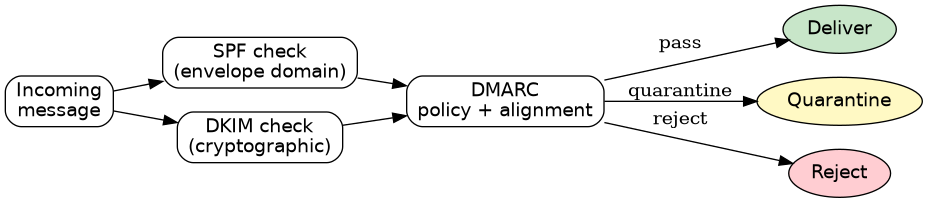
A receiving server runs all three checks in sequence. The following diagram shows the decision path.
DMARC Alignment: The Key Concept
Alignment is the subtle idea that makes DMARC powerful. SPF and DKIM may pass for a domain other than the one in the From: header. DMARC closes that gap.
- SPF alignment: the domain in the envelope sender must match the
From:domain (relaxed mode allows subdomain matches, strict mode requires an exact match). - DKIM alignment: the
d=domain in the DKIM signature must match theFrom:domain.
For DMARC to pass, the message needs at least one aligned pass from SPF or DKIM. This is why sending through a third-party provider with a shared bounce domain is not enough on its own; you need the provider to sign with a DKIM key aligned to your domain.
| Scenario | SPF | DKIM | DMARC result |
|---|---|---|---|
| Direct send from owned server, signed | pass + aligned | pass + aligned | pass |
| Marketing tool uses its own bounce domain | fail alignment | pass + aligned | pass (via DKIM) |
| Forwarded message breaks SPF, DKIM intact | fail | pass + aligned | pass (via DKIM) |
Attacker spoofs From: from a random IP |
fail | none | fail |
A Real-World Example: Locking Down example.com
Suppose you run example.com with Google Workspace for staff and a third-party tool for newsletters. A safe rollout looks like this.
Step 1 - Publish SPF and DKIM.
example.com.                       TXT  "v=spf1 include:_spf.google.com include:mailtool.example -all"
google._domainkey.example.com.     TXT  "v=DKIM1; k=rsa; p=MIIBIjANBgkq..."
Step 2 - Start DMARC in monitoring mode. Use p=none with a reporting address so you can see every source sending on your behalf.
_dmarc.example.com. TXT "v=DMARC1; p=none; rua=mailto:dmarc@example.com"
Step 3 - Read the reports, fix the gaps. Aggregate reports reveal IPs and sending services you forgot about, such as a CRM, a helpdesk, or an old server from a migration.
Step 4 - Tighten the policy gradually. Move to p=quarantine and then p=reject, optionally using pct= to roll out to a fraction of messages first.
Caution: Jumping straight to
p=rejectbefore auditing your sending sources is the single most common cause of "our legitimate email stopped arriving." Always runp=nonewith reporting first and confirm 100 percent aligned pass rates before enforcing.
Common Misconfigurations and Pitfalls
- Multiple SPF records. A domain must have exactly one SPF TXT record. Two records cause a
permerror. Merge them into one. - Exceeding 10 DNS lookups. Complex
includechains quietly break SPF. Flatten or simplify them. - Forgetting to rotate the DKIM key. Compromise or expiry requires publishing a new key under a new selector, then swapping.
- Ignoring alignment. Deploying DMARC without aligned DKIM from your ESP produces failures even though DKIM "passes."
- Overlooking subdomains. By default DMARC applies to subdomains too, but the
sp=tag can override policy. Unused subdomains are a favorite spoofing target. - Not monitoring. Without
ruareports, you are flying blind.
Beyond the Big Three
Once SPF, DKIM, and DMARC are enforcing, the ecosystem offers further layers:
- BIMI (Brand Indicators for Message Identification) displays a verified logo next to authenticated mail, and it requires DMARC enforcement.
- MTA-STS and DANE enforce TLS for mail transport, preventing downgrade attacks.
- ARC (Authenticated Received Chain) preserves authentication results across forwarding, helping mailing lists survive DMARC enforcement.
- DMARCbis, the long-running revision effort at the IETF, is expected to modernize the specification and clarify handling of the organizational domain, so watch for updates.
Key Takeaways
- Email authentication rests on three DNS-based standards: SPF authorizes senders, DKIM signs messages, and DMARC sets policy.
- DMARC is the coordinator; it requires alignment between SPF or DKIM results and the visible
From:domain. - A domain must have exactly one SPF record and stay within the 10-DNS-lookup limit, or SPF fails entirely.
- Always start DMARC at
p=nonewith reporting enabled, audit your real sending sources, then move toquarantineandreject. - Authentication proves domain identity but does not stop a compromised mailbox, encrypt content, or fix everything about deliverability.
- BIMI, MTA-STS, and ARC build on top of a solid SPF/DKIM/DMARC foundation.
Frequently Asked Questions
Do I need all three: SPF, DKIM, and DMARC? Yes, for meaningful protection. SPF and DKIM alone are easy to bypass because they do not enforce alignment to the visible sender. DMARC ties them together and enforces a policy. In practice, DMARC without at least one aligned, working method will simply fail.
What does p=none actually do?
It applies no enforcement, so all mail is delivered, but it still generates aggregate reports. It is the recommended starting point for visibility and should be temporary, not a permanent configuration.
Will DMARC stop all phishing from my domain?
It stops spoofing of your domain when enforced with p=reject. It does not stop look-alike domains, compromised accounts, or generic spam claiming to be from someone else. Combine it with monitoring and user awareness.
My newsletter broke after enforcing DMARC. Why? Most likely an alignment problem. Your newsletter provider signs DKIM with its own domain rather than yours, or uses a non-aligned bounce domain. Ask the provider to enable custom DKIM signing for your domain, then verify alignment in the DMARC reports.
How long should I stay in monitoring mode? Long enough to identify every legitimate sender and fix alignment issues, typically a few weeks to a couple of months depending on how many services send mail for the domain.
Related Articles
- Public Key Infrastructure Explained: X.509 Certificates, ACME Automation and Zero-Downtime Rotation
- OAuth 2.0 and OpenID Connect Explained: The Complete Guide to Modern Authentication and Authorization
- DNS Explained: The Complete Guide to the Internet's Phonebook


Comments
Post a Comment