Web Components in 2026: The Native Browser Standard That Eliminates Framework Lock-In

Every few years the frontend ecosystem reinvents itself. jQuery gave way to Angular, which yielded to React, which spawned a forest of meta-frameworks. Through all of that churn one browser standard has quietly matured in the background: Web Components.
Web Components are a set of native browser APIs — Custom Elements, Shadow DOM, and HTML Templates — that let you create reusable, encapsulated UI components without any framework dependency. In 2026 they have reached a tipping point: every modern browser supports them fully, major design systems adopt them, and framework-agnostic teams are choosing them as the foundation for cross-project component libraries.
This article explains how the three core APIs work, walks through a real-world example, compares Web Components with framework-based component models, and helps you decide when they are the right tool for your project.
Table of Contents
- What Are Web Components?
- The Three Pillars
- Custom Elements
- Shadow DOM
- HTML Templates
- How the APIs Work Together
- Building a Real-World Component
- Web Components vs. Framework Components
- Interop: Using Web Components Inside React, Vue, and Angular
- Performance Characteristics
- When to Use (and When Not to Use) Web Components
- Key Takeaways
- Frequently Asked Questions
- Related Articles
What Are Web Components?
A Web Component is any custom HTML element you define with JavaScript that behaves like a built-in tag such as <button> or <input>. Once registered, you can use the component in plain HTML, inside any framework, or even in server-rendered pages with zero JavaScript runtime on the client.
The specification is maintained by the W3C and standardized under WHATWG. Because the APIs live in the browser itself, you never need a bundler plugin, a transpiler step, or a runtime library to use them. A single .js file that defines a custom element can be loaded with a <script> tag and immediately used anywhere.
<!-- Register the component -->
<script src="/components/notification-banner.js"></script>

<!-- Use it like any native element -->
<notification-banner type="success" duration="5000">
  Your changes have been saved.
</notification-banner>
Important: Web Components are not a framework replacement — they are a platform primitive. They solve the problem of creating reusable, scoped UI elements that work everywhere. Frameworks still add value for state management, routing, and complex application logic.
The Three Pillars
Web Components are built on three complementary browser APIs. Understanding each one individually — and how they compose — is the key to using them effectively.
Custom Elements
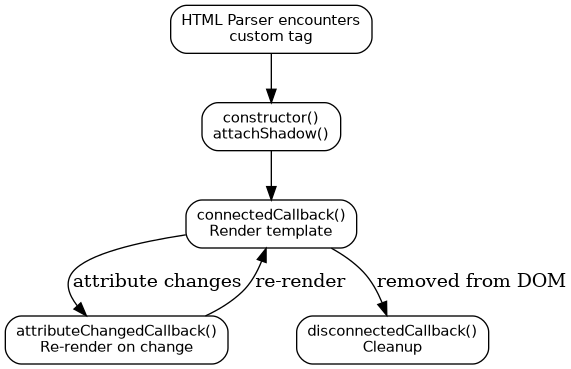
Custom Elements let you define new HTML tags and control their lifecycle. When the browser encounters your tag in the DOM, it instantiates your class and calls the appropriate lifecycle callbacks.
class GreetingCard extends HTMLElement {
  constructor() {
    super();
    this.attachShadow({ mode: 'open' });
  }

  static get observedAttributes() {
    return ['name', 'theme'];
  }

  connectedCallback() {
    this.render();
  }

  attributeChangedCallback(name, oldValue, newValue) {
    if (oldValue !== newValue) this.render();
  }

  render() {
    const name = this.getAttribute('name') || 'World';
    const theme = this.getAttribute('theme') || 'light';
    this.shadowRoot.innerHTML = `
      <style>
        .card {
          padding: 1.5rem;
          border-radius: 8px;
          background: ${theme === 'dark' ? '#1a1a2e' : '#ffffff'};
          color: ${theme === 'dark' ? '#e0e0e0' : '#333333'};
          box-shadow: 0 2px 8px rgba(0,0,0,0.1);
        }
      </style>
      <div class="card">
        <h2>Hello, ${name}!</h2>
        <slot></slot>
      </div>
    `;
  }
}

customElements.define('greeting-card', GreetingCard);
Key lifecycle callbacks:
| Callback | When it fires | Typical use |
|---|---|---|
constructor() |
Element is created | Set up shadow DOM, internal state |
connectedCallback() |
Added to the document | Fetch data, render, emit events |
disconnectedCallback() |
Removed from the document | Clean up timers, listeners |
attributeChangedCallback() |
Observed attribute changes | React to prop changes |
adoptedCallback() |
Moved to a new document | Rare — used in iframes |
Shadow DOM
Shadow DOM creates an encapsulated DOM subtree attached to your custom element. Styles defined inside the shadow tree do not leak out, and global styles do not bleed in (with the exception of CSS custom properties, which intentionally pierce the shadow boundary).
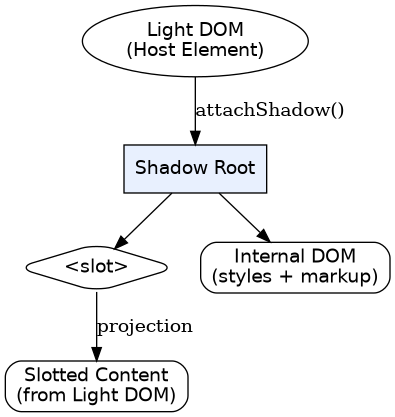
The mode: 'open' option means external JavaScript can access the shadow root via element.shadowRoot. Use mode: 'closed' if you want to fully hide the internals — the shadow root becomes inaccessible from outside.
HTML Templates
The <template> and <slot> elements let you define inert markup that is not rendered or executed until cloned into a live DOM tree. Templates are parsed once, validated by the browser, and then stamped out efficiently.
<template id="user-card-template">
  <style>
    :host { display: block; font-family: system-ui; }
    .avatar { width: 48px; height: 48px; border-radius: 50%; }
    .name { font-weight: 600; }
  </style>
  <div class="user-card">
    <img class="avatar" src="" alt="Avatar" />
    <div>
      <span class="name"><slot name="username"></slot></span>
      <p><slot name="bio">No bio provided.</slot></p>
    </div>
  </div>
</template>
Slots provide content projection: the author of the component defines where external content appears, and the consumer provides it via the slot attribute.
How the APIs Work Together
The three APIs are designed to compose. A typical workflow looks like this:
- You define a class that extends
HTMLElement. - In the constructor you call
this.attachShadow({ mode: 'open' }). - In
connectedCallbackyou clone a<template>, hydrate it with data, and append it to the shadow root. - You register the element with
customElements.define().
Building a Real-World Component
Let's build a <copy-to-clipboard> component — a small but practical element that many teams need. It should:
- Accept text via an attribute or slot
- Show a copy icon that the user clicks
- Provide visual feedback ("Copied!") after a successful copy
- Work with zero configuration
class CopyToClipboard extends HTMLElement {
  constructor() {
    super();
    this.attachShadow({ mode: 'open' });
  }

  connectedCallback() {
    const text = this.getAttribute('text') || this.textContent.trim();
    this.shadowRoot.innerHTML = `
      <style>
        :host { display: inline-block; }
        button {
          background: #4f46e5; color: white; border: none;
          padding: 0.5rem 1rem; border-radius: 6px;
          cursor: pointer; font-size: 0.875rem;
          transition: background 0.15s;
        }
        button:hover { background: #4338ca; }
        button.copied { background: #16a34a; }
      </style>
      <button aria-label="Copy to clipboard">
        <span class="label">Copy</span>
      </button>
    `;

    const btn = this.shadowRoot.querySelector('button');
    btn.addEventListener('click', async () => {
      try {
        await navigator.clipboard.writeText(text);
        btn.classList.add('copied');
        btn.querySelector('.label').textContent = 'Copied!';
        setTimeout(() => {
          btn.classList.remove('copied');
          btn.querySelector('.label').textContent = 'Copy';
        }, 2000);
      } catch {
        btn.querySelector('.label').textContent = 'Failed';
      }
    });
  }
}

customElements.define('copy-to-clipboard', CopyToClipboard);
Usage in any HTML page:
<copy-to-clipboard text="npm install my-awesome-lib">
  <code>npm install my-awesome-lib</code>
</copy-to-clipboard>
The component encapsulates its styles, handles accessibility via aria-label, and provides immediate user feedback — all without any framework.
Web Components vs. Framework Components
| Dimension | Web Components | React / Vue / Angular Components |
|---|---|---|
| Runtime dependency | None — native browser APIs | Framework runtime (15–45 KB gzipped) |
| Style encapsulation | Shadow DOM (automatic) | Scoped CSS modules or CSS-in-JS (manual) |
| Rendering model | Imperative DOM or lit-html | Declarative virtual DOM / reactivity |
| State management | Manual (attributes, properties, events) | Built-in (signals, refs, observables) |
| SSR support | Declarative Shadow DOM (since 2022) | Framework-specific hydration |
| Ecosystem / tooling | Improving but smaller | Large and mature |
| Learning curve | Standard web APIs — transferable | Framework-specific mental model |
| Longevity | W3C standard, backed by browsers | Tied to framework release cycle |
Note: The framework ecosystem is not going away. Web Components shine when you need a shared component library consumed by multiple teams using different stacks — or when you want components that will outlive any single framework choice.
Interop: Using Web Components Inside React, Vue, and Angular
One of the strongest arguments for Web Components is framework interoperability. Because they are standard HTML elements, they work inside any framework's template — with a few caveats.
React
React's JSX treats custom elements differently from built-in HTML elements. You must pass properties as camelCase props and attach event listeners with the on prefix:
// React JSX with a Web Component
<copy-to-clipboard text={codeSnippet} />
React 19+ handles custom element property assignment correctly. For earlier versions you may need a small wrapper or use ref to set properties imperatively.
Vue
Vue natively supports custom elements through its isCustomElement compiler option:
// vue.config.js
module.exports = {
  compilerOptions: {
    isCustomElement: (tag) => tag.includes('-')
  }
};
Once configured, Vue treats your component like any other — props, events, and slots all work with minimal friction.
Angular
Angular supports custom elements via CUSTOM_ELEMENTS_SCHEMA. You declare the schema in your module and Angular passes attributes and listens to events automatically.
import { CUSTOM_ELEMENTS_SCHEMA } from '@angular/core';

@NgModule({
  schemas: [CUSTOM_ELEMENTS_SCHEMA],
  // ...
})
export class AppModule {}
Performance Characteristics
Web Components have several performance advantages worth noting:
- No virtual DOM diffing. Updates go directly to the real DOM, which eliminates the overhead of reconciliation algorithms.
- Lazy hydration with Declarative Shadow DOM. Server-rendered shadow roots can be painted immediately and hydrated only when the element becomes interactive.
- Smaller bundle footprint. A custom element class is typically a few hundred bytes minified — far smaller than a framework component that requires the framework runtime.
- Native lazy loading. You can load component definitions on demand using
import()inside the element definition file, letting the browser defer parsing and execution.
However, there are trade-offs. Without a framework's reactivity system, complex components require manual change tracking. Batched updates and efficient re-rendering patterns (like the one used by Lit) must be implemented by hand or delegated to a thin library.
When to Use (and When Not to Use) Web Components
Strong fit
- Design systems shared across teams using different frameworks
- Micro-frontends where each team owns a section of the page
- Embeddable widgets dropped into third-party sites
- Progressive enhancement — components that work before JavaScript loads
- Long-lived components that must survive framework migrations
Consider alternatives
- Highly interactive single-page apps with complex state graphs — a framework's reactivity and tooling will save time
- Components that need deep framework integration (e.g., React Server Components, Vue's
<Transition>) - Rapid prototyping where framework scaffolding speeds iteration
Key Takeaways
- Web Components are native browser standards (Custom Elements, Shadow DOM, HTML Templates) — not a library or framework.
- Shadow DOM provides automatic style encapsulation that prevents leaking in either direction.
- Custom Elements define a clear lifecycle (
connectedCallback,attributeChangedCallback, etc.) that maps to familiar component patterns. - Web Components work inside React, Vue, Angular, and plain HTML with minimal configuration.
- They are ideal for shared design systems, embeddable widgets, and micro-frontends where framework independence is valuable.
- For complex SPA state management, frameworks still add significant value — Web Components complement rather than replace them.
Frequently Asked Questions
Can Web Components replace React or Vue?
Not entirely. Web Components solve the reusable UI element problem but do not provide application-level concerns like routing, server-side rendering orchestration, or sophisticated state management. Think of them as a complement — use them for your design system or widget layer, and keep a framework for application architecture.
Do Web Components work in server-side rendering?
Yes. Declarative Shadow DOM (supported in all major browsers since 2022) lets you render the shadow tree directly in the initial HTML response. The shadow root is attached during parsing without JavaScript, enabling fast first paint. Hydration attaches event listeners only when needed.
How do I handle CSS theming with Shadow DOM?
CSS custom properties (variables) intentionally pierce the shadow boundary. Define your design tokens as custom properties on :root or a parent element, and reference them inside your shadow styles. This gives consumers full theming control without breaking encapsulation.
Are Web Components accessible by default?
Web Components follow the same accessibility rules as native HTML. Use semantic elements inside your shadow tree, manage focus correctly, and expose ARIA attributes. Because shadow DOM is part of the accessibility tree, screen readers traverse it naturally. Always test with assistive technology.
What is the smallest library I can use to reduce boilerplate?
Lit (from Google) adds a thin declarative template layer on top of native Custom Elements. It is approximately 5 KB gzipped and provides reactive properties, efficient template diffing, and decorators. It does not add a virtual DOM or framework runtime — it stays close to the platform.


Comments
Post a Comment