Visual Regression Testing: The Complete Guide to Catching Broken UIs Before Your Users Do
It is 2:47 PM on a Wednesday. Your login button still says "Login", your unit tests are green, yet the support inbox is filling up with screenshots of a checkout page where the "Place Order" button has slid beneath the product image. Nothing crashed, nothing threw an error, the DOM is perfectly valid. The page is simply visually wrong — and no functional test in your pipeline was looking.
This is the gap that visual regression testing exists to close. Unit tests assert logic, API tests assert contracts, and end-to-end tests assert that elements exist and behave. None of them can say that an 8-pixel padding change collapsed a hero banner or that a font swap blew up a layout. A screenshot compared against a known-good baseline can — in milliseconds, on every commit.
This guide covers what visual regression testing is, how it works under the hood, which tools to pick, how to keep it from drowning your team in false positives, and how to wire it into CI/CD so regressions get caught the day they land — not the day a user reports them.
Table of Contents
- What Is Visual Regression Testing?
- Why Automated Visual Regression Testing Matters
- How Visual Regression Testing Works
- Comparison Strategies Within a Screenshot
- The Visual Regression Testing Workflow
- Popular Visual Regression Testing Tools
- Hands-On Example: Playwright and pixelmatch
- Dealing with Flakiness and False Positives
- Thresholds, Baselines, and the Human Review Loop
- Adding Visual Regression Testing to CI/CD
- Real-World Example: A Checkout Button Breaks at 1024px
- Best Practices for Visual Regression Testing
What Is Visual Regression Testing?
Visual regression testing is a testing technique that captures a screenshot of a UI component, page, or viewport and compares it against a previously approved baseline image. If the difference between the two exceeds a configured tolerance, the check fails and a developer (or the review loop) decides whether the change was intended or a bug slipped through.
The core idea is deceptively simple: treat a screenshot as a pixel-level contract for how the interface should look.
What Is a Baseline?
A baseline is the "known-good" reference image that your visual tests diff against. Baselines are typically:
- Generated on first run — the tool stores the very first screenshot as the baseline, with a human reviewing it before it is trusted;
- Versioned alongside your code — stored in the repository (or in a hosted service) so they change together with the features they depict;
- Updated deliberately — only through an explicit approval flow, never silently on every run.
A baseline is a promise made by the team that "this is what the UI is supposed to look like." It should require human sign-off, just like a code review.
What Kinds of Bugs Does It Catch?
Visual regression testing shines at the failure modes that functional tests are structurally blind to:
| Bug class | Example |
|---|---|
| Layout shifts | An element overlaps another after a CSS grid change |
| Typography regressions | A variable font load changes line height and overflows a card |
| Color and theme regressions | A disabled button becomes indistinguishable from an active one |
| Responsive breakpoint bugs | The mobile nav collapses only between 640px and 720px |
| Rendering differences | Browser-specific rasterization breaks a rounded corner |
| Micro-interaction drift | Hover states, focus rings, and active scales quietly change |
Why Automated Visual Regression Testing Matters
Manual reviewers can spot a broken layout instantly — which is exactly why teams tell themselves "we'll just check it visually before release." In practice, manual visual review:
- happens at the end of a release cycle, not on every commit;
- only covers the handful of pages a reviewer thinks to open;
- does not scale to multiple browsers, viewports, or locales.
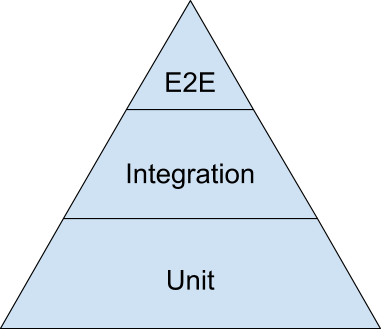
Design systems compound the problem: a change to a shared button or theme token ripples across dozens of pages. Visual regression testing is the cheap, repeatable way to catch those ripples the moment they appear, so the fix lands while the change is still fresh in the author's head. This is why visual checks sit at the apex of the classical testing pyramid, above unit and integration layers.
How Visual Regression Testing Works
Whatever the tool, the pipeline underneath is the same: launch a browser, navigate, render a screenshot, and diff it against the baseline.

Choosing What to Compare
Most tools let you scope each check:
- Full page vs. viewport — full-page captures catch scroll-dependent bugs but can be slow; viewport captures are faster and more stable;
- Component vs. page level — many teams screenshot individual Storybook components to isolate changes and keep diffs readable;
- Selected regions — diffing only a specific element (a card, a modal, a header) keeps the assertion focused and the failure message exact.
Comparison Strategies Within a Screenshot
Tools diff screenshots along a spectrum from hyper-precise to perceptual or semantic. The strategy determines the quality of your signal and the volume of your noise.
| Strategy | How it works | Strength | Weakness |
|---|---|---|---|
| Pixel-by-pixel | Compares every RGB(A) value in both images | Detects even 1-pixel subpixel shifts | Extreme sensitivity to anti-aliasing and font rendering |
| Thresholded pixel diff | Ignores pixel pairs whose color distance is below a tolerance | Filters out rendering noise, keeps real changes | Tuning the threshold is a judgement call on every project |
| Perceptual (human-vision) diff | Models how the human eye perceives contrast and edges | Matches what a user would actually notice | Can miss subtle but real changes |
| Structural / DOM snapshot | Compares the composited DOM or layout boxes, not pixels | Stable across renderers, cheap to run | Not truly visual — misses paint-level issues |
| AI-assisted semantic diff | Classifies regions (text, image, video, focus) and compares within them | Great at ignoring dynamic test data and ad banners | Rarely open source; runs in the cloud |
A pragmatic default: a thresholded pixel diff on specific components, with perceptual or AI-driven comparison reserved for whole-page coverage.
The Visual Regression Testing Workflow
A healthy visual testing loop has seven steps:
- Define coverage — list critical journeys, key pages, and high-risk shared components.
- Pick viewports — at minimum mobile, tablet, and desktop, based on your analytics.
- Create baselines — generate first-run screenshots and have a human approve each one.
- Run on every change — locally in watch mode and on every pull request in CI.
- Diff and report — produce a side-by-side view (expected, actual, diff highlight).
- Triage — accept it as intended (updating the baseline) or reject it and open a fix.
- Rotate out — prune obsolete baselines when screens are redesigned, so the suite earns its keep.
Reviewers need a side-by-side view of intended vs. actual, not a diff patch buried in CI logs.
Popular Visual Regression Testing Tools
Tools split into open-source diffing engines and hosted visual-testing platforms.
| Tool | Approach | Type | Best for |
|---|---|---|---|
Playwright toHaveScreenshot |
Thresholded pixel diff | Open source | Teams already on Playwright; zero extra infra |
| pixelmatch | Low-level pixel comparison | Open source library | Custom pipelines and CI scripts |
| BackstopJS | Puppeteer-driven page matrix | Open source | HTML/CSS heavy projects needing viewport grids |
| Percy | Hosted visual review | SaaS | Large teams wanting a polished review UI |
| Applitools Eyes | AI + perceptual diff | SaaS | Whole-page, cross-browser, dynamic-content rendering |
| Chromatic | Storybook-native screenshot testing | SaaS | Component libraries built in Storybook |
When budget is a constraint, don't let a hosted tool be the reason you skip visual testing. Playwright plus pixelmatch plus a GitHub workflow gets a credible setup running in an afternoon.
Hands-On Example: Playwright and pixelmatch
The fastest way to start is Playwright's built-in screenshot assertion — no extra packages required. Every npx playwright test run compares the login page against the stored baseline:
import { test, expect } from '@playwright/test';

test('login page has no visual regressions', async ({ page }) => {
  await page.goto('/login');
  await expect(page).toHaveScreenshot('login.png', {
    fullPage: true,
    maxDiffPixels: 200,
  });
});
Tune the global tolerance once, centrally, in the Playwright config:
import { defineConfig } from '@playwright/test';

export default defineConfig({
  expect: {
    toHaveScreenshot: {
      maxDiffPixels: 200,        // reject only if more than 200 pixels differ
      threshold: 0.2,            // per-pixel color distance we consider "same"
      animations: 'disabled',    // freeze animations for a stable render
      caret: 'hide',             // ignore the blinking text cursor
    },
  },
});
Generate baselines on the first run, and approve/refresh them deliberately:
npx playwright test --update-snapshots   # (re)write baseline images
npx playwright test                       # normal run asserts against baselines
On failure, Playwright writes expected, actual, and diff images under test-results/ so reviewers can judge at a glance.
For teams that want a custom pipeline on top of the raw comparison, pixelmatch gives full control:
import fs from 'node:fs';
import { PNG } from 'pngjs';
import pixelmatch from 'pixelmatch';

const baseline = PNG.sync.read(fs.readFileSync('baseline.png'));
const current  = PNG.sync.read(fs.readFileSync('current.png'));
const diff = new PNG({ width: baseline.width, height: baseline.height });

const mismatched = pixelmatch(
  baseline.data,
  current.data,
  diff.data,
  baseline.width,
  baseline.height,
  { threshold: 0.1 }
);

const percentChanged = 100 * (mismatched / (baseline.width * baseline.height));
console.log(`${percentChanged.toFixed(2)}% of pixels changed`);
fs.writeFileSync('diff.png', PNG.sync.write(diff));
if (percentChanged > 0.05) process.exit(1);
Dealing with Flakiness and False Positives
A flood of false positives is the number-one reason visual regression suites get abandoned. Tame the sources of benign difference first, before trusting the tool:
- Fonts — a different font-rendering engine, a late-loading webfont (FOUT), or a missing fallback changes measurements. Load verified font files deterministically before capture.
- Animations and transitions — disable them (Playwright:
animations: 'disabled'); otherwise your "expected" frame is a coin flip. - Dynamic content — dates, timers, IDs, and randomized ads make pixels non-deterministic by construction. Replace them with seeded test data, or mark them as ignored regions.
- Cursors and carets — hide focus carets before capture.
- Viewport and device pixel ratio — run at a fixed viewport and DPR; a Retina capture legitimately differs from a 1x one.
- Anti-aliasing and subpixel rasterization — the same page rendered on two GPUs can produce slightly different edges. This is what thresholds exist for.

Changes can be subtle but meaningful. Fix determinism first; tune thresholds after — not the other way around.
A visual regression tool that flags every sub-pixel shift will be switched off within a month. False positives kill adoption faster than missed bugs do; make the pipeline quiet by default and loud only when it matters.
Thresholds, Baselines, and the Human Review Loop
Three knobs control the strictness of a visual check:
| Setting | What it does | Suggested starting point |
|---|---|---|
threshold |
Per-pixel color distance treated as "same" | 0.1–0.3 |
maxDiffPixels |
Total accepted changed pixels per image | 100–500 on real pages |
ignoredRegions |
Rectangles excluded from the comparison | Timers, ads, dates, live data |
Treat them as project-level policy: if a trivial change needs a bigger threshold, you usually have a determinism problem — fix the instability, don't relax the contract.
Every failed baseline needs a human verdict: intended (approve and update the baseline) or unintended (reject and raise a bug against the rendering commit). Keep that decision latency small — the less friction between a red build and an approved baseline, the more reliably the team keeps the suite honest.
Adding Visual Regression Testing to CI/CD
Visual tests are only valuable when they run close to the code change. Practical integration rules:
- Run them in the merge pipeline — as a job that runs against a deployed preview of the PR, not against a stale environment.
- Keep rendering hardware stable — use the same container image (OS, browser bundle, fonts) in CI as you used to generate baselines.
- Never auto-update baselines in CI — updates must come from a human-reviewed step; otherwise the suite compares against whatever a developer last happened to render.
- Gate or inform — start with a non-blocking report (a PR comment with image links) and only later make the check a hard gate, once false positives are under control.
- Cache judiciously — generate the preview once and reuse it across functional and visual jobs so screenshots match what tests visited.
A simple GitHub Actions job that runs Playwright visual tests and uploads the expected/actual/diff artifacts is enough for most projects. The hard part is never YAML — it is keeping the environment deterministic.
Real-World Example: A Checkout Button Breaks at 1024px
An e-commerce team ships a tiny change to base.css: the global max-width on product media goes from 100% to 104%. Unit and functional tests pass. On desktop (1440px) nothing changes. But at exactly 1024px, the scaled image now overlaps the sticky "Place Order" button, covering its lower third.
A user reports this at 10:04. A visual regression suite with a 1024px checkout viewport check would have flagged the diff on the first build of the branch:
- Baseline: the checkout screenshot from the last approved merge.
- New run: the same viewport renders the current branch.
- Diff: a contiguous cluster of changed pixels right where the button sits.
- Triage: the reviewer sees the button half-hidden under the image, rejects the change, and the author reopens a 2-line fix before lunch.
That is the value proposition: the bug is caught at commit time, by the person who introduced it, with a visual diff they can understand — not discovered weeks later by a customer.
Best Practices for Visual Regression Testing
- Cover the journeys and components that pay the bills (login, checkout, primary navigation, design-system primitives) before anything else.
- Run at the component level for stability and at the page level for coverage; don't expect one to replace the other.
- Fix flaky sources (fonts, timers, ads) with determinism, and use thresholds strictly for rendering noise.
- Approve baseline changes through an explicit review step, and keep a paper trail of why a baseline moved.
- Include visual checks in your PR demo: screenshots in the review thread beat "trust me, it looks fine."
Key Takeaways
- Visual regression testing catches rendering and layout regressions that unit, API, and DOM-based functional tests are structurally blind to.
- Every tool reduces to the same loop: render on a fixed viewport, capture a screenshot, diff against a human-approved baseline, and triage the result.
- Determinism beats thresholds — disable animations, pin fonts, seed dynamic content, and use tolerance only for genuine rendering noise.
- Open-source (Playwright, pixelmatch) gets you started free; hosted platforms (Percy, Applitools, Chromatic) add a polished review experience and AI-assisted diffing.
- The human review loop decides everything: quick, clear approve/reject decisions keep the suite honest and keep false positives from killing adoption.
- Wire visual tests into the merge pipeline on a stable rendering environment, and never auto-update baselines inside CI.
Frequently Asked Questions
Why do I need visual regression testing if I already use Playwright or Cypress for end-to-end tests?
Functional end-to-end tests assert that elements exist, are visible, and behave when clicked — they never know whether the layout looks right. One screenshot assertion on a few key journeys adds that rendering coverage with almost no extra infrastructure.
How are baselines stored and updated?
Baselines live as images in your repo (or in a hosted tool), versioned with your code. They change only deliberately — via a flag like --update-snapshots or an approval click that replaces the old reference.
What is a good starting threshold for pixel diffs?
Start with a per-pixel threshold of ~0.1–0.2 and maxDiffPixels around 100–500 on real pages. Start strict and loosen only as determinism fixes warrant, not the other way around.
Does visual regression testing require a designer or reviewer on call?
Only for approving baseline changes. In practice one frontend developer per team runs the review loop; the diff UI makes "intended or not" a seconds-long decision.
Can visual regression testing run locally, or must it be in CI?
Both. Run it locally in watch mode while you develop and in CI on merge requests. Keep the two environments identical — same container, same browsers, same fonts — or results will diverge.
Related Articles
- Playwright Core Methods & Commands: A Complete Test Automation Cheat Sheet
- Playwright UI Features: Automating Tests Faster, Smarter, and Easier
- Mutation Testing Explained: How Breaking Your Code Proves Your Tests Actually Work
- Accessibility Testing in 2026: A Complete Guide to Building Inclusive Software


Comments
Post a Comment