Service Level Objectives and Error Budgets: The SRE Guide to Measuring Reliability

Every team says they want their system to be "reliable," but reliability without a number is just an opinion. Is 99.9% uptime good enough? What about 99.5%? If you cannot answer that question with data, you cannot make sensible trade-offs between shipping features and keeping the lights on.
This is exactly the problem that Service Level Objectives (SLOs) and error budgets were invented to solve. Pioneered by Google's Site Reliability Engineering (SRE) practice, they give teams a shared, quantitative language for reliability — one that product managers, developers, and operations engineers can all understand.
In this guide, we will build the concept from the ground up: what SLIs, SLOs, and SLAs actually are, how error budgets convert reliability targets into release decisions, how to instrument them with tools you likely already run, and a real-world example of a team using error budgets to settle a long-running debate about deployment velocity.
Table of Contents
- Why "Uptime" Is Not Enough
- The Reliability Vocabulary: SLI, SLO, and SLA
- Choosing the Right Service Level Indicators
- Setting SLOs That Actually Change Behavior
- Error Budgets: Turning Reliability Into a Currency
- How the Pieces Fit Together
- Implementing SLOs with Prometheus and OpenTelemetry
- A Real-World Example: The Deployment Freeze That Budgets Ended
- Common Mistakes and How to Avoid Them
- Key Takeaways
- Frequently Asked Questions
- Related Articles
Why "Uptime" Is Not Enough
Traditional availability metrics measure whether a server responded at all — a binary up/down signal. But users do not experience binaries. A service can be "up" for every single minute of the month while returning slow responses, empty results, or error pages to a subset of users, and your uptime dashboard will still show a perfect record.
The gap between "the process is running" and "the user got what they expected" is where most reliability programs fail. SLOs force you to measure the user-facing outcome rather than the infrastructure state.
Important: An SLO is a target for the user's experience, not for your infrastructure. Measure what the caller receives — successful, timely responses — not merely whether your load balancer reports healthy backends.

The Reliability Vocabulary: SLI, SLO, and SLA
These three acronyms get used interchangeably in casual conversation, but they describe three distinct things. Getting the hierarchy right is the first step.
| Term | Full Name | Audience | Nature | Example |
|---|---|---|---|---|
| SLI | Service Level Indicator | Internal | A measured value | 99.87% of API requests succeeded in 30 days |
| SLO | Service Level Objective | Internal | A target you commit to | 99.9% of API requests must succeed in 30 days |
| SLA | Service Level Agreement | External/customer | A contractual promise with consequences | If monthly availability falls below 99.5%, customers receive service credits |
The relationship is a strict hierarchy:
- SLIs are raw measurements collected from production telemetry.
- SLOs are the internal targets you set for those measurements. They are aspirations your team holds itself to.
- SLAs are external commitments. An SLA should always be looser than your internal SLO — you need headroom so that missing an SLA (and paying penalties) is a rare event, not a routine one.
A common rule of thumb: set your SLO roughly one order of magnitude stricter than your SLA. If the SLA promises 99.5%, aim for an internal SLO of 99.9%.
Choosing the Right Service Level Indicators
Good SLIs are few, meaningful, and cheap to compute. Google's SRE book popularized four golden signals for request-driven services, and they remain a solid starting point:
- Latency — the time it takes to serve a request, often split into "good" (fast) and "bad" (slow) buckets rather than a single average.
- Traffic — how much demand is being placed on the system (requests per second, concurrent sessions).
- Errors — the fraction of requests that fail outright or return incorrect results.
- Saturation — how close the service is to its capacity limits (memory, connection pools, queue depth).
For most application teams, the most useful pair is latency and error rate, combined into what is sometimes called a success rate or valid traffic SLI: the percentage of requests that both succeeded and returned within an acceptable time.
A practical definition might look like this:
# Good requests: HTTP 2xx/3xx responses served in under 500ms
sum(rate(http_requests_total{status!~"5.."}[30d]))
  -
sum(rate(http_requests_duration_seconds_bucket{le="0.5"}[30d]))

# Total requests
sum(rate(http_requests_total[30d]))
Two pitfalls to avoid when defining SLIs:
- Averaging away pain. A mean latency of 200ms can hide a p99 of 8 seconds. Always prefer percentile-based latency SLIs.
- Measuring only what you serve. If a load balancer rejects a request before it reaches your app, that rejection is still a failed user experience. Include it.
Setting SLOs That Actually Change Behavior
An SLO nobody acts on is decoration. To be useful, an SLO must sit at a level that is:
- Achievable but demanding. Start from historical data. If your service has reliably delivered 99.7% success over the last 90 days, setting an SLO of 99.99% guarantees constant failure and alert fatigue. Setting 99.5% changes nothing.
- Tied to a window. Most SLOs use a rolling window — 30 days is the most common, sometimes combined with a longer 90-day window to smooth out incidents.
- Owned by the team that can influence it. An SLO owned by a team with no control over the code produces learned helplessness.
A useful discipline is to write SLOs with explicit qualifiers:
# Example SLO definition (structured configuration style)
slo:
  name: checkout-api-success
  description: Percentage of checkout requests completing within 800ms
  sli:
    good: http_requests_total{handler="/checkout",status=~"2.."} and histogram le="0.8"
    total: http_requests_total{handler="/checkout"}
  objective: 99.9
  window: 30d
  owner: payments-team
Error Budgets: Turning Reliability Into a Currency
Here is the idea that makes the whole system click: an error budget is simply the complement of the SLO.
If your SLO is 99.9% availability over 30 days, your error budget is 0.1% — which, for a 30-day month, works out to roughly 43 minutes of allowed downtime or failed-request time.

The budget reframes reliability as a shared resource that gets spent. Every deployment, every risky migration, every untested code path consumes a little of it. When the budget is healthy, the team ships freely. When the budget is exhausted, the team stops adding risk and invests in reducing errors until the budget recovers.
This is powerful because it replaces an endless philosophical argument ("should we ship?") with an objective signal ("is there budget left?"). Nobody needs to win a debate; the number decides.
Burn Rate: Watching the Budget in Real Time
A 30-day window alone is too slow for alerting — by the time you have burned the entire budget, the damage is done. The SRE concept of burn rate solves this: it is how fast you are consuming the budget relative to a sustainable pace.
A burn rate of 1 means you are spending budget exactly on schedule. A burn rate of 14 means you would exhaust the entire 30-day budget in about two days — a clear emergency. Multi-window, multi-burn-rate alerting (commonly using burn rates of 14.4 for fast detection and 6 for slower, sustained degradation) lets you catch both sudden outages and slow regressions without paging someone for a brief blip.
How the Pieces Fit Together
The full flow — from raw telemetry to a governance decision — looks like this:
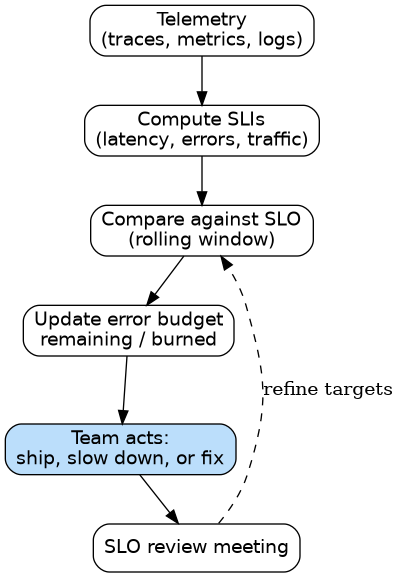
Note the feedback arrow: SLOs are not write-once artifacts. They should be reviewed periodically — after major incidents, architectural changes, or shifts in user expectations — so they stay calibrated to reality.
Implementing SLOs with Prometheus and OpenTelemetry
You likely already have most of the machinery needed. The pattern that works well in practice:
- Emit metrics at the edge. Instrument your HTTP handlers (or service mesh) to record request counts and latency histograms with labels for route, status class, and region.
- Centralize with OpenTelemetry. Use OpenTelemetry to keep instrumentation vendor-neutral and export to your metrics backend of choice. If you already run the OpenTelemetry Collector, you can derive SLO inputs without changing application code in many cases.
- Evaluate SLOs in Prometheus. Record rules or recording rules compute the windowed success ratio; alerting rules translate burn rate into pages.
- Visualize per-SLO dashboards. Grafana dashboards showing "objective," "error budget remaining," and "burn rate" make the state of reliability legible to everyone, including non-engineers.
A simplified recording rule:
groups:
  - name: slo_rules
    interval: 1m
    rules:
      - record: slo:checkout_success_ratio:ratio_rate_30d
        expr: |
          sum(rate(http_requests_total{handler="/checkout",status!~"5.."}[30d]))
          /
          sum(rate(http_requests_total{handler="/checkout"}[30d]))
      - record: slo:checkout_error_budget_remaining:ratio
        expr: |
          (slo:checkout_success_ratio:ratio_rate_30d - 0.999)
          / (1 - 0.999)
When slo:checkout_error_budget_remaining:ratio crosses zero, the budget is gone.
A Real-World Example: The Deployment Freeze That Budgets Ended
Consider a mid-sized e-commerce platform — call it ShopFront — with two teams sharing a checkout service. The operations team wanted to freeze deployments for a quarter to "stabilize" after a rough incident. The product team wanted weekly releases for a holiday campaign. Both sides had anecdotes; neither had a number.
They introduced a single SLO: 99.9% of checkout API requests completing successfully within 800ms, over a rolling 30-day window. They instrumented it with their existing Prometheus and Grafana stack, and displayed the error budget remaining on a wall monitor.
The data changed the conversation:
- The service had historically run at about 99.95% — a healthy budget of roughly 72 minutes per month.
- After a poorly tested payment-provider migration, the budget burned down to 15% in four days (a sustained burn rate near 7). The alert fired, the migration was rolled back, and the budget recovered.
- Meanwhile, the operations team's fear — that weekly deployments inherently caused outages — did not hold up. Deployment frequency correlated poorly with budget burn, but deploying without canary analysis correlated strongly.
ShopFront's outcome: deployments continued, but with a budget-aware policy — normal pace while the budget was above 50%, enhanced verification between 25–50%, and an automatic release freeze below 25% until recovery. The freeze was no longer a matter of seniority or anxiety; it was a rule the budget enforced.
Caution: Error budgets only work if the team is genuinely empowered to act on them. If leadership overrides a release freeze every time the budget is exhausted, the number becomes meaningless within a month — and everyone learns that the budget is decorative.

Common Mistakes and How to Avoid Them
- Too many SLOs. Three to seven meaningful SLOs per service is a healthy range. Fifty SLOs guarantee that nobody reads them.
- Averages instead of percentiles. Always prefer p95/p99 latency over the mean.
- Ignoring the "valid traffic" definition. A fast 500 is still a failure; a slow 200 may be one too. Define "good" carefully.
- SLOs without error budgets. An objective with no spending rule does not change behavior. Always pair them.
- Paging on SLO violations directly. Page on burn rate during a window, not on the 30-day objective itself — otherwise you will be alerted far too late (or far too often).
- Setting the SLO from a wish. Derive the first version from 90 days of historical data, then tighten deliberately.
Key Takeaways
- SLIs measure, SLOs target, SLAs promise. Keep the hierarchy intact, and always leave headroom between your internal SLO and your external SLA.
- Error budgets are the complement of the SLO — a 99.9% SLO over 30 days is about 43 minutes of allowed failure, and that number should govern release decisions.
- Burn rate turns a slow budget into a real-time signal, enabling multi-window alerts that catch both sudden outages and gradual regressions.
- Measure user outcomes, not infrastructure state. An "up" server returning errors is a failed request.
- Keep SLOs few, percentile-based, owned, and reviewable. Pair every SLO with an explicit spending rule so the target actually changes behavior.
Frequently Asked Questions
What is the difference between an SLO and an SLA? An SLO is an internal target your team sets for itself; an SLA is a contractual commitment made to customers, usually with financial consequences if breached. The SLO should always be stricter than the SLA so that SLA breaches remain rare.
How long should my SLO window be? Thirty days is the most common choice for request-driven services, sometimes paired with a 90-day window to smooth out single large incidents. Shorter windows (7 days) make the budget more responsive but also more volatile.
What error budget should I start with if I have no historical data? Start conservatively — many teams begin at 99% or 99.5% — collect a few months of SLI data, then tighten the objective deliberately. An unattainable first SLO erodes trust in the whole program.
Do error budgets mean I should never deploy when they are exhausted? Not necessarily "never," but any deployment during a exhausted budget should be reliability-improving or go through enhanced verification. The point is to remove routine risk while the system is already spending beyond its means.
Can error budgets apply to non-availability SLIs? Yes. The same math works for latency objectives (e.g., "99% of requests under 800ms") or even data-pipeline freshness. The budget is simply the allowed fraction of measurements that fall outside the objective.
Related Articles
- OpenTelemetry in DevOps: Unified Traces, Metrics, and Logs for Modern Observability
- Mastering Observability with Prometheus and Grafana: From Metrics to Actionable Insights
- Chaos Engineering and Resilience Testing: A Practical Guide to Breaking Your Systems Before They Break Themselves
- eBPF Explained: A Practical Guide to Deep Linux Observability for DevOps and SRE
- What It Actually Takes to Become a Senior DevOps Engineer


Comments
Post a Comment