Python Packaging Explained: pyproject.toml, PEP 517 Build Hooks, Wheels and Reproducible Installs
Almost every Python developer ships code to somebody else: an internal library, a CLI tool, an API service deployed by a platform team. And almost every one of us has been confused by Python packaging at least once.
The confusion has a historical cause. Python went roughly fifteen years with no single canonical way to describe a project. setup.py was a script. setup.cfg was a config file. requirements.txt was a pin list that was not a spec. Modern Python fixed most of this, and the fix is genuinely elegant — but it is split across three documents (or two, if you are lucky) and a handful of PEPs that are written for implementers rather than humans.
This article walks the whole path end to end: how a project is declared, how a build frontend talks to a build backend, what is actually inside a wheel, and how you get installs that are byte-for-byte reproducible in CI.

Table of Contents
- Why Python Packaging Feels Hard
- Two Artifacts: sdist and Wheel
- pyproject.toml: The Modern Project File
- PEP 621: The project Table
- Build Requirements: PEP 518 and PEP 517
- Dependency Groups: PEP 735
- A Complete, Realistic pyproject.toml
- What Actually Happens During a Build
- Choosing a Build Backend
- Wheels Under the Hood
- Reproducible and Reproducibly-Verified Installs
- A Practical Workflow, End to End
- Common Pitfalls and How to Fix Them
- Key Takeaways
- Frequently Asked Questions
- Related Articles
Why Python Packaging Feels Hard
The root cause is that "installing a Python package" conflates four separate jobs:
- Declaring intent — what is this project called, what does it need, who may install it.
- Building artifacts — turning source into something distributable.
- Resolving dependencies — finding a set of versions that can all be installed together.
- Installing — copying files into an environment and recording metadata for the runtime.
Classic packaging collapsed all four into one executable script, setup.py. Because it was Python, it could do anything — including things that made builds non-reproducible, like reading the current date or the machine's hostname. PEP 517 fixed this by making the build a declarative, isolated, one-way process.
Note: A build that can reach the network, read your shell environment, or import your application code is not a build — it is a script with extra steps. Build isolation exists specifically to make that class of bug impossible.
Two Artifacts: sdist and Wheel
When you publish to an index such as PyPI, you publish one or both of two artifact types.
| Artifact | Extension | What it contains | Who consumes it |
|---|---|---|---|
| Source distribution (sdist) | .tar.gz |
Your source tree plus a PKG-INFO metadata file |
The build backend, on the user's machine |
| Wheel | .whl |
Pre-built importable packages plus .dist-info metadata |
The installer directly |
The relationship matters: an sdist requires a build step; a wheel does not. That is why pip install on a machine with no compiler can succeed if a compatible wheel exists, and fail with error: metadata-generation-failed if it has to compile from source.
A healthy release usually ships both: the wheel for speed and binary compatibility, the sdist for auditability, source availability, and platforms nobody built for.
pyproject.toml: The Modern Project File
pyproject.toml is a TOML file at the root of your project. Historically it only held [build-system] (PEP 518). Under PEP 621, it now also holds a standard [project] table, which is what the current tooling ecosystem reads.
PEP 621: The project Table
Everything a PyPI index and an installer need to know is declared here — no code required.
[project]
name = "acme-metrics"
version = "0.4.2"
description = "Client helpers for the Acme metrics API."
requires-python = ">=3.10"
license = "MIT"
license-files = ["LICENSE"]
dependencies = [
  "httpx>=0.27",
  "pydantic>=2.7",
]
keywords = ["metrics", "api-client", "observability"]
classifiers = [
  "Programming Language :: Python :: 3.12",
  "Typing :: Typed",
]

[project.urls]
Homepage = "https://example.com/acme-metrics"
Source = "https://github.com/acme/acme-metrics"

[project.optional-dependencies]
async = ["anyio>=4.0"]

[project.scripts]
acme-metrics = "acme_metrics.cli:main"
A few details worth calling out:
requires-pythonis the single most valuable field for an installer. It lets the resolver refuse a package immediately on Python 3.9 instead of failing later at import time.licenseas a bare SPDX string (for exampleMIT) is the PEP 639 style. The older table form (license = { file = "LICENSE" }) andLicense ::classifiers are deprecated; treat that migration as cleanup, not novelty.[project.scripts]declares console entry points. You do not need to invokesetuptools'entry_points=wrapper anymore — the table maps command names to importable callables.- Version discovery is a choice. Static
version = "0.4.2"is the most reproducible. Dynamic versioning (dynamic = ["version"]plus aversionhook in a config file) is convenient but pushes truth back out of the metadata.
Build Requirements: PEP 518 and PEP 517
The second table is the one that makes builds isolated:
[build-system]
requires = ["hatchling>=1.24"]
build-backend = "hatchling.build"
requires— the packages the builder itself needs, such as a build backend and any C compiler toolchain description. These are installed into a temporary isolated environment, not into your project's environment.build-backend— the importable module implementing the PEP 517 hooks.
Dependency Groups: PEP 735
Optional dependencies ([project.optional-dependencies]) express features that end users may install. Dependency groups express who is installing this: developers, CI, docs.
[dependency-groups]
dev = [
  "pytest>=8.0",
  "ruff>=0.6",
  "mypy>=1.11",
]
docs = [
  { include-group = "dev" },
  "mkdocs-material>=9.5",
]
Groups are intentionally not published to the index. They never appear in a wheel's metadata, which is exactly what you want: pytest should never be installed on someone else's production machine by accident.
A Complete, Realistic pyproject.toml
Putting it together for a small published library:
[build-system]
requires = ["hatchling>=1.24"]
build-backend = "hatchling.build"

[project]
name = "acme-metrics"
version = "0.4.2"
requires-python = ">=3.10"
license = "MIT"
dependencies = ["httpx>=0.27", "pydantic>=2.7"]

[project.optional-dependencies]
async = ["anyio>=4.0"]

[dependency-groups]
dev = ["pytest>=8.0", "ruff>=0.6", "mypy>=1.11"]

[tool.hatch.build.targets.wheel]
packages = ["src/acme_metrics"]

[tool.ruff]
line-length = 100
target-version = "py310"
That is a complete, standards-compliant project definition. No setup.py, no MANIFEST.in, no setup.cfg.
What Actually Happens During a Build
A build frontend (pip, python -m build, uv build, poetry, hatch) never builds anything itself. It reads [build-system], creates an isolated environment with requires, imports the backend, and calls a fixed set of hooks.
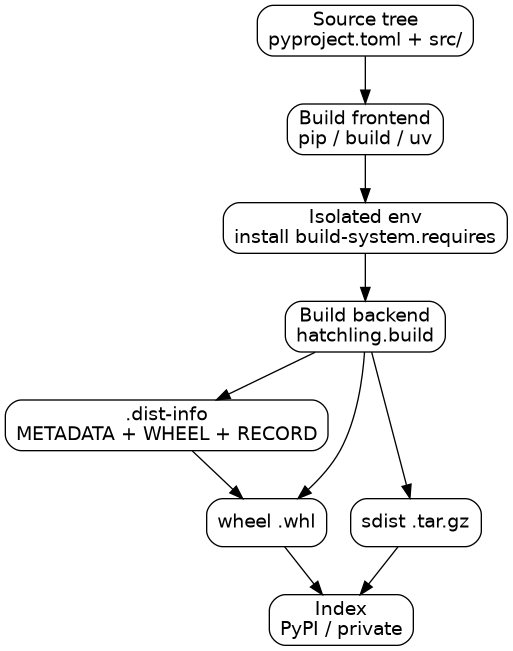
The mandatory wheel hooks are:
| Hook | Returns | Purpose |
|---|---|---|
get_requires_for_build_wheel() |
list of strings | Extra build-time requirements discovered dynamically |
prepare_metadata_for_build_wheel() |
.dist-info directory |
Generate metadata without building the whole wheel |
build_wheel(wheel_directory) |
wheel filename | Produce the wheel |
build_sdist(sdist_directory) |
sdist filename | Produce the source distribution |
PEP 660 adds the editable variants — build_editable, get_requires_for_build_editable, prepare_metadata_for_build_editable — which is how pip install -e . can be implemented cleanly instead of the old setup.py develop hack.
Two consequences worth internalising:
- Metadata and build are separable.
pip installcallsprepare_metadata_for_build_wheelfirst, readsRequires-Dist, resolves dependencies, and only then builds. That is why a slow C extension does not block dependency resolution. - No backdoor. There is no
run_setup_pyescape hatch in modern tooling, by design. If a backend needs to do something exotic, it does it as a plugin.
Choosing a Build Backend
The frontend is interchangeable; the backend is part of your project's identity and gets locked in by build-backend.
| Backend | Notes |
|---|---|
hatchling.build |
Modern default, config-first, good monorepo support |
setuptools.build_meta |
The incumbent; still fully PEP 517 compliant |
flit_core.buildapi |
Small, opinionated, minimal-config pure-Python projects |
poetry.core.masonry.api |
Pairs with Poetry's lockfile and dependency resolver |
pdm.backend |
Pairs with PDM |
scikit_build_core |
For projects that must compile native code via CMake |
uv_build |
uv's own backend, optimized for uv-driven workflows |
A rough rule: pure Python plus a config file → hatchling or flit_core. You are migrating a large existing project → setuptools.build_meta and move on. You have C/C++/Rust inside the wheel → scikit_build_core (or a maturin-style backend).
Wheels Under the Hood
A wheel is a ZIP archive with a strictly specified layout. It is not a tarball with a nicer name.
acme_metrics-0.4.2-py3-none-any.whl
├── acme_metrics/
│   ├── __init__.py
│   ├── client.py
│   └── py.typed
└── acme_metrics-0.4.2.dist-info/
    ├── METADATA
    ├── WHEEL
    ├── RECORD
    └── LICENSE
py.typed is worth a mention: it is an empty marker file that tells type checkers the package ships inline annotations. Its absence is why your pydantic library "loses" types downstream.
Filename Anatomy
The filename is a contract, not decoration:
{name}-{version}(-{build})?-{python tag}-{abi tag}-{platform tag}.whl
| Component | Example | Meaning |
|---|---|---|
| Python tag | py3, cp313, pp310 |
Interpreter and version |
| ABI tag | none, abi3, cp313 |
C-level binary compatibility |
| Platform tag | any, manylinux_2_17_x86_64, win_amd64, macosx_11_0_arm64 |
OS and ABI baseline |
Examples of real tags and what they imply:
py3-none-any— pure Python, works everywhere. The best kind of wheel.cp313-cp313-cp313-manylinux_2_17_x86_64-win_amd64— compiled for CPython 3.13 on Linux and Windows, pinned to glibc 2.17.cp39-abi3-manylinux_2_17_x86_64— uses CPython's stable ABI, so one wheel covers CPython 3.9 through 3.13.
For macOS, the platform tag encodes the minimum deployment target (macosx_11_0_arm64 means "Apple Silicon, macOS 11 or newer"), which is how pip picks the right variant.
The .dist-info Directory
| File | Contains |
|---|---|
METADATA |
RFC-style headers: Requires-Dist, Requires-Python, License-Expression, summary, classifiers |
WHEEL |
Wheel-Version, Generator, Root-Is-Purelib, and the tag triple |
RECORD |
Every file in the archive with its SHA-256 hash and size |
LICENSE |
Shipped license text, supported by PEP 639 |
RECORD is the quiet hero. Because every installed file is hashed, tools can verify that an installed package has not been modified, and uninstallers can know precisely what they created. If you write a custom installer, ignore RECORD at your peril.
Caution:
python -m buildwill happily produce a wheel that works on your laptop and fails on every Linux server, if your project has native code and you only ever build locally. Build wheels in CI across the platforms you support, and prefer the stable ABI when you can.
Reproducible and Reproducibly-Verified Installs
Reproducibility has two distinct layers, and Python tooling now supports both.
Layer 1: the same inputs give the same bytes
Set SOURCE_DATE_EPOCH and most backends normalize archive timestamps instead of stamping "now" into every file:
SOURCE_DATE_EPOCH=1700000000 python -m build
Avoid reading the clock, the hostname, or untracked files during the build, and prefer a pinned build backend in [build-system].requires (hatchling>=1.24 is better than hatchling). Rebuild from a clean checkout and compare hashes:
python -m build --outdir dist/a
python -m build --outdir dist/b
sha256sum dist/a/*.whl dist/b/*.whl
Layer 2: the install is verifiable
Hash-checking mode makes the installer verify every download:
# requirements.lock
acme-metrics==0.4.2 \
    --hash=sha256:1a2b3c... \
    --hash=sha256:4d5e6f...
pip install --require-hashes -r requirements.lock
--require-hashes disables the resolver's freedom: it only accepts pinned, hash-verified distributions. That is exactly what you want in a regulated or high-stakes deployment.
Lockfiles — uv.lock, poetry.lock, pdm.lock, or a hashed requirements.txt — pin the full transitive graph, not just your direct dependencies. Tools like pip-compile can generate one:
pip-compile --generate-hashes pyproject.toml -o requirements.lock

Provenance without long-lived secrets
Because a wheel published to an index is executed by other people's machines, supply-chain integrity matters. Two mechanisms are worth knowing:
- Trusted Publishing — CI exchanges an OIDC identity token for a short-lived upload credential. No API token is stored in repository secrets. PyPI supports this, and
pypa/gh-action-pypi-publishis the common GitHub Actions path. - Digital attestations (PEP 740) — the publisher signs a statement binding the artifact to the build that produced it, so consumers can verify provenance rather than trust a filename.
Combined with an SBOM, that turns "we built and uploaded a package" into something a security team can actually audit.
A Practical Workflow, End to End
Here is a realistic sequence for a small published package.
1. Scaffold and develop
uv init --package acme-metrics
cd acme-metrics
uv add httpx pydantic
uv sync
uv run pytest
uv sync creates .venv/, resolves from pyproject.toml, installs from the lockfile, and leaves the project environment reproducible.
2. Validate the artifacts before you publish
uv build
twine check dist/*
twine check verifies that the metadata renders correctly on the index — it catches malformed long_description markup that would otherwise appear as broken README rendering on PyPI.
3. Smoke-test the built wheel in a clean environment
Installing from source masks packaging bugs, because your working tree is right there. Test the artifact:
python -m venv /tmp/smoke && /tmp/smoke/bin/pip install dist/acme_metrics-0.4.2-py3-none-any.whl
/tmp/smoke/bin/acme-metrics --help
4. Build all wheels in CI, not locally
name: release
on:
  push:
    tags: ["v*"]

jobs:
  build:
    runs-on: ubuntu-latest
    steps:
      - uses: actions/checkout@v4
      - uses: astral-sh/setup-uv@v5
      - run: uv build
      - uses: actions/upload-artifact@v4
        with:
          name: dist
          path: dist/

  publish:
    needs: build
    runs-on: ubuntu-latest
    environment: pypi
    permissions:
      id-token: write        # OIDC, for Trusted Publishing
      contents: read
    steps:
      - uses: actions/download-artifact@v4
        with: { name: dist, path: dist/ }
      - uses: pypa/gh-action-pypi-publish@release/v1
Note what is absent: no TWINE_PASSWORD secret, no per-OS build matrix for a pure-Python project (one py3-none-any wheel covers everything).
5. Consume it reproducibly downstream
FROM python:3.12-slim
WORKDIR /app
COPY requirements.lock .
RUN pip install --no-cache-dir --require-hashes -r requirements.lock
COPY . .
CMD ["python", "-m", "acme_metrics"]
The lockfile plus hash checking means the container image you build in March resolves to the same bits you tested in January.
Common Pitfalls and How to Fix Them
| Symptom | Likely cause | Fix |
|---|---|---|
error: metadata-generation-failed |
Build needs a compiler or system library | Install build deps in CI, or publish more wheels |
ERROR: Cannot install ... because these package versions have conflicting dependencies |
Unpinned transitive requirements | Commit a lockfile and install with --require-hashes |
| Package imports from the source tree during tests | Editable install shadowing the real install | Test the built wheel in a clean venv before release |
ModuleNotFoundError inside a src/ layout on install |
Backend not told which package to ship | Set [tool.hatch.build.targets.wheel] packages = ["src/your_pkg"] |
| Types missing for downstream users | No py.typed marker |
Add an empty py.typed and include it in the wheel |
| Builds differ on every run | Clock or environment leaking into the build | Set SOURCE_DATE_EPOCH, pin the backend |
| Dev dependencies leaking to users | Test tools in dependencies |
Move them to [dependency-groups] |
| Upload rejected for filename | Manual rename of an artifact | Never rename; let the backend generate the filename |
Key Takeaways
- Packaging is four jobs — declare, build, resolve, install — and modern Python gives each one its own file or hook.
pyproject.tomlis the single source of truth: PEP 621[project]for metadata,[build-system]for the build, PEP 735[dependency-groups]for development-only tools.- The build backend is a PEP 517 plugin called in an isolated environment by a frontend. No
setup.py, no implicit imports of your code, norun_setup_py. - A wheel is a ZIP with
.dist-infometadata, and its filename encodes interpreter, ABI, and platform.py3-none-anyis a target worth aiming for. - Reproducibility comes from pinning the backend, setting
SOURCE_DATE_EPOCH, committing a lockfile, and installing with--require-hashes; provenance comes from Trusted Publishing and attestations.
Frequently Asked Questions
Do I still need setup.py at all?
No, for new projects. A modern project needs only pyproject.toml. If you maintain an older package, setup.py can coexist purely as a thin shim during migration, and it should eventually go away.
Should requirements.txt live in version control?
Yes, the locked one. An unlocked requirements.txt with >= specifiers is documentation; a hashed, fully pinned file is a build input that reproduces an environment.
When do I need a src/ layout?
Nearly always for anything you publish. It makes it structurally impossible to accidentally import your package from the working directory, which means your tests exercise the installed package rather than a fiction.
Is pip install -e . the same as the old setup.py develop?
No. Modern editable installs go through PEP 660 hooks and typically install a .pth file or a custom import hook that redirects to your source tree. Same user experience, completely different mechanism.
How do I support both Linux and macOS without building on my laptop?
Build in CI. Use a platform matrix, prefer the stable ABI (abi3) so one wheel covers many CPython versions, and target the baseline you actually support with manylinux tags.
Related Articles
- Mastering TypeScript: The Bridge to Safer, Scalable JavaScript
- Supply Chain Security in DevOps: Securing Your CI/CD Pipeline from Code to Container
- The Complete DevOps Cheat Sheet: Linux, Git, CI/CD, IaC and Beyond
- Production-Grade Architecture: The Complete Code-to-Cloud Lifecycle with AWS


Comments
Post a Comment