HTTP Status Codes Every API Tester Should Know

One sentence from a QA reference card changed the way many testers approach API work: "Not the result. The instruction for what to test next." HTTP status codes are not the end of a test conversation — they are the beginning. When an API returns 201 Created, it is not telling you the test is done; it is telling you what to do next: fetch the resource back and verify the Location header. When it returns 429 Too Many Requests, it is telling you your rate-limit test was real.
For testers, a status code is a signal, not a summary. This article walks through every major status code an API tester will meet — grouped by family, with the exact assertions that turn a "passing response" into a meaningful test case.
Table of Contents
- Why Status Codes Matter in API Testing
- Understanding the Status Code Families
- 2xx Success: The Expected Outcome
- 3xx Redirection: Follow the Path
- 4xx Client Errors: The Request Is the Problem
- 5xx Server Errors: Graceful Failure Is the Goal
- A Real-World Walkthrough: Status-Code-Driven Test Flows
- Practical Tips and Tools for Testers
- Key Takeaways
- Frequently Asked Questions
- Related Articles
Why Status Codes Matter in API Testing
A status code is the first thing your test should look at. It is the cheapest, fastest signal of whether the system behaved as expected — and it is the gatekeeper for every other assertion on the response body. The discipline is simple:
- Read the status code first.
- Decide what it is telling you to check next.
- Assert the body, headers, or behavior that the code promises.
QA reference note: Validate the status code first, before looking at anything else. The status code decides which assertions are valid —
200 OKdemands a non-empty body, while204 No Contentdemands the exact opposite.
This ordering matters because it makes tests explanatory. A failing assertion on an empty body under 200 OK tells you the response broke its contract. An empty body under 204 No Content is the correct result. Confusing the two produces false failures and false passes.
Understanding the Status Code Families
Every HTTP status code falls into one of five families, and each family has a single story to tell:
| Family | Story | Quick meaning |
|---|---|---|
2xx |
Success | The expected outcome |
3xx |
Redirection | Follow the path |
4xx |
Client Error | The request is the problem |
5xx |
Server Error | The server is the problem |
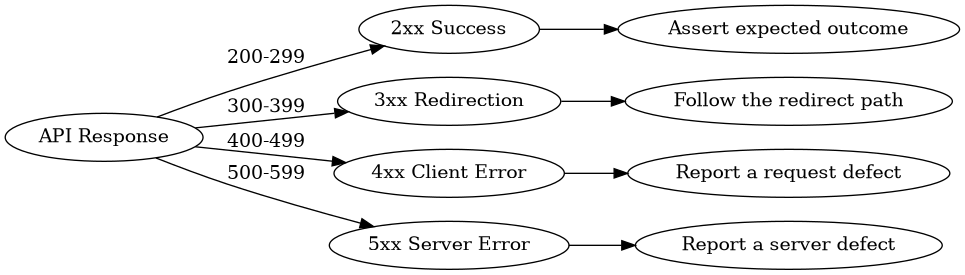
A tester who knows which family a code belongs to can already predict roughly what to look for before reading a single byte of the body.
2xx Success: The Expected Outcome
A 2xx response means your request reached the server and the server did what you asked. But "success" is not uniform — each code carries a different contract, and your assertions must match it.
200 OK
200 OK is the workhorse of API testing, and the natural first code to assert.
- Assert the response body is not empty.
- Validate the body against its schema.
- Spot-check a few representative field values.
An empty or schema-invalid body under 200 OK is a contract break, not a cosmetic issue.
201 Created
201 Created is the answer to a POST that successfully created a resource — generally a user, an order, or a document.
- GET the resource back to confirm it was really persisted.
- Confirm the
Locationheader points at the newly created resource.
# Create a resource
curl -i -X POST https://api.example.com/users \
  -H "Content-Type: application/json" \
  -d '{"name":"People Qa"}'

# Expect: HTTP/1.1 201 Created
# Expect: Location: https://api.example.com/users/42
204 No Content
204 No Content tells you the operation succeeded and has nothing to return — typical of a successful DELETE.
- Assert the response body is empty.
- A non-empty body here is a payload contract break.
Caution: Asserting "body is not empty" as a blanket rule across every success case is a classic bug. Under
204, an empty body is the correct result, so the assertion must flip.
206 Partial Content
206 Partial Content is returned when the server honors a range request — only a portion of the resource is sent.
- Test range headers explicitly (
Range: bytes=0-99). - Exercise pagination edges: first page, last page, and one page past the end.
3xx Redirection: Follow the Path
The 3xx family tells the client that the resource lives somewhere else or that a conditional request can be short-circuited. Two codes dominate API testing.
301 Moved Permanently
301 Moved Permanently signals the resource has a permanent new home.
- Assert the final target URL after following the redirect.
- Check the cache behaviour — a 301 is cacheable, so verify the caching headers that tell consumers how long to trust the old link.
304 Not Modified
304 Not Modified is returned when a client sends a validator (like an ETag or If-None-Match) and the resource has not changed.
- Send the
ETag/If-None-Matchheader from a previous response. - Verify no body is returned and the response uses the client's cached copy.
curl -i https://api.example.com/profile \
  -H "If-None-Match: \"abc123\""
# Expect: HTTP/1.1 304 Not Modified  (and no body)
4xx Client Errors: The Request Is the Problem
The 4xx family is where API testing earns its keep. These codes mean the client sent something invalid, unsupported, unauthorized, or unfulfillable — and every one is an assertion opportunity.
400 Bad Request
The request itself is malformed.
- Send a malformed payload (bad JSON, missing required field).
- Assert the error message explains what changed.
- Verify how the API surfaces the problem (field-level messages, codes, etc.).
401 Unauthorized
401 answers the question "who are you?" — no token, or an expired token.
- Perform the call with no token.
- Perform the call with an expired token.
- Assert the API rejects the request before reaching any business logic.
403 Forbidden
403 answers a different question — "what are you allowed to do?"
- Send a valid token but with a wrong role.
- Assert the resource is refused even though authentication succeeded.
QA reference note: auth is not auth.
401 Unauthorizedis an identity problem ("who are you?"), while403 Forbiddenis an authorization problem (valid identity, wrong role). Confusing them in your tests (or your implementation) hides real permission bugs.
404 Not Found
- Query a deleted resource or a non-existent id.
- Assert that unknown entities do not leak through as
500or a misleading200with an empty body.
409 Conflict
409 Conflict is the server proving you touched a shared state.
- Fire two creates at the same time — the second one is your concurrency proof.
- Assert the API prevents the duplicate from being persisted silently.
422 Unprocessable Entity
A subtle but crucial distinction: the JSON is valid, but the business rule is broken.
- Send valid JSON that violates a rule (e.g. a negative order quantity, duplicate email on an existing account).
- Assert the API responds with
422rather than400.
429 Too Many Requests
429 is your rate-limit confirmation.
QA reference note: if you cannot trigger
429in your testing environment, your rate limit is not real. The test that never fires is the test you cannot trust.
- Hammer the endpoint past its configured threshold.
- Assert both the
429status and theRetry-Afterheader. - Verify the rate limiter actually kicks in, not just the docs.
5xx Server Errors: Graceful Failure Is the Goal
The 5xx family means the request never finished successfully — and the server is responsible. You cannot prevent failures, but you can assert that they fail gracefully.
500 Internal Server Error
- Force a server error (unexpected input, an upstream crash).
- Assert the client gets a clean
500— no stack traces, no internal data leaks, no hang.
502 Bad Gateway
- Kill the upstream service your API depends on.
- Check the fallback behaviour: does the API return a sensible
502with useful messaging, or does it crash or hang?
503 Service Unavailable
- Simulate maintenance or overload.
- Verify that retry logic exists — the client should get a clear signal that the service is temporarily unavailable, usually with a
Retry-Afterheader.
504 Gateway Timeout
- Point your API at a slow upstream.
- The key question: does the client's library or the API itself retry or wait? Assert the timeout boundary is respected and the eventual answer is coherent.

The theme across all of 5xx: failure is inevitable, poor failure handling is not.
A Real-World Walkthrough: Status-Code-Driven Test Flows
Put it together with a single user-creation flow. The status code tells your test suite what to assert next at every step:
POST /userswith a valid payload → expect201 Created. - Next instruction: GET the user back and confirm theLocationheader.POST /userswith malformed JSON → expect400 Bad Request. - Next instruction: assert the error message explains the malformation.POST /userswith no token → expect401 Unauthorized. - Next instruction: confirm rejection happens before any business validation.POST /userswith a valid token but a read-only role → expect403 Forbidden. - Next instruction: confirm authorization, not just authentication, is enforced.POST /userswith identical data twice → expect409 Conflicton the second create. - Next instruction: this is your concurrency proof.GET /users/99999(deleted) → expect404 Not Found. - Next instruction: assert no phantom200with an empty body.
import requests

def test_user_flow(base_url):
    token = "read-only-role-token"

    r = requests.post(f"{base_url}/users", json={"name": "QA"})
    assert r.status_code == 201, "POST should create a resource"
    assert r.headers.get("Location"), "Location header required on 201"

    user_id = r.headers["Location"].rsplit("/", 1)[-1]
    r = requests.get(f"{base_url}/users/{user_id}")
    assert r.status_code == 200 and r.text, "200 must carry a non-empty body"

    r = requests.post(f"{base_url}/users", json={"name": "QA"}, headers={"Authorization": f"Bearer {token}"})
    assert r.status_code == 403, "Valid token, wrong role must be forbidden"
This is status-code-driven testing: every assertion is a direct answer to the instruction the previous code gave you.
Practical Tips and Tools for Testers
The reference card closes with a quick reminder worth keeping in your head at all times:
- Validate the status code first — before body, headers, or timing.
2xx= Success (expected outcome)3xx= Redirect (follow the path)4xx= Client Error (request issue)5xx= Server Error (server issue)
And use the right tools for the job, all of which show status codes at a glance:
- Postman — collections, environment variables, and built-in assertions for status codes.
- cURL — quick, scriptable checks from the terminal (
-wcan print the code for you). - Browser DevTools — the Network tab exposes every request and its status live.
| Tool | Best for | How the status code appears |
|---|---|---|
| Postman | Structured, repeatable API test suites | Assertions and test runner |
| cURL | One-off checks and CI scripts | Terminal output / -w format |
| DevTools | Debugging frontend-backend calls | Network table color-coded |
Key Takeaways
- A status code is the instruction for what to test next, not the final result of the test.
- Validate the status code first, then let it decide which body and header assertions are valid.
2xxdemands contract checks:200needs a non-empty, schema-valid body;201requires aLocationheader and a follow-upGET;204must have an empty body.3xxis about path and caching: assert the final target for301, and verify no body plusETag/If-None-Matchbehaviour for304.4xxseparates request defects from identity problems from permission problems —401is "who are you?",403is "wrong role",422is valid JSON with a broken business rule.5xxtests are graceful-failure tests: force the error and assert clean handling, never trusting that a failure free environment means the system is healthy — and if you cannot trigger429, your rate limit is not real.
Frequently Asked Questions
Why must I check the status code before the response body?
Because the status code decides which assertions are valid. A non-empty body is correct under 200 OK but a contract break under 204 No Content. Checking the body before the status code produces false passes and false failures.
What is the difference between 401 Unauthorized and 403 Forbidden?
401 asks "who are you?" — no token or an expired token. 403 asks "what are you allowed to do?" — a valid token with the wrong role. One is an identity problem, the other is an authorization problem; the source document stresses that "auth is not auth."
Why is 422 different from 400?
400 Bad Request covers malformed requests, where the payload is structurally wrong. 422 Unprocessable Entity means the JSON is valid but the business rule is broken — for example, a duplicate create or an illegal value. The source notes to send valid JSON with a broken rule to verify 422.
How do I test 429 Too Many Requests?
Send requests past your configured rate limit and assert that the API actually returns 429 with a Retry-After header. The source's caution is blunt: if you can't trigger it, your rate limit isn't real.
Which tools should I use to inspect status codes? Postman for structured collections and assertions, cURL for quick command-line checks, and browser DevTools to watch live requests and responses in the Network tab.
Related Articles
- API Test Automation with Postman Collections
- Asserting Response Schemas in Python with
requests - Load Testing and Rate-Limit Verification in QA


Comments
Post a Comment