eBPF Explained: A Practical Guide to Deep Linux Observability for DevOps and SRE

Somewhere inside your production cluster, a container is slow. Its CPU usage looks fine, memory looks fine, and the application logs say nothing useful. Your monitoring dashboard is green, yet users are complaining. If you have been an on-call engineer for more than a few weeks, you have been here. Traditional observability tools can tell you what the system is doing, but they often cannot tell you why it is doing it, because the interesting story happens at the boundary between your application and the Linux kernel.
That gap is exactly what eBPF was built to fill. eBPF lets you run small, safe, sandboxed programs inside the kernel without changing kernel source code or loading risky kernel modules. The result is a superpower for DevOps and SRE teams: surgical visibility into syscalls, network traffic, file access, and process behavior — with low overhead and without adding brittle instrumentation to every application.
This guide covers what eBPF is, how it works under the hood, the modern tooling ecosystem that has grown around it, and practical recipes you can apply today.
Table of Contents
- What Is eBPF and Why DevOps Teams Should Care
- How eBPF Works: Core Concepts
- The eBPF Program Lifecycle
- Key Use Cases for Observability and Performance
- The Modern eBPF Tooling Ecosystem
- Real-World Example: Profiling Slow Syscalls at Scale
- eBPF vs Traditional Observability: A Comparison
- Best Practices and Pitfalls
- Key Takeaways
- Frequently Asked Questions
- Related Articles
What Is eBPF and Why DevOps Teams Should Care
The name sounds intimidating, but the idea is simple. eBPF stands for extended Berkeley Packet Filter. The original BPF was a tiny virtual machine added to the kernel in 1992 so that packet-capturing tools like tcpdump could filter packets efficiently without copying everything to user space. It stayed mostly dormant for two decades. Then, in 2014, the kernel developers extended it dramatically — hence the e — turning it into a general-purpose, in-kernel execution engine.
Today, eBPF is far more than packet filtering. It is a framework that lets you attach small programs to a huge range of hooks inside the kernel:
- Syscall tracepoints — run code whenever any process calls
open,read,connect,execve, and thousands more. - Kprobes and kretprobes — probe the entry and return of almost any kernel function.
- Uprobes — attach to user-space functions inside your own binaries.
- Network hooks — including XDP at the driver level and
tcat the traffic-control layer. - Perf events, cgroup hooks, and filesystem events — for everything in between.
The deciding factor for DevOps: you get kernel-level visibility without kernel modules. Traditional monitoring agents historically shipped kernel modules or LD_PRELOAD shims to see deep telemetry. A buggy kernel module can panic the host kernel and take down every container on it. An eBPF program cannot, because the kernel's verifier refuses to load anything unsafe.
For an SRE chasing a latency regression or a DevOps engineer debugging a container that will not talk to the network, being able to attach strace-style tracing to a production host without restarting anything and without measurable performance penalty is transformative.
How eBPF Works: Core Concepts
To use eBPF effectively, you need to know four foundational pieces: programs, hooks, maps, and the verifier.
Programs
An eBPF program is a small piece of code, usually written in C (or increasingly Rust), compiled with clang to a special BPF instruction set. Each program is limited and sandboxed:
- It cannot perform arbitrary system calls from within the kernel.
- It has access to a limited set of helper functions.
- It runs only when the event it is attached to fires.
Modern kernels also allow bounded loops and BPF-to-BPF function calls, which makes writing real programs practical.
Attach Points (Hooks)
A program is useless until it is attached. The attach point decides when your program runs. Common categories:
| Hook family | Examples | Typical use |
|---|---|---|
| Tracepoints | sys_enter_openat, sched_switch, block_rq_complete |
Stable, maintained syscall and subsystem tracing |
| Kprobes / kretprobes | any kernel function symbol | Deep, kernel-function-level investigation |
| Uprobes | symbols in binaries like libc.so or your app |
Tracing user-space function calls |
| Network (tc / XDP) | driver packets, traffic control | Packet filtering, DDoS protection, load balancing |
| Perf / ring buffer | hardware counters, events | Profiling and high-throughput event streaming |
| Cgroup hooks | cgroup lifecycle | Resource accounting, cgroup-level policy |
Note on version portability: kprobes attach to symbol names that can change between kernel versions. Whenever possible, prefer tracepoints (a stable, maintained ABI) and use CO-RE/BTF (explained below) so your eBPF programs run across many kernel versions without recompilation.
Maps
eBPF programs are stateless by design, so how do they remember things between invocations? Through maps — key-value data structures that live in the kernel and can be shared between kernel-space eBPF programs and user-space tooling. Stack traces, histograms of latencies, per-process counters, and configuration data all live in maps. A companion ring buffer streams per-event data out to user space without the notorious per-CPU perf-buffer locking problems of the older perf buffer.
The Verifier
This is the security heart of eBPF. Before a program runs, the kernel's BPF verifier performs a static analysis that guarantees:
- The program terminates (no unbounded loops, with bounded loop support when provable).
- It only accesses memory it is allowed to (no out-of-bounds reads/writes).
- It uses only valid helper functions and types.
- It cannot crash the kernel or compromise it.
Rejected programs return an error like Permission denied or invalid access to map value. This verifier is why eBPF is safe enough for production and why cloud providers run it for millions of tenants.
For DevOps teams the practical meaning is: if it loads, it is safe to run in production. The verifier is the enforcement, so you do not have to be the one shouting at engineers about kernel safety.
The eBPF Program Lifecycle
Putting the concepts together, here is the complete journey from source code to running telemetry:

The flow matters to operationalize:
- Compile once with
clang -target bpf. With modern BTF and CO-RE, you do not even need kernel headers on the target machine. - Verify. The kernel checks every instruction. Anything unsafe is refused before it can do harm.
- JIT. The kernel just-in-time compiles the bytecode to native machine code for speed.
- Attach and run. The program only executes when its hook fires, which keeps overhead near zero when nothing is happening.
- Emit. Data flows out through maps and ring buffers to user space, where tools aggregate it into metrics, traces, and histograms.
This design means you can attach and detach instrumentation to a live production host in seconds, with no restarts, no agent reboots, and no code changes to your applications.
Key Use Cases for Observability and Performance
1. Syscall and File-System Tracing
The classic debugging scenario: an application is slow, but logs are silent. An eBPF tool can answer "which syscalls are this process making, and how long are they taking?" in one command, in production, live. This surfaces I/O waits, file-lock contention, and unexpected syscall patterns without touching the app.
2. Fine-Grained Network Observability
Because eBPF hooks XDP and tc, networking tools built on it can observe every packet with who-sent-it-to-whom metadata (process, container, pod). This is how tools like Cilium and Hubble deliver service-mesh-level visibility into Kubernetes clusters — seeing latency, TCP retransmits, and dropped packets per pod, without sidecar proxies on every pod.
3. CPU Profiling and On-Cpu / Off-Cpu Analysis
Traditional profilers sample on-CPU time. When a process is waiting for a lock, the kernel, or an I/O device, it is off-CPU — invisible to those samplers. eBPF captures kernel stack traces to build off-CPU flame graphs, revealing where time is simply lost, which is frequently the real cause of latency in modern services.
4. Runtime Security and Threat Detection
Tools like Falco use eBPF to watch for dangerous behavior — unexpected container shells, privilege escalation, unauthorized file access — with negligible overhead compared with traditional audit daemons. This turns the same instrumentation you use for performance into a defense-in-depth layer.
5. Database and Cache Query Tracing
By uprobbing your database client libraries, eBPF tools can map every query to the work it triggered downstream — spotting N+1 query storms, slow ActiveRecord/ORM patterns, and cache misses without adding query-logging code to every microservice.
The Modern eBPF Tooling Ecosystem
You do not need to write raw C to benefit from eBPF. The ecosystem has matured into two layers: low-level libraries, and high-level tools you can adopt today.
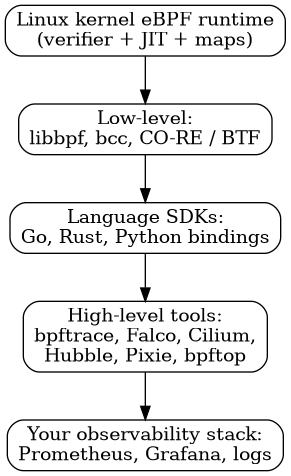
| Tool | Layer | What it does for you |
|---|---|---|
bpftrace |
Scripting | A one-liner language for instant kernel tracing, similar to awk for the kernel. Perfect for investigations. |
| BCC | Python/C library | Programmatic eBPF tools (like biosnoop, opensnoop, execsnoop) for building custom tools quickly. |
| libbpf | C library | The recommended building block for portable, CO-RE-based programs. |
| Cilium + Hubble | Networking | Service-mesh-grade pod-to-pod network observability and policy on Kubernetes. |
| Falco | Security | Runtime security with eBPF as the capture driver. |
| Pixie | Observability | Instant auto-instrumentation of Kubernetes workloads for metrics, traces, and flame graphs. |
| bpftop | Profiling | A live dashboard, "top" for eBPF, showing which programs run and how expensive they are. |
Adoption tip: start with
bpftraceone-liners for day-to-day debugging, adopt Cilium/Hubble for Kubernetes network visibility, and only reach for custom BCC or libbpf programs when you have a repeatable, production-wide need. Most teams never need raw C.
Real-World Example: Profiling Slow Syscalls at Scale
Let us walk through the kind of investigation this article started with: a production service with mysterious latency. Here is a practical, safe playbook using eBPF tooling.
Step 1: Confirm you can use eBPF on the host
# Ensure the kernel has BPF support (most distros do by default)
mount | grep bpf

# bpftrace one-liner that verifies end-to-end attach/detach works
sudo bpftrace -e 'BEGIN { printf("Hello from the kernel: %d\n", pid); exit(); }'
If you see the "Hello from the kernel" message, you are good to go. You need root — or explicitly granted capabilities CAP_BPF and CAP_PERFMON — to attach privileged programs.
Step 2: Watch syscalls from the suspicious service in real time
sudo bpftrace -e 'tracepoint:syscalls:sys_enter_openat
  /comm == "payments-api"/
  { printf("%s -> %s\n", comm, str(args->filename)); }'
This prints every file the payments-api process opens, live. If you see it thrashing config files or logging to disk dozens of times per request, you have found a classic performance bug (in this case, read amplification) without touching application code.
Step 3: Check where time is being lost with off-CPU analysis
# Which kernel stack traces are associated with the service's off-CPU time?
sudo bpftrace -e 'kprobe:finish_task_switch /prev->comm == "payments-api"/ {
    @stacks = kstack(3); @count = count(); }'
A histogram of the resulting stacks reveals sleeps behind mutexes, network waits, or page-fault stalls — the places a CPU sampler would never look.
Step 4: Turn the raw stream into a histogram
# Distribution of read() durations, in microseconds, for the service
sudo bpftrace -e 'kprobe:vfs_read /comm == "payments-api"/ {
    @start[pid] = nsecs; }
  kretprobe:vfs_read /comm == "payments-api"/ {
    @read_us = hist((nsecs - @start[pid]) / 1000); delete(@start[pid]); }'
The hist() helper prints a power-of-two bucket histogram that instantly reveals outliers, such as a bimodal distribution caused by cold page-cache misses or a remote NFS mount.
Step 5: Automate it as a permanent, low-cost check
Once you have identified the signal that matters, promote the insight from an interactive bpftrace session to a small prometheus exporter or a Cilium Hubble monitor so the metric flows into your existing Grafana dashboards and alerting. The data path looks like this:
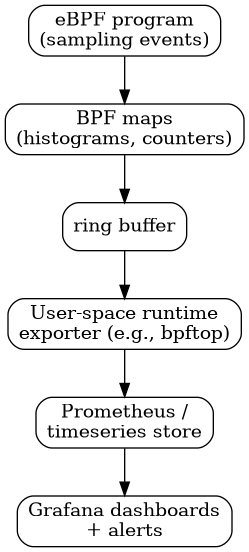
With this pipeline, the next time a pod goes slow, your dashboards answer the why before your pager even rings.
eBPF vs Traditional Observability: A Comparison
The best way to decide when eBPF is the right tool is to compare it honestly with the alternatives you already have.
| Dimension | eBPF | Kernel modules (legacy agents) | User-space agents / logs |
|---|---|---|---|
| Kernel visibility | Deep, via safe sandbox | Deep but dangerous | Limited to what the app exposes |
| Stability risk | Very low (verifier enforced) | High — an error can crash the host | Low |
| Deployment | Attach live, no restart | Requires reboot/install | Requires installing agent + often restart |
| Overhead | Very low, proportional to events | Low when idle | Modest, constant baseline |
| Portability | CO-RE / BTF across kernels | Recompile per kernel | Depends on OS/distro |
| Permission needed | Root or CAP_BPF/CAP_PERFMON | Root | Usually root or privileged |
The honest takeaway is not that eBPF replaces everything — it is that it fills the specific gap where user-space agents are blind and kernel modules are dangerous. Many teams keep their standard dashboards and add an eBPF-powered layer only for deep debugging, networking on Kubernetes, and runtime security.
Best Practices and Pitfalls
Adopting eBPF is easy; adopting it well requires discipline.
- Always run the verifier first. The verifier is your safety net. If your custom program does not load, do not bypass it with hacks — fix the program.
- Prefer tracepoints and CO-RE over raw kprobes. Tracepoints are stable; raw kprobe symbol names change between kernel releases and break your "permanent" tools.
- Watch your own overhead. eBPF is efficient, but a program firing millions of times per second is still luggage. Use sampling, filter early, and check with
bpftopthat your instrumentation is not polluting the very performance you are measuring. - Know your privilege model. eBPF requires root or
CAP_BPF/CAP_PERFMON. Running it as an unprivileged user silently limits which hooks you can use — debug confusingly-empty output before assuming the system is broken. - Do not use the prod-box-as-laptop loop. Interactive
bpftracedebugging is excellent, but the tools you automate must follow your normal review, test, and rollback path.
Important caution: eBPF is not a kernel-module replacement for everything. It cannot call arbitrary kernel functions, and systems with kernel lockdown or hardened profiles (e.g., some managed/kiosk kernels) may refuse to load any eBPF. On those hosts, plan a fallback: standard agents plus static analysis and logs.
Key Takeaways
- eBPF is a sandboxed, in-kernel execution engine that gives DevOps teams deep Linux visibility without the risks of kernel modules.
- The four pillars are programs, attach points/hooks, maps, and the verifier; the verifier is what makes production eBPF safe.
- Use tracepoints and CO-RE/BTF for portability, and attach live to running production hosts with no restarts and low overhead.
- High-value use cases: syscall/file tracing, Kubernetes network observability, off-CPU profiling, and runtime security.
- You rarely need raw C — bpftrace, BCC, Cilium/Hubble, Falco, and Pixie cover most real-world scenarios.
- Treat eBPF instrumentation like any production code: review it, watch its overhead, and plan a fallback for locked-down kernels.
Frequently Asked Questions
Is eBPF safe to run in production? Yes, for the usage described here. The kernel's verifier statically proves a program cannot crash the kernel or access memory unsafely before loading it, and the JIT limits run-time surprises. Keep programs filtered, sampled, and reviewed, and they run safely alongside production workloads.
Do I need to write C code to use eBPF?
No. High-level tools such as bpftrace, BCC, Falco, and Cilium let you get value immediately. Writing raw C or libbpf programs is only needed for custom, shipped products.
What is the difference between kprobes and tracepoints? Tracepoints are stable, officially maintained hooks in the kernel (for example, syscall entries). Kprobes attach to arbitrary kernel function symbol names, which are powerful but can break when symbol names change between kernel versions.
Why do I need root or special capabilities to use eBPF?
eBPF executes inside the kernel, so attaching programs requires elevated privileges. Linux restricts this to root or explicit capabilities such as CAP_BPF and CAP_PERFMON; unprivileged eBPF is heavily limited.
Is portability between kernel versions a problem? It used to be the biggest pain point, but CO-RE (Compile Once, Run Everywhere) with BTF type information largely solved it. Program source can be compiled once and loaded on a wide range of kernel versions without recompiling.
Related Articles
- OpenTelemetry in DevOps: Unified Traces, Metrics, and Logs for Modern Observability
- Mastering Observability with Prometheus and Grafana: From Metrics to Actionable Insights
- Chaos Engineering and Resilience Testing: A Practical Guide to Breaking Your Systems Before They Break Themselves
- Kubernetes Pod Troubleshooting in Production: 25 Real-World Interview Scenarios


Comments
Post a Comment