Bun Explained: The All-in-One JavaScript Runtime, Bundler and Test Runner

For most of the last decade, a JavaScript project needed a small ecosystem of tools just to get off the ground: Node.js to run code, npm or pnpm to install packages, a bundler like webpack or esbuild, a test runner like Jest or Vitest, and a transpiler to handle TypeScript or JSX. Each of those tools was maintained by a different team, updated on its own schedule, and configured in its own file.
Bun challenges that model. It is a single, fast JavaScript and TypeScript runtime that ships with a package manager, a bundler, and a test runner built in. Instead of assembling a toolchain, you install one binary and get the whole workflow. This guide explains what Bun actually is, how its components fit together, where it shines, and where the trade-offs still are in 2026.
Note: Bun moves quickly and its documentation evolves with each release. Always check the official docs for the current status of a specific API before relying on it in production.
Table of Contents
- What Is Bun?
- The All-in-One Philosophy
- Runtime
- Package Manager
- Bundler
- Test Runner
- How the Pieces Fit Together
- Node.js Compatibility
- Getting Started in Practice
- A Real-World Example: Migrating a Node Project
- Bun vs Node.js vs Deno
- Where Bun Still Has Rough Edges
- Key Takeaways
- Frequently Asked Questions
- Related Articles
What Is Bun?
Bun is a JavaScript and TypeScript runtime built on top of JavaScriptCore, the engine that powers Safari, rather than V8, which Node.js and Chrome use. That choice is central to Bun's performance story: JavaScriptCore's startup and memory characteristics are different from V8's, and for many scripts Bun boots noticeably faster.
Beyond raw execution, Bun is designed to be a drop-in replacement for the commands developers type every day:
bun runexecutes a script or file.bun installinstalls dependencies.bun buildbundles code for the browser or server.bun testruns a test suite.
The claim is not that Bun does each of these things slightly better. The claim is that using one coherent tool removes glue code, configuration drift, and the version-compatibility puzzles that come from wiring together four independent projects.

The All-in-One Philosophy
Runtime
The runtime is the foundation. Bun executes JavaScript, TypeScript, JSX, and .env files directly, without a separate build step. If you write a .ts file, you can run it immediately:
bun run server.ts
There is no ts-node, no tsx, and no transpile-and-restart dance. Bun also implements a large set of Web APIs that are normally only available in the browser, such as fetch, WebSocket, Request, and Response, which narrows the gap between client and server code.
Package Manager
bun install reads the same package.json format as npm, but the implementation is different. Bun uses a global cache and hard links to avoid copying the same package into every project, and it writes a text-based lockfile (bun.lock) that is easy to review in a pull request.
The practical benefits are speed and disk usage. On many projects, cold installs are dramatically faster than npm, and subsequent installs reuse the cache rather than re-downloading tarballs. Because the lockfile is a plain text format, merge conflicts are more readable than with binary lockfiles.
Bundler
bun build is a bundler and transpiler in one. It understands TypeScript, JSX, CSS, and static assets, and it can target two very different outputs:
- Browser bundles for web applications, with tree shaking and minification.
- Single-file executables via
bun build --compile, which packs a Bun runtime and your code into one binary you can ship.
That second capability is unusual. It means a JavaScript codebase can produce a self-contained executable that runs on a machine without Node or Bun pre-installed — useful for CLI tools and small services.
Test Runner
bun test is a Jest-compatible test runner. It provides describe, it, expect, and mocks, so existing test files often need little or no modification. Because the test runner, transpiler, and runtime are the same process, there is no separate transform pipeline to configure.
import { describe, expect, it } from "bun:test";

describe("checkout total", () => {
  it("sums line items", () => {
    const items = [{ price: 10 }, { price: 5 }];
    const total = items.reduce((sum, i) => sum + i.price, 0);
    expect(total).toBe(15);
  });
});
How the Pieces Fit Together
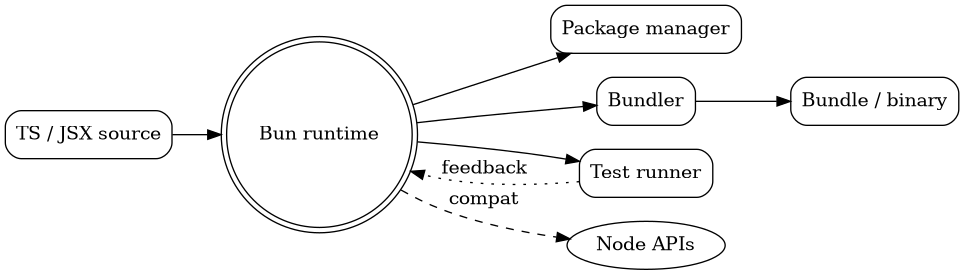
Bun's components are not independent products bolted onto a runtime; they share the same engine and the same configuration. The diagram below shows how a typical file flows through the toolchain.
Node.js Compatibility
Bun's adoption strategy is compatibility. It aims to run existing Node.js code with minimal changes by implementing Node's core modules (fs, path, http, stream, crypto) and honoring package.json semantics. For many applications, the migration path is as simple as replacing node with bun in your start script.
But compatibility is a spectrum, not a checkbox. Native addons, deep dependencies on internal Node behaviors, and some worker_threads edge cases remain the areas most likely to cause friction. Bun publishes a compatibility tracking page precisely because the answer differs module by module.
Caution: "Mostly compatible" is not "identical." Before switching a production service, run your full test suite under Bun, and load-test the paths that depend on streams, workers, or native modules. Subtle behavioral differences are the expensive kind of bug.

Getting Started in Practice
Installing Bun is a single command, and the fast path from an empty directory to a running server is short.
# Install Bun
curl -fsSL https://bun.sh/install | bash

# Start a project
mkdir my-service && cd my-service
bun init

# Add a dependency
bun add hono

# Run it
bun run index.ts

# Run the tests
bun test
A minimal HTTP server highlights how much of the standard library is built in:
const server = Bun.serve({
  port: 3000,
  fetch(req) {
    const url = new URL(req.url);
    if (url.pathname === "/health") {
      return Response.json({ status: "ok" });
    }
    return new Response("Not found", { status: 404 });
  },
});

console.log(`Listening on ${server.port}`);
Notice there is no import for Bun.serve, no framework, and no http module wiring. The server is part of the runtime, which keeps small services genuinely small.
A Real-World Example: Migrating a Node Project
Imagine a REST API built on Express, TypeScript, Jest, and npm. A realistic migration looks like this:
- Baseline first. Record current test results and benchmark a few representative endpoints. You need a before/after to know if the migration is safe.
- Install dependencies with Bun using
bun install. Compare the lockfile and check that resolved versions match your previous lockfile. - Swap the test runner. Point
bun testat the existing test directory and fix incompatibilities in mocks or globals. - Run the server under Bun with
bun run src/server.ts. Verify the routes that use streams, file uploads, and authentication. - Adopt Bun's tooling incrementally. Add
bun buildfor the production bundle, or--compilefor a CLI, only after the runtime path is stable.
The lesson is that Bun's value is cumulative. You can start with just the package manager or just the test runner, then expand as confidence grows. A big-bang rewrite is neither necessary nor advisable.
A short table helps frame where each tool earns its keep:
| Task | Traditional stack | Bun equivalent |
|---|---|---|
| Run TypeScript | ts-node / tsx |
bun run file.ts |
| Install packages | npm install / pnpm |
bun install |
| Bundle for browser | webpack / esbuild |
bun build |
| Run tests | jest / vitest |
bun test |
| Ship a CLI | pkg / Node SEA |
bun build --compile |
Bun vs Node.js vs Deno
All three runtimes execute JavaScript, and all three now support TypeScript in some form, so the differences are mostly about philosophy.
- Node.js is the incumbent: enormous ecosystem, decades of production hardening, and the safest default for conservative teams.
- Deno emphasizes security and standards, with permissions gated by default and a curated standard library.
- Bun emphasizes speed and integration, betting that bundling the whole toolchain into one binary is worth the reduced separation of concerns.
For most teams the question is not "which is objectively best" but "which trade-off fits our risk tolerance." Node minimizes ecosystem risk. Bun minimizes toolchain complexity. Deno minimizes ambient authority.
Where Bun Still Has Rough Edges
No runtime is finished, and Bun is no exception. A few things are worth watching:
- Native modules can lag behind, especially those compiled against specific Node ABI versions.
- Behavioral parity with Node's internals is a moving target; pin your versions and test upgrades.
- Ecosystem tooling that assumes npm's file layout may need small adjustments.
- Long-term stability of a fast-moving project is a real consideration for enterprises with multi-year support requirements.
None of these are deal-breakers. They are simply the normal costs of adopting a younger platform, and they should inform how aggressively you migrate.
Key Takeaways
- Bun is a single JavaScript and TypeScript runtime that bundles a package manager, bundler, and test runner.
- It is built on JavaScriptCore rather than V8, which is a major source of its startup and execution speed.
- Node.js compatibility is broad and improving, but it is not guaranteed for every native module or internal API.
- Migrations work best incrementally: start with
bun installorbun test, then expand. bun build --compilecan turn a JavaScript project into a standalone executable, a capability few runtimes offer.- Adopt Bun where toolchain simplicity and speed matter, and keep Node.js as the fallback for high-risk edge cases.
Frequently Asked Questions
Is Bun a drop-in replacement for Node.js?
Mostly, for common use cases. Bun implements Node's core modules and reads package.json, so many projects run with a simple command swap. Native addons and obscure internal APIs are the usual exceptions, so test thoroughly before production.
Can I use npm packages with Bun?
Yes. Bun reads the standard package.json format and installs from the npm registry. You can even mix package managers during a transition, though using one consistently produces a more predictable lockfile.
Does Bun replace webpack or Vite?
It replaces the bundling role with bun build, and it removes the need for separate TypeScript and JSX transforms. It is not a full replacement for every dev-server feature Vite provides, so some projects still pair Bun with a dedicated frontend dev tool.
Should I use Bun in production?
You can, and many teams do for APIs, CLIs, and internal services. The prudent approach is to benchmark, run your full test suite, and stage the rollout rather than migrating critical paths all at once.
Is Bun faster than Node because of JavaScriptCore alone?
No. JavaScriptCore is part of the story, but Bun also optimizes I/O bindings, startup, and tooling paths. The speedups vary by workload, so measure your own use case instead of trusting generic benchmarks.
Related Articles
- WebAssembly Beyond the Browser: A Practical Guide to WASM in 2026
- Mastering TypeScript: The Bridge to Safer, Scalable JavaScript
- Signals in Frontend Development: The Reactivity Pattern Reshaping Modern Web Frameworks
- Git Internals Explained: Objects, Branches, Rebase, and Merge Strategies


Comments
Post a Comment