Mastering Observability with Prometheus and Grafana: From Metrics to Actionable Insights
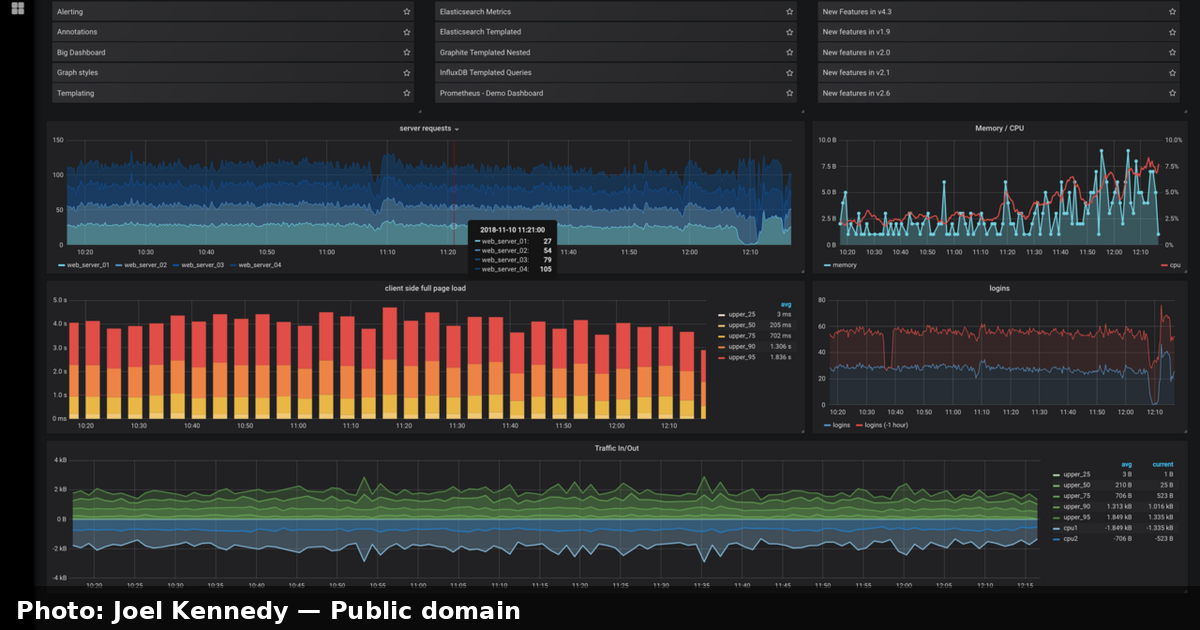
DevOps teams often confuse monitoring with observability — but they are not the same thing. Monitoring asks "is the system up?" Observability asks "why is it down, and can I answer that question without shipping new code?" As architectures shift from monoliths toward microservices, containers, and serverless functions, traditional "is it green?" dashboards stop being enough. You need a system you can interrogate, not just watch.
This article walks you through building a modern, production-grade observability stack using Prometheus for collection and storage and Grafana for visualization and alerting. We will cover the core concepts, the PromQL query language, metric exporters, alerting rules, and a real-world example you can replicate in a few hours. Whether you are an SRE, a platform engineer, or a DevOps generalist, by the end you will have a mental model of how the two tools fit together — and the practical commands to prove it.
Table of Contents
- Why Observability Matters
- The Three Pillars of Observability
- Prometheus Architecture: How It Works
- Metric Types and the Data Model
- Collecting Metrics with Exporters
- Writing Powerful Queries with PromQL
- Visualizing Data with Grafana
- Alerting: From Dashboards to Pagers
- Real-World Example: Monitoring a Web Service
- Key Takeaways
- Frequently Asked Questions
- Related Articles
Why Observability Matters
Modern distributed systems fail together. A single slow database query can cascade into timeouts, retries, queue backlogs, and finally a visible outage — even though every individual service appears healthy. If you only track "HTTP 200 vs HTTP 500," you will remain blind to the real cause.
Observability changes the approach from known unknown ("we know we have a health endpoint") to unknown unknown ("we do not know what we do not know"). The goal is that a teammate can ask an arbitrary question about the current system state without writing new code first.
Key insight: Monitoring is a practice, observability is a capability. Monitoring tells you the service is slow; observability tells you which dependency, which request, and which metric caused the slowdown.

The Three Pillars of Observability
Industry convention (popularized by Google's SRE practices and the DevOps community) groups observability into three signals, sometimes called the "three pillars":
| Pillar | What it answers | Prometheus & Grafana coverage |
|---|---|---|
| Metrics | How many? How fast? How long? Aggregated numeric data over time | Native — this is Prometheus's core strength |
| Logs | What happened? Individual events with context | Companion tools like Loki (part of the Grafana stack) |
| Traces | Where did time go? End-to-end request journeys across services | Companion tools like Tempo, or integrate with Jaeger |
While Prometheus and Grafana form the metrics backbone, Grafana Labs offers Loki for logs and Tempo for traces, letting you build a unified stack. This article focuses on the metrics pillar, which is where most teams should start.
Core Architecture: How Prometheus Works
Prometheus uses a pull-based model. Rather than having servers push data, the Prometheus server reaches out on a schedule and scrapes metrics over HTTP at a designated endpoint (usually /metrics). This design has important consequences:
- Discovery-driven: The server can discover targets dynamically via Prometheus, Kubernetes, or DNS-based service discovery.
- Reliability: If the server is briefly down, scrapes simply resume on the next interval; nothing is permanently lost or queued unboundedly.
- Single source of truth: Target health is measured from the collector's perspective, so you always know the scrape succeeded.
Prometheus components
The overall system is made up of several components working together:
flowchart LR
    A[Service / App with /metrics endpoint] -->|scrape :9090| P[Prometheus Server]
    E[Exporter: node_exporter] -->|scrape :9100| P
    P -->|pull / query| G[Grafana]
    P --> R[Alertmanager]
    R --> N[Notifications: Slack, email, PagerDuty]
    G --> D[Dashboard]
- Prometheus Server — ingests scrapes, stores time-series data in a local TSDB, and evaluates recording/alerting rules.
- Exporters — small processes that expose metrics from systems that cannot expose them natively (the OS, a database, a queue).
- PromQL — the query language used to retrieve and aggregate those metrics.
- Alertmanager — handles alerts generated by the server, deduplicating, grouping, and routing them to notification channels.
Metric Types and the Data Model
Prometheus identifies each time series by a metric name and a set of key/value labels. For example:
http_requests_total{method="GET", status="200", endpoint="/api/v1/users"} 1047
The metric name is http_requests_total, and method, status, and endpoint are labels. Labels are what make PromQL powerful: you can aggregate, slice, and sum to subsets, and across label dimensions.
Four metric types matter most in practice:
| Type | Description | Typical example |
|---|---|---|
| Counter | A cumulative counter that only increases | Requests served, errors, bytes sent |
| Gauge | A value that can go up and down | Current CPU load, memory in use, active sessions |
| Histogram | Observations buffered into configurable buckets | Request latency distribution, response times |
| Summary | Like a histogram with pre-computed quantiles | Latency percentiles (p50, p95, p99) |
This is a crucial distinction:
Caution: Use a Counter for things that only ever increase (completed requests), and a Gauge for things that fluctuate (current CPU usage). Using the wrong type produces meaningless graphs — computing a rate over a gauge that oscillates around zero is a classic beginner mistake.
Collecting Metrics with Exporters
Most applications won't expose Prometheus natively from the start. The solution is an exporter — a tiny service that translates existing health or instrumentation data into Prometheus's format.
The most common exporters you will meet:
- node_exporter — OS and host-level metrics (CPU, memory, disk, network).
- cadvisor — container-level metrics for Docker.
- blackbox_exporter — probes HTTP, TCP, ICMP endpoints (the "can I reach it?" check).
- mysqld_exporter / postgres_exporter — database metrics.
- kube-state-metrics — Kubernetes object states (Deployments, Pods, etc.).
Scraping job configuration in prometheus.yml typically looks like this:
global:
  scrape_interval: 15s

scrape_configs:
  - job_name: "node"
    static_configs:
      - targets: ["localhost:9100"]

  - job_name: "app"
    metrics_path: "/metrics"
    static_configs:
      - targets: ["app-server:8080"]
A genuinely complete stack is often started with docker-compose before moving to Kubernetes:
    services:
      prometheus:
        image: prom/prometheus:latest
        volumes:
          - ./prometheus.yml:/etc/prometheus/prometheus.yml
        ports:
          - "9090:9090"
      grafana:
        image: grafana/grafana:latest
        ports:
          - "3000:3000"
      node-exporter:
        image: prom/node-exporter:latest
        ports:
          - "9100:9100"
Writing Powerful Queries with PromQL
PromQL is the heart of using Prometheus effectively. Below are the building blocks you will use daily.
Rates and increase
For a counter like http_requests_total, you rarely plot the raw cumulative value. Instead you compute a rate (per second) filtered to the last 5 minutes:
rate(http_requests_total[5m])
Aggregation across dimensions
To total requests across all endpoints and methods:
sum(rate(http_requests_total[5m]))
To break down by a label (e.g., per status code):
sum by (status) (rate(http_requests_total[5m]))
Histograms and quantiles
Histogram quantiles give you latency percentiles to answer "how slow are the slowest users?":
histogram_quantile(0.99, sum by (le) (rate(http_request_duration_seconds_bucket[5m])))
Recording rules
Complex queries are expensive and slow. Recording rules precompute them every interval and store a fresh, fast metric:
groups:
  - name: latency.rules
    interval: 1m
    rules:
      - record: job:http_request_duration:99quantile
        expr: histogram_quantile(0.99, sum by (le) (rate(http_request_duration_seconds_bucket[5m])))
Visualizing Data with Grafana
Prometheus is a champion at storing and serving metrics; Grafana is its face. Grafana connects to Prometheus as a data source and gives you interactive dashboards, panels, and variable-based filtering.
A pragmatic dashboard layout often follows this pattern:
- Top row: request rate, error rate, and duration (the classic "USE" / "RED" method overview).
- Middle row: breakdowns by endpoint, status code, and host.
- Bottom row: infrastructure resource panels (CPU, memory, disk, network) for digging into cause.

The USE and RED methods are worth knowing before you build your first dashboard:
- USE (utilization, saturation, errors) — for infrastructure resources, e.g., CPU, memory, disk.
- RED (rate, errors, duration) — for requests, e.g., request throughput, error rate, latency.
Choose one method per panel and label the panel clearly; a dashboard littered with unlabeled panels is useless in an incident.
Alerting: From Standing and Dashboards to Noise
Dashboards are for humans who are looking; alerting knows for when no one is. Prometheus has a notion of an alerting rule that fires when an expression stays above a threshold, and Alertmanager handles what to do with it.
A simple alerting rule:
groups:
  - name: service-alerts
    rules:
      - alert: HighErrorRate
        expr: sum(rate(http_requests_total{status=~"5.."}[5m]))
               / sum(rate(http_requests_total[5m])) > 0.05
        for: 10m
        labels:
          severity: critical
        annotations:
          summary: "High error rate on {{ $labels.job }}"
Caution: Every alert you add has a cost: on-call fatigue and noise. Prefer fewer, more meaningful alerts that fire for fewer than 1 minute of repeat pages, and always write a runbook. An alert without a runbook is just a panic with extra steps.
The general flow from metric to incident looks like this:
sequenceDiagram
    participant App as Application
    participant P as Prometheus Server
    participant A as Alertmanager
    participant S as On-call
    App->>P: /metrics (scrape)
    P->>P: evaluate rule (HighErrorRate)
    P->>A: send pending alert
    A->>S: notify Slack/PagerDuty
    S->>S: sleep, wake, read runbook
Real-World Example: Monitoring a Web Service
Let's assume you run a small e-commerce API (checkout-service) on a single VM. You want to catch a degradation before users complain. Here is a realistic, minimal setup.
Step 1 — Instrument the app. Your API exposes a /metrics endpoint with a Prometheus client library (e.g., prom-client for Node.js). It records http_requests_total (a counter with status and endpoint labels) and http_request_duration_seconds (a histogram).
const client = require("prom-client");
const httpRequests = new client.Counter({
  name: "http_requests_total",
  help: "Total HTTP requests",
  labelNames: ["status", "endpoint"]
});
app.get("/metrics", (_req, res) => res.send(client.register.metrics()));
Step 2 — Scrape and store. Add the service to prometheus.yml:
scrape_configs:
  - job_name: "checkout"
    static_configs:
      - targets: ["checkout-service:8080"]
Step 3 — Record latency rules and alerts. Add the recording rule and the HighErrorRate alert you saw above.
Step 4 — Build Grafana dashboards. Add Prometheus as a data source and create panels:
sum(rate(http_requests_total{job="checkout"}[5m]))                 # request rate
sum(rate(http_requests_total{job="checkout", status=~"5.."}[5m]))  # 5xx rate
histogram_quantile(0.95, sum by (le) (rate(http_request_duration_seconds_bucket[5m])))  # p95 latency
Step 5 — Test it. Use hey or ab to hammer the endpoint and watch the dashboard move; intentionally break the DB and confirm the alert fires within the for window and the runbook steps get exercised in a safe place.
Reading the numbers
Once everything is wired up, your dashboard answers the incident questions directly:
- HTTP 5xx rate crosses 5% for 10 minutes →
HighErrorRatefires. - p95 latency climbs while 5xx stays flat → likely latency-driven, not a crash.
- A single endpoint label spikes → the problem is isolated to that endpoint, not the whole app.
That is the difference observability makes: instead of paging based on "site is down", you can page based on "the /api/v1/cart endpoint is slow" — a page that your on-call can actually start to act on immediately.
Key Takeaways
- Observability is a capability, not a tool-install. Monitoring answers known questions; observability lets you ask new questions without deploying new code.
- Prometheus is pull-based and meticulous. It scrapes targets over HTTP and stores time series in a local TSDB; exporters bridge the gap for anything that cannot expose metrics natively.
- PromQL is built on counter-gauge-histogram types and the labels. Mastering
rate,sum by, andhistogram_quantileunlocks almost everything you'll want. - Grafana is the visualization layer. Use dashboard namespaces the USE and RED methods to keep panels meaningful and actionable during incidents.
- Alerting is a discipline on metric ethics. Fewer, well-runbooked alerts beat a thousand noisy pages; always measure in a small container (
for) window test. - Start with metrics, extend to logs and traces. Prometheus + Grafana for metrics, then Loki (logs) and Tempo (traces) as your system evolves.
Frequently Asked Questions
Q: Do I need Prometheus AND Grafana, or can I use just one? A: They serve different roles. Prometheus is the data store and the query engine; Grafana is the visualization and alerting front-end that reads from Prometheus (and many other sources). Most teams use them together, and Grafana can also query separate data sources like Loki, Tempo, and CloudWatch.
Q: Is Prometheus good for log data? A: No — Prometheus is designed for numeric time-series metrics, not plain text logs. For log aggregation, pair Grafana with Loki (or ELK/OpenSearch) instead. Keeping prometheus to metrics, and feeding it only metrics, is the mistake beginners make.
Q: What is the difference between a Counter and a Gauge?
A: A Counter only increases over time and should be used with rate() (e.g., total requests). A Gauge can go up and down and reflects a current value (e.g., CPU percent, active connections). Mixing them breaks the meaning of your graphs.
Q: How do I avoid alert fatigue?
A: Only alert on patient/paging conditions, tune the for duration so transient blips don't page, group/de-duplicate alerts in Alertmanager, and always pair each alert with a written runbook. Alert on the severity that means (a human must wake up now)).
Q: How does Prometheus discover targets in Kubernetes?
A: Via Kubernetes service discovery (kubernetes_sd_configs), which lets Prometheus automatically find pods, services, and nodes using labels and annotations, rather than static config lists. This is essential as cluster size scales.


Comments
Post a Comment