Essential Ports Every DevOps Engineer Should Know
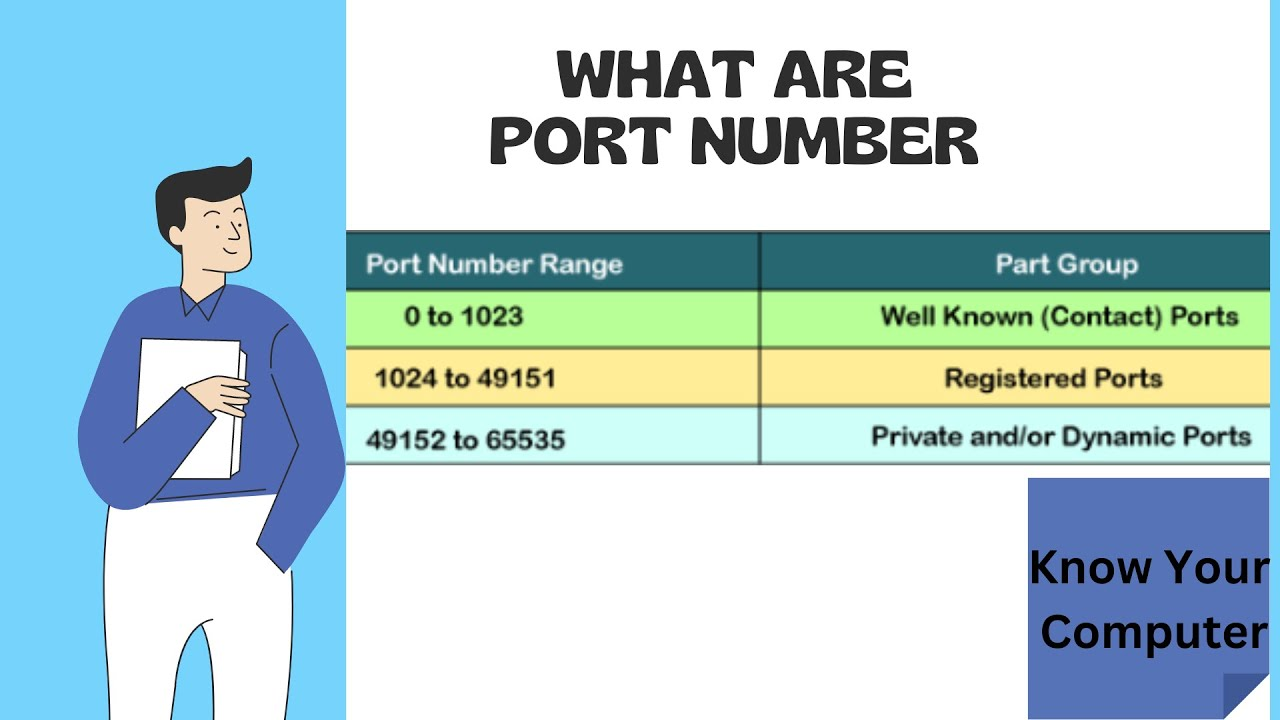
Port numbers play a crucial role in the communication protocols of the Internet. They function as virtual endpoints for network connections, allowing multiple applications on a single device to share the same network interface efficiently.
These port numbers are key to identifying specific services and applications, which in turn helps route data, recognize services, and manage security in networked environments. When combined with IP addresses, port numbers enable seamless communication between applications across different devices.
In this post, we’ll dive into the concept of port numbers, explore their various types, and highlight their significance in computer networking. Additionally, we’ve compiled a list of 25 commonly used network port numbers that every network professional should be familiar with.
Port numbers are a foundational topic in Cisco training, a widely respected certification for network professionals, as they are integral to understanding core networking protocols such as TCP and UDP.
As a DevOps Engineer, understanding essential port numbers, their purpose, protocols, and key features is crucial for managing infrastructure, networking, security, and automation. Below is a list of essential ports:
🔹 Common Networking Ports
Port
Protocol
Purpose
Key Features
22
SSH (TCP)
Secure Shell for remote login
Used for secure remote administration and automation (Ansible, SCP, Git over SSH)
21
FTP (TCP)
File Transfer Protocol
Used for transferring files (insecure, replaced by SFTP)
20
FTP (TCP)
Data transfer for FTP
Handles data transfer in active mode
69
TFTP (UDP)
Trivial File Transfer Protocol
Lightweight, used for network booting (PXE)
23
Telnet (TCP)
Remote shell (insecure)
Replaced by SSH, still used in legacy systems
53
DNS (TCP/UDP)
Domain Name System
Resolves domain names to IP addresses (UDP for queries, TCP for zone transfers)
67, 68
DHCP (UDP)
Dynamic Host Configuration Protocol
Assigns IP addresses to devices dynamically
123
NTP (UDP)
Network Time Protocol
Synchronizes system clocks across networks
161, 162
SNMP (UDP)
Simple Network Management Protocol
Network monitoring and management
🔹 Web & Application Ports
Port
Protocol
Purpose
Key Features
80
HTTP (TCP)
Web traffic (insecure)
Default port for websites, replaced by HTTPS
443
HTTPS (TCP)
Secure web traffic
Encrypts web traffic using SSL/TLS
8080
HTTP Proxy (TCP)
Alternate HTTP port
Used for web proxies and application servers
8443
HTTPS Proxy (TCP)
Secure alternate web traffic
Used for SSL-based applications
🔹 DevOps & Cloud Management Ports
Port
Protocol
Purpose
Key Features
2379, 2380
etcd (TCP)
Distributed key-value store
Used in Kubernetes for cluster state management
6443
Kubernetes API Server (TCP)
Kubernetes cluster management
Used for API requests to Kubernetes
10250
Kubelet API (TCP)
Node management in Kubernetes
Allows API communication with worker nodes
10255
Kubelet Read-Only API (TCP)
Read-only access to node data
Deprecated but used in some monitoring tools
5000
Docker Registry (TCP)
Private container registry
Stores and distributes Docker images
8500
Consul (TCP/UDP)
Service discovery
Used for service discovery and health checking
🔹 Database Ports
Port
Protocol
Purpose
Key Features
3306
MySQL (TCP)
MySQL database connections
Used for relational database management
5432
PostgreSQL (TCP)
PostgreSQL database connections
Advanced relational database system
27017
MongoDB (TCP)
NoSQL database connection
Used for JSON document-based storage
6379
Redis (TCP)
In-memory key-value store
Used for caching and message brokering
🔹 Logging & Monitoring Ports
Port
Protocol
Purpose
Key Features
9200, 9300
Elasticsearch (TCP)
Search and analytics engine
Used for log storage and indexing
5601
Kibana (TCP)
Visualization for Elasticsearch
UI for searching and analyzing logs
1514, 514
Syslog (UDP/TCP)
System logging
Used for centralized log collection
9090
Prometheus (TCP)
Metrics collection
Used for monitoring time-series data
3000
Grafana (TCP)
Data visualization
Used for dashboard monitoring
🔹 Security & VPN Ports
Port
Protocol
Purpose
Key Features
443
TLS (TCP)
Secure web communication
Used for encrypted communications
1194
OpenVPN (UDP/TCP)
VPN connections
Used for secure remote access
500, 4500
IPsec (UDP)
VPN tunnels
Used in site-to-site VPNs
3389
RDP (TCP)
Remote Desktop Protocol
Used for Windows remote administration
🔹 Message Queues & Streaming Ports
Port
Protocol
Purpose
Key Features
9092
Kafka (TCP)
Message streaming
Distributed event streaming
61616
ActiveMQ (TCP)
Message brokering
Used for enterprise messaging
1883
MQTT (TCP)
IoT messaging protocol
Lightweight protocol for IoT communication
🔹 CI/CD & Automation Ports
Port
Protocol
Purpose
Key Features
8081
Nexus Repository (TCP)
Artifact management
Used for storing dependencies
8082
Artifactory (TCP)
Binary storage
Repository for CI/CD builds
3000
Jenkins (TCP)
CI/CD pipeline automation
Used for automating DevOps workflows
9418
Git (TCP)
Git version control
Used for managing source code repositories
✅ Key Takeaways for DevOps Engineers
- Networking: Know essential ports like SSH (22), DNS (53), HTTP (80), HTTPS (443).
- Cloud & Kubernetes: Familiarity with etcd (2379), Kubernetes API (6443), and Kubelet (10250).
- Database Management: Understand MySQL (3306), PostgreSQL (5432), and Redis (6379).
- Monitoring & Logging: Use Prometheus (9090), Elasticsearch (9200), and Grafana (3000).
- Security: Secure services with TLS/SSL and VPN (443, 1194, 500, 4500).
- CI/CD Pipelines: Jenkins (3000), Git (9418), and Artifact Repositories (8081, 8082).
🔑 Keynotes for DevOps Engineers About Ports
1️⃣ Security & Access Management
- Always disable unused ports to minimize security risks.
- Use firewalls (iptables, UFW, AWS Security Groups) to control traffic.
- Prefer SSH (22) over Telnet (23) for secure remote access.
- HTTPS (443) is mandatory for encrypting web traffic; avoid HTTP (80) in production.
- Implement VPN (1194 – OpenVPN, 500/4500 – IPsec) for secure remote connections.
2️⃣ Kubernetes & Container Networking
- 6443 (Kubernetes API Server) → Used for cluster communication, must be secure.
- 10250 (Kubelet API) → Needed for monitoring & node management.
- 5000 (Docker Registry) → Private container image storage.
- Use network policies to control inter-container communication.
3️⃣ Monitoring & Logging
- 9090 (Prometheus) → Collects metrics for monitoring infrastructure.
- 9200 (Elasticsearch) + 5601 (Kibana) → Used for log analysis & visualization.
- 514 (Syslog) → Centralized logging for system events.
- Ensure logs are encrypted and sent over TLS (TCP instead of UDP).
4️⃣ CI/CD & Automation
- 3000 (Jenkins) → Automates CI/CD pipelines.
- 9418 (Git) → Used for source code version control.
- 8081/8082 (Nexus, Artifactory) → Securely store build artifacts.
5️⃣ Database & Performance
- 3306 (MySQL), 5432 (PostgreSQL), 27017 (MongoDB) → Critical for database connectivity.
- Restrict database ports to internal access only (avoid public exposure).
- Use Redis (6379) as a cache to improve performance.
6️⃣ High Availability & Load Balancing
- 443 (HTTPS) + 80 (HTTP) → Always use a Load Balancer (Nginx, HAProxy).
- 53 (DNS) is critical for internal service discovery.
- 3389 (RDP) for Windows remote management (Use with strict access controls).
📌 Pro Tip: Always test port connectivity using:
nc -zv


Comments
Post a Comment