All About API Testing
Top API Testing Tools
- Katalon Postman
- SoapUI Rest-Assured
- CITRUS Karate
- Jmeter apigee
API Terminologies
- API – Application Programming Interface (API) is software that acts as an intermediary for two apps to communicate with each other.
- HTTP – Hypertext Transfer Protocol is the collection of rules for the transmission of data on the World Wide Web, like graphic images, text, video, sound, and other multimedia
- HTTPS – The S in HTTPS stands for “secure.” HTTPS uses TLS (or SSL) to encrypt HTTP requests and responses
- URI – Uniform Resource Identifier is a string identifier that refers to a resource on the internet. It is a string of characters that is used to identify any resource on the internet using location, name, or both.
- URL – Uniform Resource Locator is used to find the location of the resource on the web. It is a reference for a resource and a way to access that resource. A URL always shows a unique resource, and it can be an HTML page, a CSS document, an image, etc.
Layers of API Testing
Three separate layers
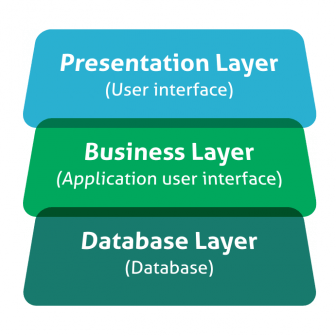
- Presentation (or user interface) layer
- The business layer
- The database layer for modeling and manipulating data.
API Test Actions
- Verify correct HTTP status code. – For example, creating a resource should return 201 CREATED and unpermitted requests should return 403 FORBIDDEN, etc.
- Verify response payload – Check valid JSON body and correct field names, types, and values — including in error responses.
- Verify response headers – HTTP server headers have implications on both security and performance.
- Verify correct application state – This is optional and applies mainly to manual testing, or when a UI or another interface can be easily inspected.
- Verify basic performance sanity – In case an operation was completed successfully but took an unreasonable amount of time, the test fails.
API Test Scenario Categories
- Basic positive tests (happy paths)
- Extended positive testing with optional parameters
- Destructive testing
- Security, authorization, and permission tests (which are out of the scope of this post)
- Negative testing with valid input
- Negative testing with invalid input
API Example with Test Matrix
API Calls
Actions
GET
/users
List all users
GET
/users?name={username}
Get user by username
GET
/users/{id}
Get user by ID
GET
/users/{id}/configurations
Get all configurations for user
POST
/users/{id}/configurations
Create a new configuration for user
DELETE
/users/{id}/configurations/{id}
Delete configuration for user
PATCH
/users/{id}/configuration/{id}
Update configuration for use
Web Services
- SOAP (Simple Object Access Protocol) is a standard protocol defined by the W3C standards for sending and receiving web service requests and responses.
- REST (Representational State Transfer) is the web standards-based architecture that uses
- HTTP Unlike SOAP-based Web services, there is no official standard for RESTful Web
- CRUD Create, Read, Update & Delete
HTTP Request Methods
- GET – It fetches the information from the server. Moreover, it is the most commonly used method which does not have a request body. Every time you open a website, the Get request fires to retrieve the website contents. Additionally, it is equivalent to the
- POST It works to send data to the server. User may add or update data using the Post request. They send the information that needs to update in the request body.
- PUT It is similar to the Post method since it updates the data. The only difference is that we use it when we have to replace an existing entity completely
- PATCH It’s again similar to Post and Put methods, but user use it when they have to update some data partially. Moreover, unlike the Post and Put methods, the user may send only the entity that needs update in the request body with the Patch method.
- HEAD It is similar to the Get method, but it retrieves only the header data and not the entire response body. User use it when they need to check the document’s file size without downloading the document.
- DELETE It deletes the server’s representations of resources through the specific URL. Additionally, just like the Get method, it does not have a request body.
- OPTIONS It is not a widely used method when compared to other ones. It returns data specifying the different methods and the operations supported by the server.
HTTP Response Status Codes
Code
Description
1xx
informational response, request was received, continuing process
2xx
Success, request was successfully received, understood, and accepted
3xx
Redirection, further action needed in order to complete the request
4xx
Client Error, request contains bad syntax or cannot be fulfilled
5xx
Server Error, the server failed to fulfil an apparently valid request
Error Code and Description
HTTP Response Status Codes in Detailed
Code
Description
1xx
informational response, request was received, continuing process
100
Continue: The client can continue with the request as long as it doesn’t get rejected.
101
Switching Protocols: The server is switching protocols.
102
Processing, It indicates that the server has received and is processing the request, but no response is available yet.
103
Early hints, it primarily intended to be used with the Link header, letting the user agent start preloading resources while the server prepares a response.
2xx
Success, request was successfully received, understood, and accepted
200
OK: The request succeeded
201
Created: The request succeeded, and a new resource was created as a result. This is typically the response sent after POST requests, or some PUT requests.
202
Accepted: Request accepted for processing, but in progress
203
Non-Authoritative Information: The information in the entity header is not from an original source but a third party
204
No Content: Response with status code and header but no response body
205
Reset Content: The form for the transaction should clear for additional input
206
Partial Content: Response with partial data as specified in Range header
207
Multi-Status, conveys information about multiple resources, for situations where multiple status codes might be appropriate.
3xx
Redirection, further action needed in order to complete the request
300
Multiple Choices: Response with a list for the user to select and go to a location
301
Moved Permanently: Requested page moved to a new url
302
Found: Requested page moved to a temporary new URL
303
See Other: One can find the Requested page under a different URL
305
Use Proxy: Requested URL need to access through the proxy mentioned in the Location header
307
Temporary Redirect: Requested page moved to a temporary new URL
308
Permanent Redirect: This means that the resource is now permanently located at another URI, specified by the Location: HTTP Response header.
4xx
Client Error, request contains bad syntax or cannot be fulfilled
400
Bad Request: Server unable to understand the request
401
Unauthorized: Requested content needs authentication credentials
403
Forbidden: Access is forbidden
404
Not Found: Server is unable to find the requested page
405
Method Not Allowed: Method in the request is not allowed
407
Proxy Authentication Required: Need to authenticate with a proxy server
408
Request Timeout: The request took a long time as expected by the server
409
Conflict: Error in completing request due to a conflict
411
Length Required: We require the “Content-Length” for the request to process
415
Unsupported Media Type: Unsupported media-type
417
Expectation Failed, it means the expectation indicated by the Expect request header field cannot be met by the server.
421
Misdirected Request, request was directed at a server that is not able to produce a
423
response.
Locked, the resource that is being accessed is locked
429
Too Many Requests,user has sent too many requests in a given amount of time
5xx
Server Error, the server failed to fulfil an apparently valid request
500
Internal Server Error: Request not completed due to server error
501
Not Implemented: Server doesn’t support the functionality
502
Bad Gateway: Invalid response from an upstream server to the server. Hence, the request not complete
503
Service Unavailable: The server is temporarily down
504
Gateway Timeout: The gateway has timed out
505
HTTP Version Not Supported: Unsupported HTTP protocol version
507
Insufficient Storage, method could not be performed on the resource because the server is unable to store the representation needed to successfully complete the
511
Network Authentication Required, it indicates that the client needs to authenticate to gain network access


Comments
Post a Comment